Moving Amazon EKS pods from Fargate to EC2 managed node groups
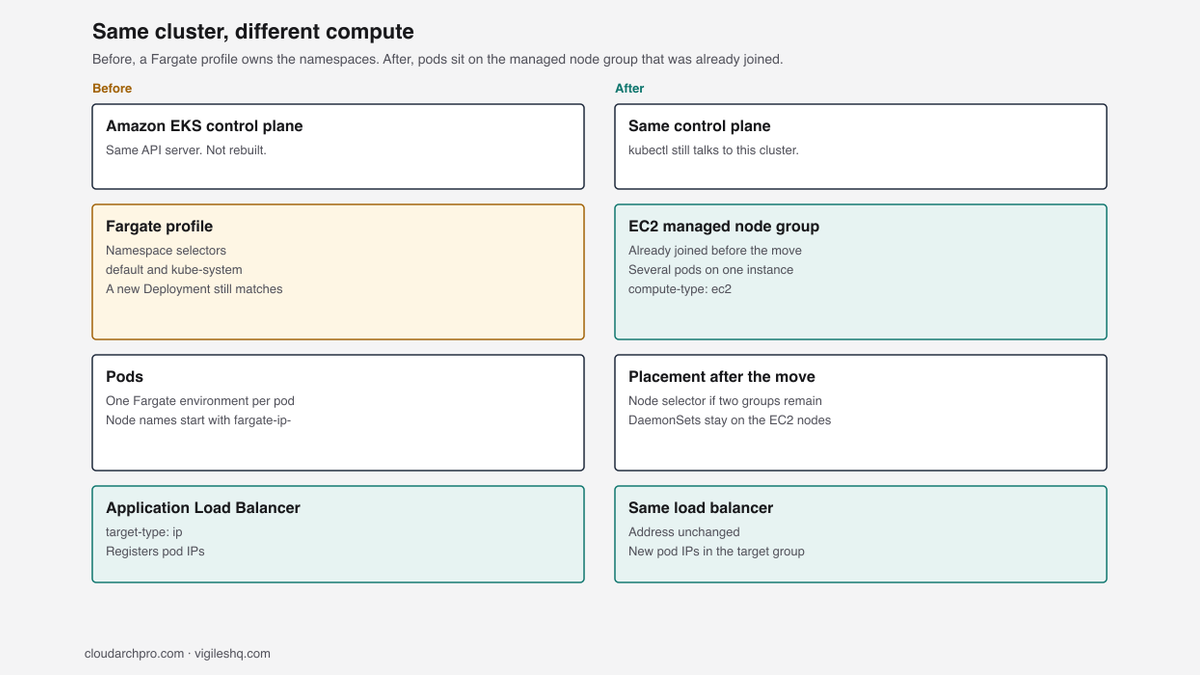
We moved Amazon EKS pods off a Fargate profile onto an EC2 managed node group in the same cluster. The control plane and the load balancer address stayed.
Guide details
- Platform
- Amazon EKS
- Scope
- Fargate profile selectors, the compute-type annotation, and managed node group deletion checked 18 October 2026
- Documentation checked
- October 18, 2026
- Last technically verified
- October 18, 2026
Set eks.amazonaws.com/compute-type to ec2 on the pod template and roll the Deployment so the next pods schedule onto the EC2 managed node group already in the cluster. The control plane, Services, and Application Load Balancer stay. Move CoreDNS and the controllers before you delete the Fargate profile. While that profile still exists, removing the annotation puts the pods back on Fargate. These notes record the drain of the older nodes. They do not include a later listing that shows the profile or the old node group gone.
The cluster was already Amazon EKS. Application pods, CoreDNS, the AWS Load Balancer Controller, and the EBS CSI controller were on Fargate, because the profile selected their namespaces. kubectl kept the same API server, the Services stayed, and the Application Load Balancer kept its address. The work was the compute under those pods: off that Fargate profile and onto an EC2 managed node group that was already joined.
We wanted a node selector, DaemonSets beside the pods, and a bill that followed the instance. The Deployments we moved were steady, so a Fargate environment per pod was a standing cost. We did not track a before-and-after bill.
Fargate gives each pod its own network interface in the profile subnets. On the managed node group the VPC CNI on the instance assigns the address, so the pod IP changes and the load balancer, already on IP targets, registers the new one. Patching and replacing those EC2 instances becomes our job.

The names in the commands are placeholders. Set them once in the shell you use for the rest of the page.
export CLUSTER=<cluster-name>
export REGION=<aws-region>
export PROFILE=<profile-name>
export NEW_NODEGROUP=<new-nodegroup>
export OLD_NODEGROUP=<old-nodegroup>
Why we left Fargate
Fargate will not run a DaemonSet. On this cluster the VPC CNI, kube-proxy, the EBS CSI node plugin, and the Pod Identity agent were already on the EC2 nodes for that reason. Privileged containers are on the same refusal list, which Fargate considerations spells out. We needed DaemonSets beside the application pods, and we needed to pin some of those pods to a node. A namespace selector cannot do either.
An EC2 managed node group packs several of those steady pods onto one instance. We then patch that instance, keep spare CPU and memory on it, and replace it when EKS rolls the group. Leave a workload on Fargate when it is idle most of the time, or when it can live without a DaemonSet and without a node selector. A node that stays up can cost more than a per-pod environment that exists only while the pod does. That is the shape of the two bills.
Once several pods share an instance, the charge is the node, and how full that node is decides what share each pod carries. Kubernetes cost allocation is the write-up of that split.
| Fargate on this cluster | EC2 managed node group | |
|---|---|---|
| Pod compute | One environment per pod | Several pods on one instance |
| Worker patching | AWS patches the Fargate environment | We patch, hold spare capacity, and replace nodes |
| DaemonSets | Not scheduled | Already running on the EC2 nodes |
| How a pod is placed | Namespace selector, including kube-system | eks.amazonaws.com/compute-type: ec2, then a node group selector if two groups remain |
| Load balancer | Application Load Balancer, target-type: ip | Same mode. New pod IPs. The address stayed |
| Capacity we used | The profile matches pods as they are created | The managed node group was already joined |

What was already running
The profile did not name Deployments. It selected namespaces, including the application namespace and kube-system. A selector with a namespace and no labels matches every pod in that namespace, so a new Deployment in either namespace was eligible for Fargate until something else steered it. The selectors we were working from looked like this. The live profile may use other namespaces, so we described it before any patch.
{
  "selectors": [
    {
      "namespace": "default"
    },
    {
      "namespace": "kube-system"
    }
  ]
}
aws eks list-fargate-profiles \
--cluster-name "$CLUSTER" \
--region "$REGION"
aws eks describe-fargate-profile \
--cluster-name "$CLUSTER" \
--fargate-profile-name "$PROFILE" \
--region "$REGION"list-fargate-profiles is the names. describe-fargate-profile is the selectors, subnets, and status for one of them. We read both before the first rollout.
Pods were next. We read the NODE column. On this cluster a Fargate node name began with fargate-ip-, and an EC2 node name began with ip-. A Deployment whose name contains fargate can still be sitting on EC2.
kubectl get pods -A -o widekubectl get pods -A -o wide | grep 'fargate-ip'Profiles cannot be edited in place. We left the selectors as they were and steered pods with the annotation in the next section, because the EC2 capacity was already in the cluster.
That capacity was a managed node group already joined to this control plane. A Ready node can still leave the replacement pods Pending when requests, the max pod count, or a taint leaves no fit.
aws eks list-nodegroups \
  --cluster-name "$CLUSTER" \
  --region "$REGION"

kubectl get nodes -o wide

kubectl get nodes \
  -o custom-columns='NODE:.metadata.name,NODEGROUP:.metadata.labels.eks\.amazonaws\.com/nodegroup,CREATED:.metadata.creationTimestamp'
The custom column is the eks.amazonaws.com/nodegroup label. We used that label and the node creation time to tell the older group from the replacement. The names alone did not tell us which group was newer. We also checked instance types while we decided which group would remain. The type and the node count are not written down here.
kubectl top nodes
kubectl describe nodes
kubectl top needs metrics-server, which was already installed. In describe nodes, read Allocated CPU, Allocated memory, and the pod count against the max.
The two-replica test
We did not start with the production Deployments. We created a two-replica Deployment with a readiness probe and set this on the pod template:
metadata:
  annotations:
    eks.amazonaws.com/compute-type: ec2
AWS documents that key so CoreDNS stays on EC2 when a kube-system profile matches. We set the same key on the test Deployment. The new pods came up on EC2 nodes. The annotation chooses EC2. With two managed node groups still schedulable, either group can take the pod, which is why the node selector comes later, after the profile work.
We also learned not to drain fargate-ip- nodes as the way to move a Deployment. A drain evicts the current pod. If the profile still matches the namespace, the next pod gets a new Fargate node. The annotation is what steers the ReplicaSet. Removing it later, while the profile still exists, is how a Deployment goes back.
If an add-on update has replaced CoreDNS since the cluster was built, read the live template before you assume this annotation is still on it.
For a Deployment that already exists, the patch merges the annotation into the pod template and starts a rollout:
kubectl patch deployment <deployment-name> \
  --namespace default \
  --type merge \
  -p '{
    "spec": {
      "template": {
        "metadata": {
          "annotations": {
            "eks.amazonaws.com/compute-type": "ec2"
          }
        }
      }
    }
  }'
kubectl rollout status deployment/<deployment-name> \
--namespace default \
--timeout=10m
kubectl get pods --namespace default -o widerollout status waits until the new replicas are available, or until 10 minutes pass. We then read the NODE column on the wide listing. The test pods were on EC2 nodes.
For a Deployment that has to keep serving, we set the rolling update so a new pod can start before an old one is removed:
strategy:
  type: RollingUpdate
  rollingUpdate:
    maxUnavailable: 0
    maxSurge: 1
maxUnavailable: 0 with maxSurge: 1 adds one pod, waits until it is Ready, then removes an old pod. That still drops traffic when the new pod never becomes Ready, when the load balancer is slow to register the new IP, or when the application is a single replica and the replacement is the only pod.
The application rollouts
After the test pods were on EC2, we patched the application Deployments with the same annotation, one Deployment at a time. The loop stops on the first rollout that does not finish, so a stuck application does not leave you halfway through the list with no signal.
for deployment in \
  <deployment-one> \
  <deployment-two> \
  <deployment-three>
do
  echo "Migrating $deployment"

  kubectl patch deployment "$deployment" \
    --namespace default \
    --type merge \
    -p '{
      "spec": {
        "template": {
          "metadata": {
            "annotations": {
              "eks.amazonaws.com/compute-type": "ec2"
            }
          }
        }
      }
    }'

  kubectl rollout status "deployment/$deployment" \
    --namespace default \
    --timeout=10m || break
done
Replace the three names with the Deployments you are moving. After each success we checked the node and the new address. The pod IP differs from the Fargate pod it replaced, and that address is what the EndpointSlice has to pick up.
kubectl get pods --namespace default \
  -o custom-columns='POD:.metadata.name,NODE:.spec.nodeName,IP:.status.podIP'
New pod IPs, same ALB
A finished rollout means the new pods exist. The Service still has to select them, and on a current cluster that selection is an EndpointSlice. We read the slices before the move and again after readiness passed.
kubectl get endpointslice --namespace default -o wideBefore the move, the application slices held Fargate pod IPs. After the new pods passed readiness, the slices held the EC2 pod IPs. A pod in Running with a failed readiness check stays out of the slice. The old pod can still receive traffic until the load balancer in front of it drops the old address. How long that overlap lasts depends on the application and on that load balancer.
The cluster already had an internet-facing Application Load Balancer from the AWS Load Balancer Controller. The Ingress used IP targets:
alb.ingress.kubernetes.io/target-type: ipIn ip mode the controller registers pod IPs in the target group. Fargate pods on an Application Load Balancer use that mode, which is why this Ingress was already set that way, and the same mode registered the EC2 pod IPs. The target-type annotation is the controller reference. We left the Ingress object as it was. The address on it was the same before and after the application rollouts.
kubectl get ingress <ingress-name> --namespace defaultWe ran that before the first application patch and again after the last one, and compared the address column. An unchanged address does not show target health. We checked the target group in AWS after the rollouts, and we read the controller logs for reconcile errors:
kubectl logs \
  --namespace kube-system \
  deployment/aws-load-balancer-controller \
  --since=15m
The controller Deployment itself was still on Fargate at this point. Read its IAM permissions before that rollout. An under-permissioned controller can keep the current listeners working and still fail the next target-group change.
CoreDNS and the profile
CoreDNS, the AWS Load Balancer Controller, and the EBS CSI controller were still on Fargate because the profile selected kube-system. Deleting the profile while they matched it would have deleted those pods.
We set eks.amazonaws.com/compute-type: ec2 on each of those Deployments with the same patch as the applications, using namespace kube-system, and we waited for each rollout.
kubectl get pods \
  --namespace kube-system \
  -l k8s-app=kube-dns \
  -o wide

kubectl get pods \
  --namespace kube-system \
  -l app=ebs-csi-controller \
  -o wide

kubectl rollout status \
  deployment/aws-load-balancer-controller \
  --namespace kube-system \
  --timeout=10m
k8s-app=kube-dns is the CoreDNS label, and app=ebs-csi-controller matched the EBS CSI controller on this cluster. If either label is empty, read the Deployment and use the selector it actually has. After the three rollouts, kubectl get pods -A -o wide showed those pods on EC2.
The VPC CNI, kube-proxy, the EBS CSI node plugin, and the Pod Identity agent were already DaemonSets on the EC2 nodes, so they were never part of moving the profile’s Deployments.
An EKS add-on update can replace a Deployment you patched by hand. The CoreDNS add-on overwrites a hand-edited Corefile unless that value lives in the add-on configuration, which Manage CoreDNS calls out. Put the compute-type annotation in the add-on or Helm values that own the Deployment, or the next reconcile can schedule the pods back onto Fargate while the profile still exists.
We filtered again and wanted no required pods on the Fargate prefix:
kubectl get pods -A -o wide | grep 'fargate-ip' || trueThen we issued the delete.
aws eks delete-fargate-profile \
  --cluster-name "$CLUSTER" \
  --fargate-profile-name "$PROFILE" \
  --region "$REGION"
The delete is asynchronous. The profile moves to DELETING, and only one profile in the cluster can sit in that status at a time. EKS deletes pods that were still scheduled with the profile. If they match another profile they come back on Fargate. If they match none, they can stay Pending, because nothing places them on Fargate. The CoreDNS and controller rollouts came first so those pods were already on EC2 when the delete started.
aws eks list-fargate-profiles \
  --cluster-name "$CLUSTER" \
  --region "$REGION"
Poll that until $PROFILE is gone before you treat those namespaces as finished with Fargate. A later listing that shows the name gone is not in these notes. After the delete finishes, a namespace this profile used to own has no Fargate fallback unless another profile matches. New pods then need an EC2 node that satisfies their requests, node selectors, affinity, and taints.
While the profile still exists, the move is reversible. Remove eks.amazonaws.com/compute-type: ec2 and roll the Deployment. The profile places the new pods on Fargate again. You do not cordon anything to get them back. Once the delete finishes, that path is gone. Profiles cannot be edited, so a later return to Fargate means a new profile. Draining the older node group does not put anything back on Fargate.
The older EC2 nodes
This part is separate from the Fargate profile. After the pods were on EC2 they were spread across two managed node groups. The compute-type annotation only chooses EC2, so either group can still take the pod.
We listed the label and the creation time again, and we checked instance types, to decide which group would remain. For Deployments that had to leave the older group, we set a node selector on the pod template:
spec:
  template:
    spec:
      nodeSelector:
        eks.amazonaws.com/nodegroup: <new-nodegroup>
kubectl patch deployment <deployment-name> \
--namespace default \
--type merge \
-p '{
"spec": {
"template": {
"spec": {
"nodeSelector": {
"eks.amazonaws.com/nodegroup": "<new-nodegroup>"
}
}
}
}
}'
kubectl rollout status deployment/<deployment-name> \
--namespace default \
--timeout=10mThe patch merges the selector into the pod template, which starts another rollout. A Ready pod can still sit on the older group, so we confirmed the node group of the node that actually got the pod:
kubectl get pods --namespace default -o wide
kubectl get nodes \
  -o custom-columns='NODE:.metadata.name,NODEGROUP:.metadata.labels.eks\.amazonaws\.com/nodegroup'
If the cluster has a single suitable node group and no Fargate profile left, you can skip the selector. We needed it because both groups were still schedulable.
kubectl patch edits the live object. The next Helm release renders the Deployment from the chart and can drop the annotation and the node selector, which puts pods back on any matching Fargate profile or on the older node group if that group still exists. For a cluster that should keep using one group, the chart needs the same selector:
spec:
  template:
    spec:
      nodeSelector:
        eks.amazonaws.com/nodegroup: <new-nodegroup>
A hard-coded group name has to change again when you replace that group. A label you own, applied by the node group and selected by the chart, survives a group rename. We used the EKS node-group label because this cluster had two concrete groups and we needed the pods on one of them. Whoever merges the chart has to carry that selector, or the live patch lasts only until the next deploy.
Cordon stops new pods from landing on a node. It leaves the pods that are already there. We cordoned each node whose node-group label was $OLD_NODEGROUP and waited until the status was Ready,SchedulingDisabled.
kubectl cordon <old-node-name>The Datadog cluster agent, the Datadog operator, and metrics-server were still on the older nodes after the application selector was in place. They are Deployments, so the same node selector patch applies, in whichever namespace kubectl get deploy -A shows. We waited for each rollout and checked the node group before the drain. A DaemonSet such as the Datadog node agent stays on the node until the node itself is removed.
When ordinary pods were gone, we drained one old node at a time:
kubectl drain <old-node-name> \
  --ignore-daemonsets \
  --grace-period=60 \
  --timeout=15m
--ignore-daemonsets is required because those pods are owned by a DaemonSet and a drain refuses to evict them otherwise. --grace-period=60 is the deletion grace period in seconds. The command waits up to 15 minutes. A PodDisruptionBudget that refuses the eviction holds the drain until that timeout or until the budget allows it. Our drains finished inside the window.
If a pod uses emptyDir, drain stops unless you pass --delete-emptydir-data. That flag allows the eviction and the data on that node is removed. Read the pod spec before you add it. We did not need it on these nodes.
With ordinary pods off the older nodes, we started the group deletion:
aws eks delete-nodegroup \
  --cluster-name "$CLUSTER" \
  --nodegroup-name "$OLD_NODEGROUP" \
  --region "$REGION"

aws eks list-nodegroups \
  --cluster-name "$CLUSTER" \
  --region "$REGION"
delete-nodegroup sets the Auto Scaling group minimum, maximum, and desired size to zero. Before each instance terminates, EKS drains it: preStop hooks, then SIGTERM, then terminationGracePeriodSeconds. If that drain is still running after 5 minutes, EKS lets Auto Scaling terminate the instance anyway, per Delete a managed node group. The earlier manual drain is how you see a pod that will not leave before that timer starts.
The call is asynchronous. The manual drain completed and the old nodes stayed cordoned. These notes do not include a later listing that shows $OLD_NODEGROUP gone, so read list-nodegroups yourself before you treat the group as retired. If this node role is also used by a self-managed node group, removing the role from a group that still needs it marks those nodes NotReady.
What the checks showed
kubectl get nodes -o wide
kubectl get pods -A -o wide
kubectl get deployments -A
kubectl get endpointslice -A
kubectl get ingress -A
Also call an application health URL from outside the cluster, resolve a Service name from a debug pod, and look at the metrics you already alert on. The API can show Ready pods while the application is still failing its own check.
| Check | In these notes |
|---|---|
| Application pods | On EC2 nodes after the rollouts, with new pod IPs |
| EndpointSlices | EC2 pod IPs after readiness |
| Ingress address | Unchanged. Target health was checked in AWS |
| CoreDNS, load balancer controller, EBS CSI controller | On EC2 after the kube-system rollouts |
| Older nodes | Cordoned. Ordinary pods drained. Drains finished inside 15 minutes |
| Fargate profile | Delete was issued after required pods left fargate-ip-. A later listing that shows the profile gone is not here |
| Old node group | Delete was started. A later listing that shows $OLD_NODEGROUP gone is not here |
| Cost | No before-and-after bill |
If the cluster bill moves after the profile work, start with the Kubernetes cluster cost increase runbook.
Lessons from this move
Drain is the wrong tool for a pod that the Fargate profile still matches. The profile builds a new node for the replacement pod. The compute-type annotation is what moves the Deployment, and removing that annotation is the rollback for as long as the profile exists.
On a cluster with two managed node groups, the selector is a second change, and it has to live in the chart or the next Helm release drops it.
Delete the profile only after CoreDNS and the controllers are on EC2. EKS deletes pods that are still scheduled with that profile, and there is no Fargate fallback for those namespaces unless another profile matches. The older node group is a later job: cordon, move Datadog and metrics-server, drain, then start delete-nodegroup and watch the five minute timer. Do not treat either delete as finished until list-fargate-profiles or list-nodegroups shows the name gone.