Generative AI on Alibaba Cloud: use cases, Qwen models and the project life cycle
Map the generative AI project life cycle to Alibaba Cloud Model Studio and PAI, pick a Qwen model by cost and context, and make a first API call from Singapore.
Part 1 of a series that applies Generative AI on AWS (O'Reilly, 2023) to Alibaba Cloud. It covers chapter 1: use cases, foundation models and the project life cycle.
Guide details
- Platform
- Alibaba Cloud Model Studio
- Example region
- Singapore, ap-southeast-1
- Scope
- Model Studio API in the International deployment scope
- Scope
- Python 3.9 or later with the openai SDK in OpenAI-compatible mode
- Documentation checked
- October 8, 2026
- Last technically verified
- October 8, 2026
- Evidence basis
- Provider documentation
Part 1 of 3. Generative AI on Alibaba Cloud
What you will learn
- Which generative AI tasks to ship first and how to measure them
- How the six life cycle stages map to Model Studio, PAI and monitoring
- How AWS services in the book map to Alibaba Cloud services
- What a month of traffic costs on four Qwen models
- How to make and price a first Model Studio API call
Start generative AI on Alibaba Cloud with Model Studio in the Singapore region and a small hosted Qwen model such as qwen3.8-flash. Pick one task with a checkable output, write a test set, and compare two or three models on it. Move to fine-tuning, RAG or PAI only after prompting fails that test. Set Free Quota Only and model-scoped API keys before anyone else gets access.
The fastest safe start for generative AI on Alibaba Cloud is Model Studio in the Singapore region, a small hosted Qwen model, one task with an output you can check, and a test set written before the first prompt. That sequence comes from chapter 1 of Generative AI on AWS by Chris Fregly, Antje Barth and Shelbee Eigenbrode. The chapter describes a project life cycle that does not depend on AWS. This page maps each stage to Alibaba Cloud services, prices four Qwen models for one workload, and ends with a first API call you can run and cost in under ten minutes.
What this series takes from the book
The book was published by O’Reilly in November 2023. It has 12 chapters: use cases and life cycle, prompt engineering, foundation model internals, memory and compute, fine-tuning, parameter-efficient fine-tuning, RLHF, deployment, RAG and agents, multimodal models, Stable Diffusion, and Amazon Bedrock.
The mechanisms in it still hold. Tokens, attention, sampling, LoRA, retrieval and reward models work the same way on any provider. The service names and the models do not carry over. The book’s reference models were Llama 2, with a 4,096-token context window, Falcon and FLAN-T5. On 8 October 2026, qwen3.8-flash in Model Studio accepts a 1,000,000-token context and can return up to 131,072 output tokens.
This series keeps the book’s order and replaces each AWS service with the Alibaba Cloud service you would use today. Each part names the chapter it covers. This part covers chapter 1. Prompt engineering with Qwen covers chapter 2, and tokens, embeddings and transformers covers chapter 3.
Use cases to ship first
Chapter 1 lists the tasks generative models handle well: summarization, rewriting, information extraction, question answering, toxicity detection, classification and moderation, conversation, translation, code generation, reasoning, PII masking and personalized content. Every one of them runs on a hosted Qwen model. They differ in how easily you can prove the output is right.
Ship the tasks you can grade first. A classification label is right or wrong. An extracted order ID matches the source or it does not. A chatbot answer needs a person, or a second model, to judge it, and that judgement is the expensive part of every project.
| Task | What you measure | Model Studio starting point | Main risk |
|---|---|---|---|
| Ticket classification | Accuracy against labelled tickets | qwen3.8-flash, few-shot prompt | Label drift when categories change |
| Field extraction to JSON | Exact match per field | qwen3.8-flash, JSON mode | Invented values for missing fields |
| Summarization | Facts kept, length limit met | qwen3.8-flash | Dropped numbers and IDs |
| PII masking | Recall on a seeded test file | qwen3.8-flash plus a regex pass | One missed identifier is a data incident |
| Translation | Reviewer score on a sample | qwen3.7-plus | Tone and terminology |
| Internal question answering | Answer correct and cited | Model Studio knowledge base | Answers from stale documents |
| Customer-facing chat | Resolution rate, escalations | qwen3.7-plus or qwen3.8-max with guardrails | Wrong commitments made to customers |
The first four rows have numeric pass marks. Build those first, learn how tokens, latency and failure rates behave on your traffic, and then take on the open-ended tasks.
Foundation models on Alibaba Cloud
A foundation model is a network with billions of learned parameters, pretrained on a large general corpus before anyone adapts it to a task. The book starts every project from an existing foundation model in a model hub. On Alibaba Cloud there are two hubs.
Model Studio serves hosted models through an API. You pay per token and never see the weights. The model list on 8 October 2026 includes Qwen models (qwen3.8-max, qwen3.7-plus, qwen3.8-flash) and third-party models from DeepSeek, Moonshot (Kimi), Zhipu (GLM) and MiniMax.
PAI Model Gallery lists open-weight models that you train or deploy on your own PAI resources. Model Gallery wraps PAI-DLC for training jobs and PAI-EAS for inference services, so you can start either one without writing the job definition yourself.
The Qwen family moved fast after the book was written. Qwen3 arrived in April 2025 as open weights under Apache 2.0, with dense models from 0.6B to 32B parameters and a 235B mixture-of-experts flagship. Qwen3-Max in September 2025 was served only through the API, as Qwen2.5-Max had been. Qwen3.5 in February 2026 returned to open weights with a 397B model that activates 17B parameters per token. Qwen3.8-Max followed in August 2026. Alibaba describes it as 2.4 trillion parameters with 95 billion active per token and a 1,000,000-token context. At Apsara in September 2026 Alibaba said Qwen 4 is in training, without a date.
Two naming rules matter in production:
qwen3.8-flash,qwen3.7-plusandqwen3.8-maxname a model generation.qwen-plusandqwen-flashare aliases. On 8 October 2026qwen-pluspoints to the snapshotqwen-plus-2025-12-01andqwen-flashpoints toqwen-flash-2025-07-28. An alias can move to a new snapshot, and your evaluation results move with it. Pin a dated snapshot or a versioned name for anything that has passed a test.
The book recommends starting with a small model and moving up only when it fails. That advice transfers directly. Start with qwen3.8-flash. Move to qwen3.7-plus or qwen3.8-max when the flash model fails your test set, and record which test cases failed.
What a month of traffic costs
Model Studio bills input and output tokens separately, and prices differ by region. The table uses Singapore list prices in USD per 1,000,000 tokens for requests under the first input tier, checked on 8 October 2026.
| Model ID | Input | Output | Notes |
|---|---|---|---|
qwen-flash | 0.05 | 0.40 | Thinking off by default. Tier up to 256K input tokens |
qwen3.8-flash | 0.15 | 0.47 | Thinking on by default. One price up to 1M input tokens |
qwen3.7-plus | 0.40 | 1.60 | Thinking on by default. Listed with a limited-time 20% discount |
qwen3.8-max | 2.00 | 6.00 | Thinking on by default. One price up to 1M input tokens |
Take one workload: 1,000,000 support tickets a month, 500 input tokens each for the system prompt plus ticket, and a 120-token summary.
| Model ID | Input cost | Output cost | Monthly total (calculated) |
|---|---|---|---|
qwen-flash | USD 25.00 | USD 48.00 | USD 73.00 |
qwen3.8-flash | USD 75.00 | USD 56.40 | USD 131.40 |
qwen3.7-plus | USD 200.00 | USD 192.00 | USD 392.00 |
qwen3.8-max | USD 1,000.00 | USD 720.00 | USD 1,720.00 |
The spread between the cheapest and the largest model is 23 times. Two settings move these numbers more than the model choice does.
Thinking mode. qwen3.8-flash, qwen3.7-plus and qwen3.8-max think by default. Reasoning tokens are reported in usage.completion_tokens_details.reasoning_tokens and are counted inside completion_tokens, so they bill at the output price. If thinking adds 300 reasoning tokens to each ticket summary, the qwen3.8-flash output line grows from 120 million to 420 million tokens, and the month rises from USD 131.40 to USD 272.40 (calculated). Turn thinking off with enable_thinking: false for tasks that do not need multi-step reasoning, and measure the reasoning tokens on the tasks that do.
Context caching. Model Studio caches repeated prompt prefixes of 1,024 tokens or more. For most models, implicit cache hits bill at 20% of the input price and explicit cache hits at 10%, while creating an explicit cache bills at 125%. The qwen3.8 models are listed as exceptions with their own cache prices, so check the console for qwen3.8-flash and qwen3.8-max. A long system prompt reused on every call is the usual cache candidate. Part 2 measures both effects with real calls.
Treat the monthly totals as a planning model. They exclude retries, guardrail charges, embedding calls and any traffic over the first input tier. The AI FinOps page covers how to turn token meters into unit cost per ticket or per user.
The project life cycle on Alibaba Cloud
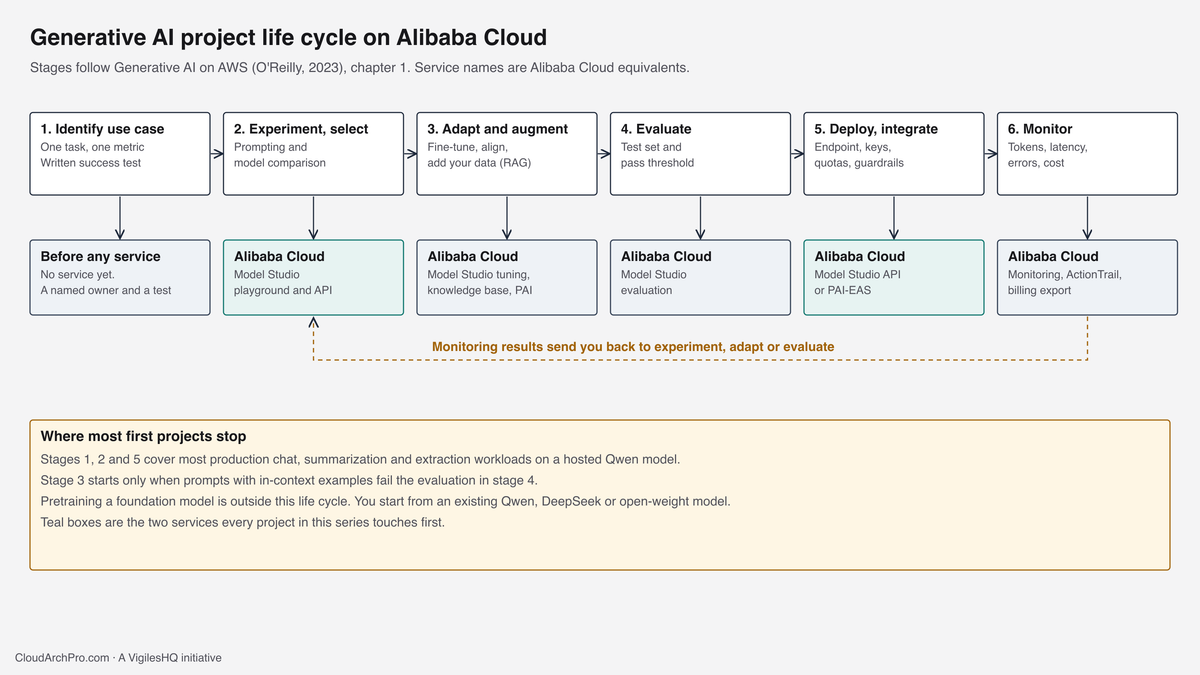
Chapter 1 draws the life cycle as six stages: identify the use case, experiment and select, adapt and align and augment, evaluate, deploy and integrate, and monitor. The diagram maps each stage to the Alibaba Cloud service that does the work.

Identify the use case
Write down one task, one owner and one pass mark before you open a console. “Classify inbound tickets into three queues with 95% accuracy on last month’s labelled tickets” is a use case. “Use AI in support” is a theme. Collect 100 to 200 real examples with the correct answer. They become the test set for every later stage.
Experiment and select
Use the Model Studio playground for the first prompts, then move to the API so you can run the whole test set. Compare two or three models on the same test set with the same prompt. Free quota covers this stage for most teams: new Model Studio users get about 1,000,000 tokens per model for 90 days in Singapore. Chapter 2 of the book, and part 2 of this series, cover the prompting techniques.
Adapt, align and augment
Prompting and in-context examples do not change the model’s weights. When they are not enough, there are three routes:
- Fine-tuning in Model Studio. Supervised fine-tuning, continued pre-training and direct preference optimization run as managed jobs. The book covers these in chapters 5 to 7.
- Retrieval in Model Studio. A knowledge base connects the model to your documents at query time. The book covers retrieval in chapter 9.
- Open weights on PAI. Model Gallery starts a PAI-DLC training job on an open-weight Qwen model when you need to own the result.
Retrieval fixes missing or stale facts. Fine-tuning fixes format, tone and domain vocabulary. Pick by the failure you saw in the test set.
Evaluate
Run the test set after every prompt, model or data change, and keep the scores. Model Studio includes model evaluation for comparing models and checking a fine-tuned model against its base. Your own test script, which sends each test case and grades the reply, is still needed for task-specific pass marks.
Deploy and integrate
Most applications call the Model Studio API from their backend. For production, use the workspace-dedicated endpoint, https://{WorkspaceId}.ap-southeast-1.maas.aliyuncs.com/compatible-mode/v1 in Singapore, which ties the key to one workspace. Dedicated inference services are available in Model Studio for pre-built or custom models, and PAI-EAS serves open-weight models on GPU instances you choose.
Monitor
Model Studio’s Monitoring and Alerts page shows call volume, token consumption and success rate per model. Add your own application metrics: latency per call, guardrail blocks, the share of responses that fail validation, and cost per business transaction. For synthetic checks and paging on the endpoint your application exposes, see cloud monitoring with Vigiles. Feed what you learn back into the test set.
AWS services in the book and their Alibaba Cloud counterparts
The book uses AWS services throughout. These are the closest Alibaba Cloud services as of 8 October 2026. “Closest” means the same job in the life cycle. Feature sets, quotas and limits differ, so check the linked documentation before you port a design.
| In the book (AWS) | Job in the life cycle | Alibaba Cloud service |
|---|---|---|
| Amazon Bedrock | Hosted foundation models by API, tuning, agents | Model Studio |
| SageMaker JumpStart | Model hub with one-click deploy and fine-tune | PAI Model Gallery |
| SageMaker Studio notebooks | Interactive development | PAI-DSW (Data Science Workshop) |
| SageMaker training jobs | Distributed training | PAI-DLC (Deep Learning Containers) |
| SageMaker real-time endpoints | Model serving with autoscaling | PAI-EAS (Elastic Algorithm Service) |
| OpenSearch vector engine, Aurora and RDS pgvector | Vector store for RAG | AnalyticDB for PostgreSQL, Alibaba Cloud Elasticsearch, Hologres, OpenSearch Vector Search Edition |
| Amazon Kendra | Managed retrieval over your documents | Model Studio knowledge base |
| Amazon CodeWhisperer | Coding assistant | Lingma |
| CloudWatch and CloudTrail | Metrics and API audit | Model Studio Monitoring and Alerts, CloudMonitor, ActionTrail |
| AWS Trainium and Inferentia | Purpose-built training and inference chips | This series uses GPU-accelerated instances through PAI or ECS |
Three ways to run the model
Every model call on Alibaba Cloud runs in one of three places. The diagram compares them.

Use these rules:
- If you can send the data to a hosted API in your chosen region, use Model Studio. You start in minutes, pay per token, and change models by changing one string.
- If the weights must be yours, or the model is not in Model Studio, use PAI Model Gallery and PAI-EAS. You pay for GPU time whether or not requests arrive, so idle capacity becomes your cost problem. The GPU and AI workload cost governance guide covers that meter.
- If PAI cannot meet a hard constraint, such as a custom inference server or a driver version, run ECS GPU instances yourself. You then own the operating system, drivers, server software and patching.
At USD 131.40 a month, one million hosted ticket summaries cost less than one GPU instance running all month at any hourly rate above USD 0.18 (calculated, 730 hours). Self-hosting starts to pay only at sustained volume, and that break-even needs a measured token rate, which the first two stages give you.
Region and deployment scope
Model Studio separates two location choices. The region decides your endpoint and where your static data is stored. The deployment scope decides where inference runs.
| Region | Scope options | Where inference runs |
|---|---|---|
| Singapore | International | Within the International scope |
| China (Beijing) | Chinese mainland | Within the Chinese mainland scope |
| US (Virginia) | Global or US | Global pool, or within the US scope |
| Germany (Frankfurt) | Global or EU | Global pool, or within the EU scope |
| Japan (Tokyo) | Global or Japan | Global pool, or within the Japan scope |
| China (Hong Kong) | Global or Hong Kong | Global pool, or within the Hong Kong scope |
The Global scope schedules inference across a larger shared pool while keeping stored data in the region you picked. If a regulation or contract says where processing must happen, pick the scope that names that place and record the choice in an architecture decision record.
API keys are region-specific. A key created in Singapore fails against the Virginia endpoint. Model availability and prices also differ by region, so check the model list for the region you deploy to. The Alibaba Cloud architecture guide covers account structure and network decisions that sit underneath this choice.
Demo: make and price your first call
This demo runs one ticket summary through qwen3.8-flash in Singapore and prints the tokens billed and the cost. It takes about ten minutes. You need an Alibaba Cloud international account and Python 3.9 or later.
Step 1: Open Model Studio in Singapore
- Sign in at modelstudio.console.alibabacloud.com.
- Select Singapore in the region selector at the top right.
- If a Terms of Service dialog appears, read and accept it to activate Model Studio. No dialog means the service is already active.
- If the console asks for identity verification, complete it. New unverified users cannot call models after their free quota is used.
Step 2: Turn on Free Quota Only
- Open the Free Quota page from the model usage section of the console.
- Turn on Free Quota Only.
With this on, a call that would be billed fails with HTTP 403 and the error code AllocationQuota.FreeTierOnly. That is the behaviour you want while experimenting. Turn it off when you are ready to pay for usage.
Step 3: Check the model in the playground
- Open the model list and select
qwen3.8-flash. - Note the remaining free quota on the model card. It shows as used over total, for example 362,917/1,000,000.
- Paste a short ticket into the playground and ask for a two-sentence summary. This confirms the model is available to your account in this region.
Step 4: Create a scoped API key
- Open the API Key page with Singapore still selected.
- Click Create API Key.
- Select the default workspace and add a description such as
first-call-demo. - Under Permissions, choose Custom. Allow only
qwen3.8-flashand add your current public IP address to the IP whitelist. - Click OK, then copy the key immediately. The plaintext key is shown once.
Keys created after the security upgrade start with sk-ws. API keys do not expire, so delete this one when you finish the series.
Step 5: Set up your terminal
macOS or Linux:
python3 -m venv .venv
source .venv/bin/activate
pip install -U openai
export DASHSCOPE_API_KEY="sk-ws-paste-your-key"
export DASHSCOPE_BASE_URL="https://dashscope-intl.aliyuncs.com/compatible-mode/v1"
Windows PowerShell:
python -m venv .venv
.venv\Scripts\Activate.ps1
pip install -U openai
$env:DASHSCOPE_API_KEY = "sk-ws-paste-your-key"
$env:DASHSCOPE_BASE_URL = "https://dashscope-intl.aliyuncs.com/compatible-mode/v1"
The shared dashscope-intl endpoint is the legacy shared domain. It still works and accepts a key from any workspace in Singapore, which keeps the demo short. Production services should use the workspace-dedicated endpoint shown earlier.
Step 6: Call the API with curl
curl -s "$DASHSCOPE_BASE_URL/chat/completions" \
  -H "Authorization: Bearer $DASHSCOPE_API_KEY" \
  -H "Content-Type: application/json" \
  -d '{
    "model": "qwen3.8-flash",
    "enable_thinking": false,
    "messages": [
      {"role": "system", "content": "Summarize support tickets in two sentences."},
      {"role": "user", "content": "Order A-10293 arrived with a cracked screen. The customer wants a replacement unit."}
    ]
  }'
The response is OpenAI-compatible JSON. Find choices[0].message.content for the answer and the usage object for prompt_tokens, completion_tokens and total_tokens.
Step 7: Run the Python script
Save this as first_call.py:
import os
import sys

from openai import OpenAI

BASE_URL = os.getenv("DASHSCOPE_BASE_URL", "https://dashscope-intl.aliyuncs.com/compatible-mode/v1")
MODEL = os.getenv("QWEN_MODEL", "qwen3.8-flash")

# USD per 1M tokens, Singapore, first input tier. Checked 2026-10-08.
PRICES = {
    "qwen3.8-flash": (0.15, 0.47),
    "qwen-flash": (0.05, 0.40),
    "qwen3.7-plus": (0.40, 1.60),
    "qwen3.8-max": (2.00, 6.00),
}

if not os.getenv("DASHSCOPE_API_KEY"):
    sys.exit("Set DASHSCOPE_API_KEY first. The key must come from the same region as DASHSCOPE_BASE_URL.")

client = OpenAI(api_key=os.environ["DASHSCOPE_API_KEY"], base_url=BASE_URL)

ticket = (
    "Order A-10293 arrived on Monday with a cracked screen. "
    "The customer has photos, wants a replacement unit and asks whether they must return the damaged one first."
)

completion = client.chat.completions.create(
    model=MODEL,
    messages=[
        {"role": "system", "content": "You summarize customer support tickets for an agent. Use two sentences. Keep order IDs exactly as written."},
        {"role": "user", "content": ticket},
    ],
    temperature=0.2,
    extra_body={"enable_thinking": False},
)

print("Model:", completion.model)
print("Answer:", completion.choices[0].message.content.strip())

usage = completion.usage
print(f"prompt_tokens={usage.prompt_tokens} completion_tokens={usage.completion_tokens} total_tokens={usage.total_tokens}")

if MODEL in PRICES:
    price_in, price_out = PRICES[MODEL]
    cost = usage.prompt_tokens / 1_000_000 * price_in + usage.completion_tokens / 1_000_000 * price_out
    print(f"List-price cost of this call: USD {cost:.8f}")
    print(f"Same call 1,000,000 times a month: USD {cost * 1_000_000:,.2f}")
Run it:
python first_call.pyThe output has this shape. Your summary text and token counts will differ.
Model: qwen3.8-flash
Answer: <two-sentence summary that keeps A-10293>
prompt_tokens=<n> completion_tokens=<n> total_tokens=<n>
List-price cost of this call: USD <cost>
Same call 1,000,000 times a month: USD <cost x 1,000,000>
Check three things in the output. The order ID A-10293 survived unchanged. completion_tokens is close to the length of two sentences, which confirms thinking stayed off. The monthly figure is in the same range as the planning table above. To compare models, run QWEN_MODEL=qwen3.7-plus python first_call.py after adding that model to the key’s allowed list.
Step 8: Find the call in the console
Open Monitoring in Model Studio and filter by qwen3.8-flash. The call count and tokens appear after a short delay. The free quota counter on the model card drops by the same total. It updates about once a minute and needs a manual refresh.
When the call fails
| Error | Cause | Fix |
|---|---|---|
| HTTP 401, invalid API key | Key from another region, or a typo | Create the key with Singapore selected and use the dashscope-intl endpoint |
HTTP 403, AllocationQuota.FreeTierOnly | Free quota used up with Free Quota Only on | Turn off Free Quota Only after adding a payment method, or switch models |
HTTP 400, data_inspection_failed | The AI guardrail flagged the input or output | Review the content. This appears when guardrails are enabled |
| Model not found or access denied | Model not allowed by the key’s custom permissions, or not offered in the region | Add the model to the key, or check the region’s model list |
Controls before anyone else gets a key
The first call is the moment to set the controls you will need when ten developers and three services share the account.
- One key per application and environment. Name keys by service and stage. A leaked key then has a known blast radius, and deleting it breaks one thing.
- Custom permissions on every key. Restrict each key to the models that application uses and to the egress IP addresses of its servers.
- Workspaces as the boundary. Separate production and development workspaces. A RAM user sees keys only in the workspaces they have joined.
- Free Quota Only until a budget exists. Then set budget alerts in Expenses and Costs. Free quota alerts already fire at 20% remaining and at zero.
- Guardrails for user-facing text. The input and output AI guardrail scans prompts and replies. You enable it per request with the
X-DashScope-DataInspectionheader after buying and authorizing the guardrail service. - Pinned model versions. Record the exact model ID and snapshot each application uses, and re-run the test set before changing it.
What comes next
Part 2: Prompt engineering with Qwen on Model Studio covers chapter 2 of the book. It measures zero-shot, one-shot and few-shot prompts on a ticket classifier, breaks in-context learning on purpose, and compares thinking on and off for cost and accuracy.
Part 3: How Qwen models work covers chapter 3. It counts tokens across five languages with the Qwen tokenizer, compares embedding dimensions, and explains why a 1,000,000-token context window does not mean the model reads every token equally well.
Planning FAQ
Do I need PAI to start?
No. Model Studio covers experimentation, evaluation and production calls for hosted models. Add PAI when you need open weights you control, a model Model Studio does not host, or a training job on your own data at a scale managed fine-tuning does not support.
Which model should a first project use?
qwen3.8-flash, with thinking off for extraction, classification and summarization. Move up a tier only when the flash model fails specific test cases, and keep those cases in the test set so you can tell when a cheaper model catches up.
Is the free quota enough to evaluate three models?
Usually. Each model has its own quota of about 1,000,000 tokens for 90 days. A 200-case test set at 600 tokens per case uses 120,000 tokens per run, so you can run it eight times per model. Embedding models such as text-embedding-v4 have a separate quota of their own.
Can I use the OpenAI SDK I already have?
Yes. Model Studio exposes an OpenAI-compatible endpoint. Change base_url and the API key, and pass Qwen-specific parameters such as enable_thinking and top_k through extra_body.
Alibaba Cloud architecture consulting covers account structure, workspace design and cost controls for teams moving generative AI workloads to production. Model IDs, prices, endpoints and console steps on this page were checked against the Alibaba Cloud documentation listed below on 8 October 2026.
Official sources
- Generative AI on AWS, O'Reilly Media, 2023, ISBN 9781098159191
- What is Alibaba Cloud Model Studio
- Model Studio supported models
- Model Studio model pricing
- Model Studio base URLs by region
- Model Studio regions and deployment scopes
- Obtain a Model Studio API key
- Free quota for new users
- Deep thinking in Model Studio
- Input and output AI guardrail
- What is Platform for AI (PAI)
- Retrieval-augmented generation solution
- Qwen3.8-Max arrives on Alibaba Cloud, CRN Asia, 7 August 2026
- The story of Qwen, MarkTechPost, 4 October 2026