Alibaba Cloud ACK node pools: subscription, Spot and autoscaling
Keep ACK system pools on subscription and scale a multi-zone Spot application pool only after role, KMS, SLB quota and instance-stock checks pass.
Guide details
- Platform
- ACK managed node pools, SpotAsPriceGo, ECS disk encryption, OpenTofu 1.12
- Example region
- ap-southeast-1
- Scope
- Alicloud provider 1.293 schema checked 23 September 2026
- Last technically verified
- September 23, 2026
Part 2 of 3. Building Secure Alibaba Cloud ACK Platforms
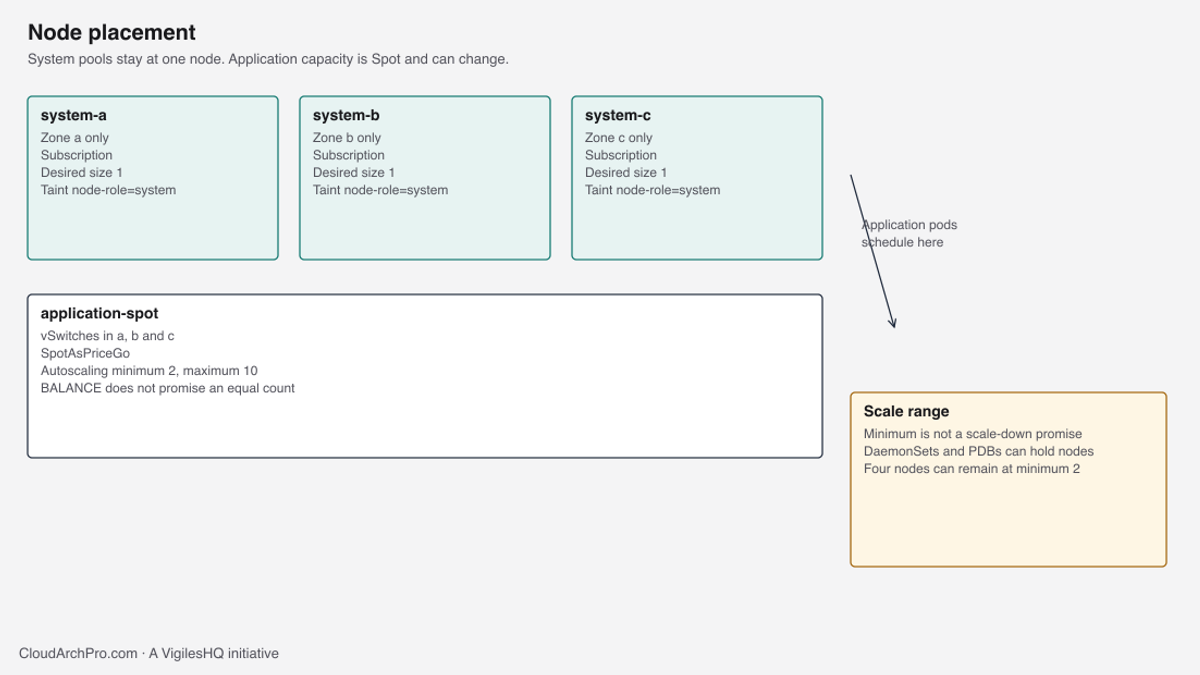
Keep cluster services on three fixed subscription nodes, one in each zone, and put application pods on a multi-zone Spot pool. Spot capacity is interruptible. The autoscaler replaces reclaimed nodes when stock exists. It does not promise that the minimum size is what you will see after scale-down, and it does not make a sold-out instance type appear.
CoreDNS, the Terway daemon and the cluster autoscaler components have a different failure budget from the application. If a Spot node disappears, the API should reschedule. If the only node running CoreDNS disappears, every lookup in the cluster fails until a replacement is Ready. This page splits those two budgets for the private ACK cluster described in Build a secure Alibaba Cloud ACK cluster with OpenTofu.
The complete OpenTofu example is available in the VigilesHQ Alibaba Cloud ACK repository. Node pools are the ACK node pool module, called from examples/production/cluster. Nothing here is a stock report for a real account. Instance types are inputs you fill after DescribeAvailableResource. There is no family that is “the” 4 vCPU, 16 GiB choice in every zone on every day.
Two failure budgets
System workloads are the pods the cluster needs before your Deployment matters: CNI, CSI, CoreDNS, the node problem detector, and any admission controller you installed on purpose. They tolerate a node replacement measured in minutes only if another zone still serves them. They do not tolerate a pool that can go to zero because the Spot market emptied.
Application workloads are your Deployments. Give them a pod disruption budget and more than one replica. Losing one node is ordinary. Losing the whole pool is a capacity incident, which is why the maximum is capped and why you decide, explicitly, whether an on-demand node may fill a Spot gap.
Mixing both on one autoscaled Spot pool looks cheaper until the autoscaler scales the pool to the minimum and that minimum is not enough for the DaemonSets plus CoreDNS. The cluster then looks “up” in the ACK console and serves nothing. The split below is how you avoid that shape.
Three subscription pools, one node each
system-a, system-b and system-c are separate node pools. Each pool has one vSwitch, one zone, desired_size 1, charge type PrePaid, autoscaling off, and a NoSchedule taint. PrePaid is the subscription billing mode. You pick a period (the example uses one month) and whether it auto-renews. The node does not disappear because the Spot price moved.
One node per zone is easier to reason about than three nodes in one pool spread by a balance policy. A single pool with desired_size 3 and multi_az_policy BALANCE will usually place one node per zone, and then a later scale event or a stock miss can place two in one zone and zero in another. With three pools you can name the failure: system-b is not Ready. The other two zones still have a system node. You replace one pool without touching the others.
The cost is three subscriptions of a 4 vCPU, 16 GiB class instance, plus the disks. That bill is stable. Put it on the FinOps review as platform overhead. Count application waste on its own line. Scaling system pools “to save money” is how CoreDNS ends up on a Spot node.
module "system_a" {
  source         = "../../../modules/ack-node-pool"
  mode           = "system"
  name           = "system-a"
  vswitch_ids    = [data.terraform_remote_state.network.outputs.subnet_ids_by_name["example-node-a"]]
  instance_types = var.system_instance_types["a"]
  desired_size   = 1
  labels         = { "node-role" = "system", "topology.kubernetes.io/zone" = "ap-southeast-1a" }
  taints = [{
    key    = "node-role"
    value  = "system"
    effect = "NoSchedule"
  }]
}
The module precondition refuses a system pool that is not exactly one node, one vSwitch, and autoscaling off. A desired_size of 3 in system-a is a plan error. If you need more system capacity, add a node to each pool in a reviewed change, or add a second system pool per zone. Do not turn on autoscaling for these pools. An autoscaler that adds a second system node during an incident also adds a subscription you may not be allowed to cancel until the period ends.
Labels node-role=system are what the Argo CD Helm values select. The topology label is recorded so a human reading kubectl get nodes -L topology.kubernetes.io/zone does not have to join the ECS API to see placement. Kubernetes will also set the topology label itself on modern versions. Setting it in the pool keeps the value obvious in OpenTofu.
When the same type is not in every zone
system_instance_types is a map keyed by a, b and c. Each value is a list of ECS type names. The lists do not have to match. Zone b can be on a different family from zone a if that is what stock allows on the day you apply. The validation only checks the shape ecs.<family>.<size>. It cannot know stock. A plan that names ecs.g7.xlarge in a zone where that type is sold out will fail at apply, inside ECS, after ACK has already created the pool object.
Query stock before every apply, including a retry. Stock is per zone and per billing method. A type available as PostPaid can be sold out as PrePaid, and the reverse happens too. Subscription system pools must be checked with SpotStrategy of NoSpot and InstanceChargeType of PrePaid. The application pool must be checked with Spot and PostPaid.
aliyun ecs DescribeAvailableResource \
  --RegionId ap-southeast-1 \
  --DestinationResource InstanceType \
  --InstanceChargeType PrePaid \
  --ZoneId ap-southeast-1a \
  --InstanceType ecs.g7.xlarge
Replace ecs.g7.xlarge with the candidate you are about to put in tfvars. A closed or sold-out status means you pick another type that still has 4 vCPU and 16 GiB, or you delay the apply. Do not leave a stale type in the pool “until stock returns” and then re-apply a plan file from yesterday. ECS will reject the instance, the pool will sit degraded, and the plan file will not show the new type you typed into the console.
DescribeZones is the companion call. If ap-southeast-1c is missing from the response, the address plan’s third vSwitch cannot be created and system-c has nowhere to live. Stop at the network stack. Do not invent a two-zone system and call it the three-zone design.
The application pool is Spot, across three zones
application-spot is one pool. It passes all three node vSwitches, charge type PostPaid, spot_strategy SpotAsPriceGo, spot_instance_remedy true, autoscaling on, minimum 2, maximum 10. SpotAsPriceGo means you do not set a price cap. ECS picks the current Spot price, up to the pay-as-you-go price. You can still be reclaimed. The remedy flag tells ACK to start a replacement when a preemption notice arrives, if a matching instance can be created.
There is no desired_size on this pool. Autoscaling pools in this module set only scaling_config.min_size and scaling_config.max_size. Setting both a desired size and a scaling range makes the next apply fight the autoscaler. The precondition requires autoscaling, at least three vSwitches, a minimum of at least 1, and a maximum above the minimum.
spot_strategy             = local.application_mode ? "SpotAsPriceGo" : "NoSpot"
spot_instance_remedy      = local.application_mode
compensate_with_on_demand = local.application_mode ? var.compensate_with_on_demand : false
multi_az_policy           = var.multi_az_policy

dynamic "scaling_config" {
  for_each = var.enable_autoscaling ? [1] : []
  content {
    min_size = var.min_size
    max_size = var.max_size
  }
}
Spot is not a discount coupon on a reliable node. A reclaimed instance stops. Pods on it go away. Pods with a single replica stay down until they schedule elsewhere. The replacement node is empty: image pulls start again, and they share the NAT EIP bandwidth from the cluster guide. A 200 Mbps EIP cap is the shared cap, not 200 Mbps per new node. A scale-out from 2 to 10 that pulls large images can sit at the cap while the nodes are NotReady. That looks like an autoscaler bug. The EIP monitor tells you which it is.
Remedy and the on-demand decision
spot_instance_remedy replaces a preempted Spot instance with another Spot instance when stock allows. compensate_with_on_demand is a different switch. The provider honours it only when multi_az_policy is COST_OPTIMIZED. With BALANCE, ACK spreads instances across the vSwitches you passed and does not fill a hole with on-demand.
The production stack sets the policy from that fact:
multi_az_policy           = var.compensate_with_on_demand ? "COST_OPTIMIZED" : "BALANCE"
compensate_with_on_demand = var.compensate_with_on_demand
Leave compensate_with_on_demand false when you care that a zone stays populated and you accept that a stock-out in one zone reduces capacity. Set it true only when you would rather pay on-demand than run short, and you accept COST_OPTIMIZED placement. COST_OPTIMIZED can put more nodes in the cheaper zone. It will not keep an equal count. The module rejects the combination of compensate true and BALANCE, because that combination is how people think they bought a fallback they did not buy.
Write the choice in the change ticket in one sentence: “Spot only, balance across zones” or “Spot first, on-demand fill allowed, cost-optimized placement”. Do not leave the default implicit.
What minimum, maximum and scale-down actually do
Minimum 2 means the autoscaler should not scale the application pool below 2 while the pool is healthy and pods can move. Maximum 10 means a traffic spike or a mis-set replica count cannot create an eleventh node. Ten 4 vCPU nodes is the capacity ceiling you are willing to pay for this pool. Raise it in a reviewed change when the application Deployment needs more, and check the vSwitch address count and the ENI quota before you do.
Scale-down removes a node the autoscaler considers empty enough, after its delay. It will not remove a node that still has a pod which cannot be evicted. The minimum is not a promise that you will observe two nodes tonight. You can sit at four for days. Common reasons:
- BALANCE keeps capacity in more than one zone, so the floor is “one per zone” even when the configured minimum is 2. Three zones and a balance policy can hold three nodes. A fourth stays if a pod cannot move.
- DaemonSets run on every node. They are supposed to. They should tolerate scale-down. A DaemonSet that sets
safe-to-evict=false, or that does not tolerate eviction, pins the node. - A pod disruption budget with
minAvailableequal to the current replica count refuses eviction. The autoscaler waits. - A pod using a local disk, or an annotation that marks it unsafe to evict, pins the node.
- System pods that were never given a toleration for the system taint, and that landed on the application pool, pin application nodes. That is the next section.
Check the autoscaler events before you “fix” a minimum by editing the pool to desired size 2. The event usually names the pod. Removing the pool to force the count destroys the nodes and the pods that were pinning them.
Taints decide where the minimum is spent
The system taint is node-role=system:NoSchedule. Application pods without a toleration cannot land on system-a, system-b or system-c. They land on application-spot. That is why the application minimum has to cover the application, and why the system pools can stay at one node.
If you forget the taint, the scheduler places application pods on the subscription nodes. Those nodes are the right size for a few system DaemonSets. Application pods belong on the Spot pool. They fill up. The autoscaler then adds Spot nodes for the overflow, and you pay for both. Worse, a system pod that has no node affinity can land on Spot. When that Spot node is reclaimed, CoreDNS or Terway on that node goes with it.
The module requires at least one NoSchedule taint on a system pool. It does not require the application pool to be untainted. Do not add the system taint to the Spot pool. If you taint both, nothing schedules unless every pod tolerates it, including DaemonSets you do not control.
Argo CD in the state and GitOps guide selects node-role=system and tolerates the taint. Copy that pattern for other control-plane add-ons you install. Do not copy it onto the application Deployment.
A useful check after the first scale-out:
kubectl get pods -A -o wide --field-selector spec.nodeName=NAME_OF_SYSTEM_NODEYou want system DaemonSets and the add-ons you pinned. An application pod on that node means the taint is missing or the pod tolerates it. Fix the taint. Do not cordon the node and leave the taint wrong, or the next reboot schedules the same way.
Why four Spot nodes remain
Someone sets the minimum to 2, watches the pool settle at 4, and files a bug. Walk the node list before changing the minimum.
kubectl get nodes -L node-role,topology.kubernetes.io/zone
kubectl describe node NODE | sed -n '/Taints/,+2p;/Non-terminated Pods/,+40p'
Count nodes per zone. If BALANCE holds one application node in each zone, three nodes are the policy working, and the fourth is a pod that will not move. describe names that pod. If the pod is a DaemonSet, fix the DaemonSet’s eviction annotation or its PDB. If the pod is a batch job with a local volume, it will leave when the job ends. If every zone has a spare node and the pods are ordinary Deployments, then look at the autoscaler scale-down delay and at whether scale-down is disabled on the pool. The Terraform argument for the range does not, by itself, turn off scale-down. An ACK console toggle or a cluster autoscaler flag can.
Equal counts are not guaranteed at every minute even with BALANCE. A reclamation in zone c drops that zone to zero until the remedy creates a replacement. During that window the other zones still have their nodes. Alerts on “zone c has no application node for 15 minutes” are more honest than alerts on “node count is not divisible by three”.
Disk encryption on the pool
Every pool sets an encrypted ESSD system disk, PL0, 120 GiB, algorithm aes-256, and a customer key:
system_disk_category          = "cloud_essd"
system_disk_size              = 120
system_disk_performance_level = "PL0"
system_disk_encrypted         = true
system_disk_kms_key           = var.disk_kms_key_id
system_disk_encrypt_algorithm = "aes-256"
internet_max_bandwidth_out    = 0
internet_max_bandwidth_out = 0 is the ECS convention for “no public IP”. Confirm it against the provider version you pinned. A schema that rejects 0 must be fixed by pinning a provider that accepts 0, or by an argument the provider documents as “no public address”. Setting 1 allocates a public address with almost no bandwidth. That still fails the design. DescribeInstances after apply must show an empty public address.
The key variable rejects any id containing alias/acs/. ECS documents two different encryption paths. Omit the key, and ECS uses the service key alias/acs/ecs without an extra RAM role. Pass a customer-managed key, and ECS calls KMS as AliyunECSDiskEncryptDefaultRole. Pass alias/acs/ecs in the customer-key field, and ECS returns InvalidKMSKeyCreatorType because a service-created key is not a key you are allowed to name there.
DataEncryptedKeyCreateFailed and KMSUnauthorized mean the customer key could not be used. The key can still “exist” in the console. Existence is not a grant. Check the key state, the region, and the role.
aliyun kms DescribeKey --KeyId YOUR_KEY_ID --RegionId ap-southeast-1
aliyun ram GetRole --RoleName AliyunECSDiskEncryptDefaultRole
DescribeKey should show the key enabled, in ap-southeast-1, with a creator that is your account rather than the ECS service. GetRole should return the role document. Then read the key policy and confirm the role can kms:Encrypt, kms:Decrypt, kms:GenerateDataKey and the describe calls ECS actually makes. The resource group that owns the key does not add those statements. A key in security-shared and a node in example-prod work together only when the policy says so.
The identity and security guides are the place to keep that key policy. This module only refuses the service-key alias so a plan cannot look green and then die on InvalidKMSKeyCreatorType.
Encrypted disks do not hide files from a process that is already root in a privileged container. They stop a snapshot copied without the key from being useful. Treat a privileged pod as a separate incident.
Add-ons and roles before the pool
ACK refuses some managed node pool operations when ack-node-problem-detector is not installed. The error text is close to ack-node-problem-detector is not installed. The cluster guide installs that add-on, plus Terway, CSI and logtail, with the cluster. The pool apply comes after. If you imported a cluster that skipped the add-on, install it and wait until the addon API shows it active. Then plan the pool again.
aliyun cs GET /clusters/CLUSTER_ID/addonsThe response must list ack-node-problem-detector in an installed or active state. A listed name in a failed state is not a pass. Creating the cluster’s SLS project is also not a pass. The detector writes events. A logstore without an index will not answer a query. Confirm an index before you rely on the event center.
ErrManagedSecurityRoleNotAttach means AliyunCSManagedSecurityRole is not authorised. It shows up when secret encryption or the credential add-on needs that role. AdministratorAccess on the human caller does not create it. Run GetRole for the role list in the cluster guide, including AliyunOOSLifecycleHook4CSRole if the pool uses lifecycle hooks during scale. A missing hook role leaves instances running after the autoscaler tried to remove them, and the pool drifts above the maximum until someone deletes them by hand.
SLB quota is still a cluster problem
Node pools do not each create an SLB. The cluster does. KB 141866 lists the API server SLB, even when slb_internet_enabled is false, and a second SLB if an ingress controller is installed. This baseline does not install that ingress. You still need one free SLB instance in the region for the private API.
QuotaExceeded.SLBInstancesQuota on cluster create is a quota problem. Keep the API private. Request a quota increase, wait until the quota API shows the new limit, then plan again. A retry of the old plan file does not re-read the quota.
Read the SLB account attributes or the Quota Center entry for SLB instances in ap-southeast-1 with whatever caller your RAM policy allows. Compare the limit to the number of SLBs already in the region. The evidence you want is remaining quota of at least one, before the cluster exists, and no unexpected second SLB after it exists. If a public SLB appears, the ingress add-on or slb_internet_enabled slipped through. Delete that path in a reviewed change. Do not “use it now that it is there”.
A DNS error that is not an outage
SLS endpoints and ECS endpoints fail closed when the resolver you are using refuses them. A laptop on a network that blocks *.aliyuncs.com produces a lookup error. That is not evidence that Simple Log Service is down, and it is not evidence that the node pool is wrong.
Resolve the same hostname with a resolver you already trust, from a network that is allowed to query it. Then open HTTPS to that host. If the second resolver works, fix the first resolver or run the command from the VPC. If both fail, check the Alibaba status page and the endpoint spelling for ap-southeast-1 before you change infrastructure. Do not rebuild a node pool because a corporate DNS policy returned REFUSED.
Failures, and the wrong story people tell about them
| Error or symptom | Root cause | Incorrect assumption | Correction | Prevention |
|---|---|---|---|---|
ErrManagedSecurityRoleNotAttach | AliyunCSManagedSecurityRole is not authorised | AdministratorAccess on the caller was enough | Authorise the ACK service role, then plan again | ram GetRole for every role in the cluster module list |
ack-node-problem-detector is not installed | The node pool API depends on the add-on | Pools can be created and the add-on added later | Install the add-on, wait until it is active, plan again | Gate the pool apply on addon state |
DataEncryptedKeyCreateFailed or KMSUnauthorized | ECS could not use the customer key | A key that exists is a key ECS can use | Grant AliyunECSDiskEncryptDefaultRole, enable the key, match the region | Describe the key and the role before plan |
InvalidKMSKeyCreatorType | The ECS service key was passed in the CMK field | Any regional key id is valid input | Use a user-created key, or omit the key and accept the service key. This module forbids the alias | Validation rejects alias/acs/ |
QuotaExceeded.SLBInstancesQuota | Cluster create needed an SLB instance | A private API uses no SLB | Raise the SLB instance quota, then plan again | Compare quota and current SLB count |
| SLS or ECS endpoint DNS failure | The local resolver refused the name | The cloud service is down | Query a resolver you trust, then HTTPS | Treat REFUSED as a client network fault until a second resolver agrees |
| Instance type sold out in one zone | Stock differs by zone and by PrePaid versus Spot | One family string works everywhere | Pass a per-zone type list that DescribeAvailableResource just confirmed | Query stock before every apply, including retries |
Recovery without deleting the cluster
A failed node pool apply often leaves the cluster running and the pool scaling or failed. Deleting the cluster throws away the API SLB, the RRSA issuer and the etcd you just encrypted. Do not do that to clear a KMS error.
- Read the task or event message and match it to the table. Copy the error code into the ticket. Do not paste a cluster id from a different environment.
- Fix the thing outside the cluster: the role, the key policy, the quota, or the instance type list.
- Discard the plan file from the failed run.
tofu applyis not repeated. Runtofu planand read it. State may already contain the pool. The new plan might be an update. Read the plan before you treat it as a create. An unexpected destroy ofsystem-ais a stop.- If OpenTofu wants to replace the pool because a force-new argument changed, expect the node to be recreated. Drain it first if it is the only system node in that zone. Replacing all three system pools in one apply leaves a window with no system node. Do them one zone at a time unless you have confirmed the DaemonSets fit on the survivors.
tofu state list
tofu plan -lock=true -input=false
state list should show the cluster and any pools that were recorded. A pool that exists in the ACK console and is absent from state was created outside OpenTofu, or the state write failed. Import it or delete that console pool before the next apply. Two pools with the same name and different owners are how a later apply deletes the one you meant to keep.
A lock error from TableStore means someone else’s plan holds the state. Wait if that job is still running. Release a stale lock only after you have proved the holder is dead and no apply is in progress. Do not copy state to your laptop to get around the lock. That is how two applies run.
What to look at after scale-out
After the application pool reports a successful scale, check the nodes rather than the OpenTofu output. The output is the pool id. The nodes are the evidence.
kubectl get nodes -o wide
aliyun ecs DescribeInstances --RegionId ap-southeast-1 --InstanceName 'worker-k8s-for-cs-*'
Use the name pattern your cluster actually applies. The example cannot know it until the cluster exists. For each new instance, Status is Running, the public IP fields are empty, the zone is one of a, b or c, and the instance type is one you put in tfvars. A public IP means internet_max_bandwidth_out was not 0. A type you did not list means the console or another pool created it.
Then:
kubectl -n kube-system get pods -o wide
kubectl get events -A --field-selector reason=FailedScheduling
DaemonSets should be Running on the new node within a few minutes. FailedScheduling that mentions taints is expected for a pod that does not tolerate node-role=system and has no room on the Spot pool. FailedScheduling that mentions insufficient ENI or IP addresses is a Terway capacity problem. A 4 vCPU type has a smaller secondary-IP quota than a large type. Lower the pods per node, or pick a type whose ENI specification you checked, and plan again. Do not raise the maximum to 10 and hope the addresses appear. The pod /20 is large. The ENI quota on the instance is usually the tighter limit.
Cost and the availability you actually bought
Subscription system nodes cost a month of instance plus disk whether the application is busy or not. That is the price of a node that is still there on Saturday. Spot application nodes cost less per hour and can vanish. The autoscaler adds hours when pods are pending and removes hours when pods are gone, subject to the blockers above. A minimum of 2 means you pay for at least two Spot nodes most of the time. The invoice can also show more hours when the autoscaler adds nodes.
On-demand compensation, when you enable it, removes the savings on the nodes that fall back. A week of sold-out Spot with compensation on is a week of pay-as-you-go prices. Read that invoice before you leave compensation on as a permanent setting. The FinOps guides cover how to attribute that spend. The node pool tags and the node-role label are what you join on. They do not enforce a budget.
Image pull through the shared NAT EIP can dominate a scale-out. A private registry in ap-southeast-1, reached over the VPC, removes that pull from the EIP cap. The networking guides are where the registry endpoint should be designed. This pool does not create one.
Production checklist
GetCallerIdentitymatches the account in the ticket.DescribeZonesreturns the three zones in the address plan.DescribeAvailableResourcereturns a usable type for PrePaid in each system zone, and a usable Spot type for the application list. Record the types in tfvars. Do not commit a different list “as a default”.- Every ACK service role, the ECS disk role, and the OOS lifecycle role exist.
DescribeKeyshows a user-created key, Enabled, inap-southeast-1. The key policy names the ECS role.- SLB instance quota has room for the API SLB. No internet ingress add-on is in the plan.
ack-node-problem-detectoris active before the pool plan.- System pools: PrePaid, desired 1, one vSwitch, NoSchedule, no autoscaling, encrypted disk, bandwidth 0.
- Application pool: SpotAsPriceGo, remedy on, min 2, max 10, three vSwitches, compensation only with COST_OPTIMIZED.
- After apply: no public IPs, one system node per zone, application pods not on system nodes, no FailedScheduling for CoreDNS.


Questions that show up in the apply log
Can I use one Spot pool for CoreDNS and the API?
You can, and the first reclamation will tell you whether CoreDNS had a second replica on a node that survived. This design does not. System pools exist so that question has a boring answer.
Does multi-zone balance mean the same number of nodes in each zone?
No. It is a placement policy. Reclamation, stock and pods that will not move all change the count. Alert on an empty zone. Equal counts across zones can still hide a hole.
Will the pool scale down to the minimum?
Not if a pod, a DaemonSet, a PDB or the balance policy needs the extra node. Read the autoscaler event. Lowering the minimum in OpenTofu does not evict a pod that cannot move.
Is a green plan after a KMS error enough to retry apply?
Only if the plan was created after the key policy changed. A plan file from the failed run still contains the old action. Run tofu plan again and read the diff.
What if zone c is sold out of every 4 vCPU type?
Do not apply system-c with a type ECS will reject. Either choose a larger type that is in stock, or stop and tell the change owner the three-zone system budget cannot be met today. Two system nodes are a different availability design. Write it down before you apply it.
The cluster foundation, including the private API those nodes register with, is the OpenTofu ACK guide. Shared state for this apply is OpenTofu remote state and private GitOps. Account structure around the cluster is Alibaba Cloud architecture for APAC. Alibaba Cloud architecture consulting is the service engagement for that account design. The Kubernetes topic index is Kubernetes guides.
Source code
The complete OpenTofu modules and examples are maintained in the VigilesHQ Alibaba Cloud ACK repository.