Build a secure Alibaba Cloud ACK cluster with OpenTofu
Plan a private ACK Pro cluster in ap-southeast-1 with OpenTofu: CIDR ownership, Terway ENIIP, RRSA, encrypted disks, NAT egress and a private API.
Guide details
- Platform
- ACK managed Pro (ack.pro.small), Terway ENIIP, OpenTofu 1.12, Alicloud provider 1.241 to 1.293
- Example region
- ap-southeast-1
- Documentation checked
- 23 September 2026
- Last technically verified
- September 23, 2026
Part 1 of 3. Building Secure Alibaba Cloud ACK Platforms
A secure ACK deployment starts before the cluster resource exists. Decide CIDR ownership, resource groups, egress, service roles, encryption and state storage first. Build the replacement VPC and ACK Pro cluster in parallel. Leave the unstable source cluster alone until the new private API, encrypted node pools and logs are proven.
The example is a private API in ap-southeast-1, three zones, and pod egress that leaves nodes without a public address. The complete OpenTofu example is available in the VigilesHQ Alibaba Cloud ACK repository. VPC 172.21.0.0/16 and names such as vpc-example are stand-ins. A real apply uses the account GetCallerIdentity returns.
If the current cluster is unstable, or you no longer trust its kubeconfig, do not rebuild it in place. Create the replacement beside it. Application migration waits until the checks at the end of this page pass. Node pool shape is covered in ACK node pools: subscription, Spot and autoscaling. Shared state and Argo CD are covered in OpenTofu remote state and private GitOps.
Architecture overview
What you are building
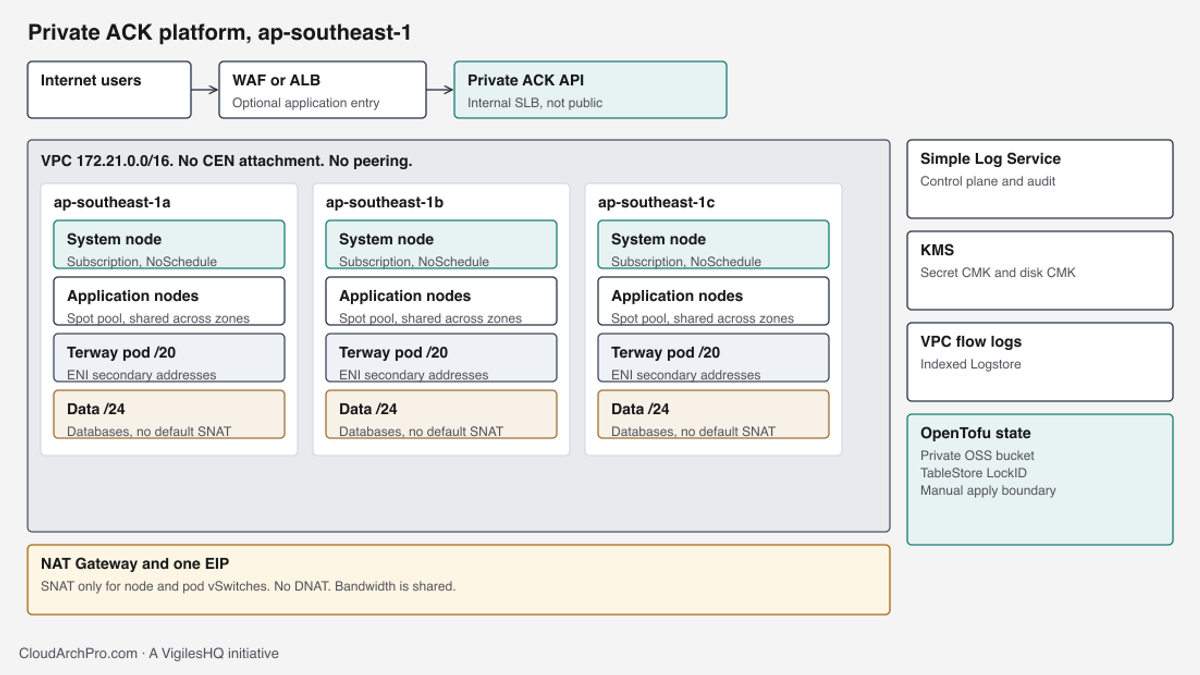
ACK is Alibaba Cloud’s managed Kubernetes service. This baseline uses ACK Pro, API value ack.pro.small, in one VPC. The control plane API is an internal SLB. Nodes have no public IP. Pod addresses come from Terway ENIIP, which attaches elastic network interfaces to nodes and gives each pod an address from a dedicated vSwitch. RRSA lets a pod assume a RAM role through a projected service account token. SLS is Simple Log Service, the store for control plane logs and, once indexed, VPC flow logs.

The diagram is the target architecture. It shows the shape you are building toward. Internet users never connect to the API. They reach an application load balancer only if you have already reviewed that entry. Databases sit on data vSwitches that do not receive a default SNAT route. KMS holds two different keys in the usual case: one for Kubernetes Secret encryption, one for ECS system disks. OpenTofu state sits in a private OSS bucket with a TableStore lock. That bucket is a separate stack, created before anyone treats the cluster state as shared.
Assumptions and scope
The account already exists. Resource Directory membership, the break-glass RAM user, and any CEN decision belong to Alibaba Cloud architecture for APAC. This page does not attach the new VPC to CEN and does not create a peering connection.
The example assumes:
- Region
ap-southeast-1, zonesap-southeast-1a,ap-southeast-1bandap-southeast-1c. Confirm the zone IDs withDescribeZoneson the day you plan. Zone letters are not portable across accounts. - One resource group for the production cluster and its databases, plus shared groups for network, security, observability and state.
- Production VPC
172.21.0.0/16. Non-production uses172.22.0.0/16so the two clusters cannot be peered later by accident of overlapping space. - Service CIDR
172.30.10.0/24, outside the VPC. A/24yields 254 ClusterIP addresses. Size it for Services. Node addresses come from the node vSwitches. You cannot change it after the cluster exists. - IPv4 only.
proxy_modeisipvs. - No SSH security-group rule, no DNAT, no public node IP, no internet-facing ingress add-on.
- Kubernetes patch versions that match
1.x.y-aliyun.z. ReadDescribeKubernetesVersionMetadatabefore you pinkubernetes_version. A version that worked in another region can be absent here.
Provider credentials stay in the environment. The provider block is only the region.
provider "alicloud" {
  region = var.region
}ALICLOUD_ACCESS_KEY, ALICLOUD_SECRET_KEY and, for an STS session, ALICLOUD_SECURITY_TOKEN are read by the provider. They do not belong in providers.tf. A plan that prints those values has already failed the review, even if the graph is otherwise empty.
Build the replacement beside the broken cluster
An in-place rebuild reuses the VPC, the service CIDR and the SLB that applications already depend on. If that cluster’s credentials leaked, those objects are part of the thing you no longer trust. Deleting the cluster to “start clean” also deletes the worker nodes and, depending on how disks were created, the volumes you still need for a restore.
A parallel build keeps the source VPC routing untouched. You inventory its CIDRs, pick a non-overlapping range, and create example-prod in a new VPC. DNS cutover and data copy happen after the new API answers on the internal SLB, the node pools are Ready, and flow logs show the NAT path you intended. Until that cutover, the source cluster still serves traffic. You do not run tofu apply against its state from this example.
The failure mode of the parallel build is orphaned cost: two NAT gateways, two sets of system nodes, two SLBs. That cost is visible on the FinOps guides invoice. It is cheaper than discovering, during an in-place apply, that the service CIDR cannot be changed and the only fix is a second cluster anyway.
Network design
Resource groups record ownership
A resource group is a Resource Management container. RAM policies can limit a principal to one group. Billing can group spend. Neither of those behaviours is a subnet ACL, a security group, or a KMS key policy. Putting a key and a cluster in example-prod does not allow ECS to use the key. The disk encryption role still has to be granted on the key.
The example creates six groups. Names are display names you can change. IDs come back as outputs and are passed into later stacks. Do not hard-code rg-example in an environment that has already applied. rg-example is documentation.
| Resource group | What it owns | What it does not decide |
|---|---|---|
| example-prod | ACK cluster, node pools, production disks, production databases | Packet paths, KMS key use, who can call the API |
| example-nonprod | The non-production copy of the same objects | Isolation from production. That comes from the VPC and RAM. |
| network-shared | VPC, vSwitches, route tables, NAT, EIP | Which pods may egress. SNAT entries decide that. |
| security-shared | Customer KMS keys used by this platform | Automatic access for every resource in the group |
| observability-shared | SLS project for audit and flow logs | Whether a log line has arrived |
| platform-state | OSS bucket and TableStore lock instance | Safety of a local state file that was never migrated |
Tags travel with the resources: project=example, environment=production, owner=platform, managed-by=opentofu. Tags are labels for search and cost allocation. A tag does not deny a RAM action. If finance needs the invoice split by namespace later, that is a different report. The cluster tags only explain the cloud objects.
resource "alicloud_resource_manager_resource_group" "this" {
  display_name        = var.display_name
  resource_group_name = var.resource_group_name
  tags                = var.tags
}
Create the groups in the resource-groups stack before the VPC stack plans. The network module takes network_resource_group_id with no default, so a plan cannot silently land the VPC in the account’s default group.
Write down every CIDR before you create the VPC
Collect the ranges that already exist: the source VPC, other clusters’ pod and service CIDRs, CEN published routes, VPN pools, office ranges, and the non-production VPC if it already exists. Overlap is a plan-time failure in this module, but the module can only see the CIDRs you pass in. A route that arrives later through CEN will not be in var.subnets.
The production plan refuses to continue until allow_example_cidrs is true. That flag is an acknowledgement that 172.21.0.0/16 is an example range. Confirm the range is free in your account before you turn the flag on. Turn it on only after the inventory says the range is free. Leave it false in CI until someone has recorded the inventory in the change ticket.
Service CIDR 172.30.10.0/24 must sit outside 172.21.0.0/16. The cluster module checks that with cidrcontains on both directions. Overlap fails the plan. A successful plan does not mean the range is unused by an on-premises network that Alibaba cannot see.
Three zones, five roles
Each zone gets five vSwitches. Edge, management and data are /24. Node and Terway pod networks are /20. The /20 blocks are cut with cidrsubnet(vpc, 4, netnum) so they do not collide with the /24 blocks at the start of the /16. See the VPC module.
| Name | Zone | CIDR | Role |
|---|---|---|---|
| example-edge-a / b / c | a, b, c | 172.21.0.0/24, 172.21.48.0/24, 172.21.96.0/24 | NAT placement. Not a node subnet. |
| example-mgmt-a / b / c | a, b, c | 172.21.1.0/24, 172.21.49.0/24, 172.21.97.0/24 | Control plane ENIs and the internal API SLB. |
| example-node-a / b / c | a, b, c | 172.21.16.0/20, 172.21.64.0/20, 172.21.112.0/20 | ECS nodes. SNAT allowed. |
| example-pod-a / b / c | a, b, c | 172.21.32.0/20, 172.21.80.0/20, 172.21.128.0/20 | Terway ENI addresses. SNAT allowed. |
| example-data-a / b / c | a, b, c | 172.21.2.0/24, 172.21.50.0/24, 172.21.98.0/24 | Databases. No default SNAT. |
| ClusterIP | n/a | 172.30.10.0/24 | Kubernetes Service range. Outside the VPC. |
Non-production repeats the shape inside 172.22.0.0/16 with the prefix np. Do not reuse the production /20 indexes in a second VPC that will later be joined to the same CEN. Overlap is evaluated per VPC by the guard, and across VPCs by you.
The address plan is a module with no provider. It only computes names and CIDRs.
"${var.name_prefix}-node-${regex("[a-z0-9]$", zone_id)}" = {
  zone_id = zone_id
  role    = "node"
  cidr    = cidrsubnet(var.vpc_cidr, 4, local.zone_layout[index].node)
}
regex("[a-z0-9]$", zone_id) takes the zone suffix. OpenTofu’s substr does not accept a negative offset, so this is the portable way to turn ap-southeast-1a into a. If a zone id does not end in a single character, the name will be wrong and the plan should be rejected in review.
The vSwitch module then refuses a plan when any CIDR falls outside the VPC, when two vSwitches overlap, or when the service CIDR overlaps the VPC. Those checks are terraform_data preconditions. tofu validate does not execute them. tofu plan does. A clean validate is not a clean plan.
resource "terraform_data" "cidr_guard" {
  lifecycle {
    precondition {
      condition     = length(local.overlapping_pairs) == 0
      error_message = "vSwitch CIDRs overlap. Fix the address plan before apply."
    }
  }
}
Each role has its own route table. The VPC module creates those tables and the vSwitch module attaches them. Alibaba adds a default route to the system table when an enhanced NAT gateway is created. Custom tables do not inherit that route. This layout uses the custom tables on purpose, so SNAT is opt-in per role.
Why the roles are separate
Nodes need room for autoscaling. A /20 is 4,094 addresses. That is more than this cluster’s maximum of ten application nodes plus three system nodes, and it leaves space for a second pool if stock forces a different instance family. Putting nodes in a /24 looks tidy until the autoscaler stops with an address error and the only fix is a new vSwitch plus a rolling replace.
Pods in Terway ENIIP mode consume addresses from pod_vswitch_ids. Node vSwitch addresses stay with the nodes. Alibaba requires those pod vSwitches to be in the same zones as the node vSwitches and to be different vSwitches. The cluster module rejects a plan that reuses the control-plane vSwitch IDs as pod vSwitches. Sharing one /24 between nodes and pods couples node scale to pod density. A DaemonSet plus a handful of pods can exhaust the node subnet while the autoscaler still reports capacity.
Management vSwitches hold the control plane ENIs. The API SLB lives there. Mixing them with node addresses makes a security-group change for “workers” also touch the API path. Keep the management /24 small. You are not scaling user workloads into it.
Data vSwitches are for RDS or another database you create later. They have a route table with no default route to the NAT gateway. A database that needs a patch from the internet should use an explicit, temporary route. Leave the cluster SNAT off that route table. The absence of that route is the control. A security group that also denies egress is a second control, and you should add it on the database. The route table alone is not a host firewall.
Edge vSwitches exist so the NAT gateway has a place to live. Nodes do not launch there. If you later add an internal-facing load balancer for an application, give it its own vSwitch or a reviewed edge address. Do not publish the Kubernetes API from the edge tier.
Terway ENIIP
Terway is the ACK network plugin that can enforce Kubernetes NetworkPolicy. Flannel on ACK does not. The add-on name in this baseline is terway-eniip. ENIIP mode gives pod IPs from the pod vSwitch by assigning secondary addresses on an ENI. The pod CIDR in the table above is that vSwitch. A Kubernetes cluster_cidr overlay is a different model.
Consequences you will feel during planning:
- Security groups on the node ENI see pod traffic. A default-deny NetworkPolicy is still required. The security group is the cloud filter. NetworkPolicy is the Kubernetes filter. They answer different callers.
- Each node has an ENI quota and a secondary-IP quota. A 4 vCPU instance does not have the same quota as a 32 vCPU instance. The node pool page covers how that interacts with DaemonSets. If you pick a small instance and then schedule 40 pods per node, Terway will fail to allocate and the pod will stay pending. Check the instance type’s ENI specification before you treat max pods as a scheduler problem.
pod_vswitch_idsmust cover every zone where a node can run. The application pool spans three zones, so it needs three pod vSwitches. A system pool in zone a still needs the zone a pod vSwitch to exist, because system pods also get Terway addresses.
The cluster resource wires management vSwitches to vswitch_ids and pod vSwitches to pod_vswitch_ids. Since provider 1.241, vswitch_ids on alicloud_cs_managed_kubernetes means the control plane vSwitches. worker_vswitch_ids is the old name. Node pools carry their own vswitch_ids for the nodes. Do not point the control plane at the node /20. Provider 1.293 derives the VPC from those vSwitches and rejects an explicit vpc_id on the cluster resource. The VPC id still belongs on the vSwitch and NAT resources.
Private connectivity
NAT, one EIP, no DNAT
Nodes and pods that must reach the internet use a NAT gateway in example-edge-a. See the NAT egress module. The gateway is Enhanced, pay-as-you-go, billed by LCU. An EIP with pay-by-traffic bandwidth is associated to it. SNAT entries exist only for the node and pod vSwitches. There is no alicloud_forward_entry. DNAT would publish a port on the EIP into the VPC, which is the opposite of a private node.
resource "alicloud_nat_gateway" "this" {
  vpc_id               = var.vpc_id
  vswitch_id           = var.nat_vswitch_id
  nat_type             = "Enhanced"
  payment_type         = "PayAsYouGo"
  internet_charge_type = "PayByLcu"
}

resource "alicloud_snat_entry" "this" {
  for_each          = var.snat_vswitch_ids
  snat_table_id     = alicloud_nat_gateway.this.snat_table_ids
  source_vswitch_id = each.value
  snat_ip           = alicloud_eip_address.this.ip_address
}
The EIP bandwidth argument defaults to 200 in the example. That number is the cap for traffic leaving through that EIP. It is not 200 Mbps reserved for each node. Forty pods pulling images share it. If image pulls stall while the EIP monitor shows the bandwidth line flat at the cap, raise the EIP bandwidth or pull from a registry inside the region. Do not “fix” it by giving nodes public IPs.
new_nat_gateway on the cluster resource stays false. ACK can create a NAT for you. That NAT is harder to match to the route tables in this module, and it tends to cover more vSwitches than the node and pod set. Own the gateway in the egress stack.
After apply, check three things. The SNAT table lists six entries (three node, three pod) and no data vSwitch. The node and pod route tables have 0.0.0.0/0 to the NAT gateway. The system route table may also have a default route that Alibaba added automatically. A second default route in a table you thought was empty is a stop. Do not add another one “to be sure”.
The NAT EIP is also the address you will later give a private Git server as an allowlist entry. That is why it should be stable. Release the EIP and the allowlist breaks. The GitOps guide covers that hand-off.
Nodes do not get public addresses
internet_max_bandwidth_out = 0 is set on every node pool. ECS treats 0 as “do not assign a public IP”. The provider schema has disagreed with that ECS behaviour across versions: older docs allow 0 to 100, and some later schema text says 1 to 100. Confirm the value against the provider you pinned before apply. If the provider rejects 0, stop and change the provider constraint or the argument. Do not set it to 1 to silence the error. Bandwidth 1 still allocates a public address.
No security group rule opens TCP 22 to 0.0.0.0/0. The node pool takes key_name so a later break-glass session has a key, and the module rejects a value that contains BEGIN. That stops someone pasting a private key into tfvars. Session Manager or a bastion you already operate is the access path. This example does not create a jump host.
A public IP on a node bypasses the NAT EIP. Egress source addresses then vary per node, and any allowlist you set for image registries or Git becomes a moving set. It also gives every scanned port on the node a route from the internet, limited only by the security group. The private API does not close that port if you opened it.
The API stays on an internal SLB
slb_internet_enabled = false creates the API SLB without a public address. Managed ACK still creates that SLB. KB 141866 describes the default load balancers: the API server SLB listens on 6443, and an ingress add-on would add another SLB on 80 and 443. A private API does not mean “no SLB quota”. QuotaExceeded.SLBInstancesQuota happens to clusters that never asked for a public API. Check the quota before the first apply. The node pool guide lists the command.
The internal SLB is reachable from vSwitches in the VPC, and from networks you explicitly route toward this VPC. It is not reachable because someone knows the hostname. RBAC and the ACK RAM authenticator still decide what a caller who can open a TCP connection is allowed to do. A private endpoint without RBAC is a flat admin network.
Do not install nginx-ingress-controller in this baseline. The cluster module rejects that add-on name and rejects any add-on config string that contains internet. Application entry, if you need it, is a separate ALB or WAF with its own certificate and source review. That box is optional on the diagram because many internal platforms never expose it.
Cluster security
ACK Pro and deletion protection
cluster_spec = "ack.pro.small" selects ACK Pro. Pro is the managed edition that supports the control plane log delivery and the SLA path this platform is written for. The string is the API value from the Terraform cluster document. Workload size is a separate decision. A larger cluster can still be ack.pro.small until you have a quota or feature reason to change the spec. Changing spec later is a separate change with its own downtime notes. Do not bury it in a node pool apply.
deletion_protection = true blocks a console or API delete until the flag is cleared. OpenTofu will also refuse to destroy the cluster while the flag is set, which is what you want. The flag does not stop a node pool delete, a vSwitch delete, or a RAM user with the right to turn the flag off. Pair it with a RAM boundary on who can call the delete API. The identity and security guides cover how that RAM boundary should look. This module only sets the cluster flag.
RRSA for workload identity
enable_rrsa = true turns on RAM Roles for Service Accounts. A pod with a projected service account token can assume a RAM role whose trust policy names that issuer, namespace and service account. The cluster output rrsa_metadata is the issuer data you put in the role. It is not a credential.
RRSA cannot be turned off once the cluster has it, on Kubernetes 1.22.3 and later. Set it at creation. A cluster that ships without it pushes teams toward access keys in Secrets. Those keys show up in state, in CI logs, and in image layers.
RRSA does not grant any cloud permission by itself. You still write a role and a policy. A role trusted by every service account in example is only slightly better than a node instance role. Prefer one role per application, with the namespace and service account name in the trust condition.
The worker RAM role on new managed clusters, from the 1.22.15-aliyun.1 line onward, does not carry a broad policy by default. Do not “fix” a pod’s AccessDenied by attaching AdministratorAccess to the node role. That gives every pod on the node the same cloud power. Use RRSA.
Service roles the caller cannot invent
AdministratorAccess on your user lets you call most APIs. It does not create AliyunCSManagedSecurityRole or the other service-linked roles ACK expects. Those roles are authorised separately, usually through the ACK console prompt or the RAM CreateServiceLinkedRole path for the specific service. A plan can be valid and the apply can still return ErrManagedSecurityRoleNotAttach.
The cluster module exports the role names it expects you to have authorised before apply:
AliyunCSDefaultRoleAliyunCSManagedKubernetesRoleAliyunCSManagedSecurityRolefor KMS-backed secret encryptionAliyunCSKubernetesAuditRoleAliyunCSManagedLogRoleAliyunCSManagedCmsRoleAliyunCSManagedCsiRoleAliyunCSManagedNetworkRoleAliyunCSManagedArmsRole
Check each one with a read-only RAM call before the cluster plan. A missing role is a preflight failure. Fix the role before you plan again. Autoscaling lifecycle hooks also need AliyunOOSLifecycleHook4CSRole. That one matters when you add the Spot pool, so the node pool guide repeats it.
aliyun ram GetRole --RoleName AliyunCSManagedSecurityRoleA role document in the response is success. EntityNotExist.Role is the failure. Do not treat a 403 from a caller who lacks ram:GetRole as proof the role is missing. Use a caller who can read RAM, then decide.
Add-ons installed with the cluster
The default add-on list matches the official Terraform cluster example, minus anything that creates an internet SLB. Config strings are empty because the documented examples pass an empty config, and an invented JSON key would be a guess.
| Add-on | Why it is here | What installing it does not prove |
|---|---|---|
| terway-eniip | Pod addresses and NetworkPolicy | That your default-deny policy exists |
| csi-plugin and csi-provisioner | Encrypted disk attach and dynamic volumes | That the KMS key policy allows ECS |
| logtail-ds | Node log shipping to SLS | That a query returns lines |
| ack-node-problem-detector | Node conditions and events. Managed node pools fail closed when it is absent | That the event logstore has an index |
| arms-prometheus | Metrics scrape for the cluster | That an alert will page anyone |
Install these with the cluster. The first node pool apply expects them to exist already. The node pool API checks for ack-node-problem-detector. Creating the pool first produces a clear error and a partial cluster. The order in this repository is network, egress, cluster (add-ons included), then node pools inside the cluster stack.
NetworkPolicy starts as default deny
Enabling Terway enables the enforcement point. It does not create a policy. Until you apply a policy, pod-to-pod traffic follows the security group.
The example manifests are manifests/default-deny.yaml and manifests/allow-dns.yaml. They target the example namespace. Default deny selects all pods and allows no ingress or egress. The DNS exception allows UDP and TCP 53 to pods in kube-system.
Apply those after the namespace exists and before the first application Deployment. Confirm with a pod that should fail:
kubectl -n example exec deploy/example-api -- wget -qO- --timeout=3 http://example.comThe expected result is a timeout or a policy refusal. A page of HTML means the default deny is not in effect, or the pod is not in the namespace you labelled. Then confirm DNS still works with a lookup of kubernetes.default. A cluster where application egress fails and CoreDNS also fails is a broken exception. A successful deny still resolves DNS.
Clusters past roughly 100 nodes can push NetworkPolicy evaluation onto the control plane if you turn on the policy proxy path Alibaba documents. This example does not set that. If you grow past that size, read the current network security page before you flip it. A flag that moves load onto the API server is a capacity decision.
Security groups
is_enterprise_security_group = true asks ACK for an advanced security group, which can hold more rules and more ENIs than a basic group. The group ACK creates is still a default-allow group until you add rules. Enterprise is a quota and feature tier. It is not a set of deny rules.
Keep the ACK-managed group for node and pod ENIs. Add a separate group for data-tier instances. Do not pile database rules into the node group, and do not attach the node group to a bastion you use for other accounts.
Rules you should add, in the security group, after the cluster exists:
- Ingress to the API SLB on 6443 only from the management and operator address ranges you listed in the inventory. “The whole VPC CIDR” is acceptable only if every address in the VPC is an operator. It usually is not.
- No ingress from
0.0.0.0/0. - Egress from nodes toward the NAT, plus whatever private registry or directory you use. A wide-open egress rule plus SNAT means every pod can open outbound connections until NetworkPolicy says otherwise.
The networking guides describe how those group rules should sit next to routes. This cluster does not replace that design.
Encryption and logging
Encrypt Kubernetes Secrets with your key
encryption_provider_key is the KMS key ACK uses for Secret objects at rest. disable_encryption = false keeps that provider on. The key id is a required variable with no default. A cluster that comes up without it stores Secrets with the platform mechanism you did not review.
The key must be in the same region as the cluster. AliyunCSManagedSecurityRole must be allowed to use it. A key that exists, and a key that this role can call Encrypt on, are different facts. Describe the key, then read the key policy.
Secret encryption does not hide a Secret from a principal who can kubectl get secret and who is allowed to decrypt. RBAC still matters. It also does not encrypt pod environment variables once kubelet has projected them, and it does not cover an emptyDir a process writes after it starts.
Encrypt the system disk with a user-created key
Node pools set system_disk_encrypted = true, category cloud_essd, performance level PL0, size 120 GiB, algorithm aes-256, and system_disk_kms_key to a key you pass in. The module rejects a key id or alias equal to the ECS service key alias/acs/ecs.
That rejection is there because of a specific API behaviour, documented on the ECS encryption permissions page. If you encrypt a disk and do not name a key, ECS uses alias/acs/ecs and you do not need an extra role. If you pass alias/acs/ecs yourself, the API returns InvalidKMSKeyCreatorType. If you pass a customer key and ECS cannot use it, the API returns DataEncryptedKeyCreateFailed or KMSUnauthorized. The usual cause is a missing AliyunECSDiskEncryptDefaultRole, a disabled key, a key in the wrong region, or a key policy that never granted that role.
Resource group membership does not grant that role. Create the key in security-shared if that is your ownership model, then grant the ECS role on the key. The node pool guide has the preflight commands. This page only requires the key id at cluster planning time so the node pool module is not tempted to fall back to an implicit service key.
Disk encryption protects a stolen snapshot and a disk that left the host. It does not protect data a privileged container can read through the mounted filesystem. Pod security admission and image policy are the controls for that path. They are not in this module.
Logging is a project plus a query
The cluster stack creates an SLS project named example-prod-ack and passes that name to control_plane_log_project. Components are apiserver, kcm, scheduler, ccm and controlplane-events. TTL is 30 days. If you omit the project, ACK creates k8s-log-{ClusterID} in an account location you then have to find. Name it yourself so the observability resource group and the RAM policy have a stable target.
logtail-ds ships node logs. Creating the project and the logstore does not mean lines are arriving. After the first system node is Ready, run a query for the API server logstore over the last 15 minutes. Zero rows means the logtail or the RAM role AliyunCSManagedLogRole is wrong, or the index does not exist yet. A logstore without an index accepts writes and refuses useful queries. The logging module creates a full-text index on the flow and audit stores. Confirm the index in the console or with the SLS API before you tell anyone the audit trail is searchable.
A local DNS failure that mentions an SLS endpoint is not, by itself, an Alibaba outage. Resolve the hostname with a resolver you already trust, then request HTTPS. If that resolver answers and your laptop’s resolver does not, fix the laptop or the VPC DNS policy. Do not rebuild the cluster.
VPC flow logs
The logging module creates a flow log on the VPC, traffic type All, status Active, delivered to its own logstore. Flow logs show which addresses talked. They do not show HTTP paths, and they do not replace application audit logs.
Use them for three checks after apply:
- Nodes and pods source from the NAT EIP when they leave the VPC. A node source address that is not the EIP means a public IP or a different NAT.
- Data vSwitches do not appear as sources of internet-bound flows. If they do, a default route was added.
- The API SLB address is private and the clients are the operator ranges you allowed.
Sampling and indexing delay the first line. Wait for the logstore index to finish building before you call the check failed. A missing index looks like a missing flow.
Node conditions
ack-node-problem-detector runs a node-problem-detector DaemonSet and ships Kubernetes events toward SLS. The component version documented around 18 August 2026 was 1.2.41. Check the current version when you install. The event center retains events for a limited period (the product page describes 90 days for that event store). That retention is not the same as your control plane log TTL.
The detector reports conditions such as kernel deadlock, PID pressure and inode pressure. It does not restart your Deployment. Alerts on those conditions belong in the monitoring stack you already run. arms-prometheus is installed so the metrics exist. This example does not create a contact point. A metric without a person is a graph.
Managed node pool operations call this add-on. If the add-on is missing, stop and install it. Do not delete the cluster. The recovery sequence is on the node pool page.
OpenTofu deployment
How the OpenTofu is split
The cluster resource is the ACK cluster module. Each directory under examples/ and bootstrap/ is a stack with its own state. Workspaces are not used. A workspace shares a backend configuration and makes the blast radius a string in TF_WORKSPACE. Separate state objects make a bad apply in non-production unable to refresh production.
| Stack | State key suffix | Depends on |
|---|---|---|
| resource-groups | platform-foundation/resource-groups/terraform.tfstate | Nothing in this platform |
| state-backend | platform-foundation/state-backend/terraform.tfstate | Resource group id, then a migration off local state |
| production-network | platform-foundation/production-network/terraform.tfstate | Resource groups |
| production-egress | platform-foundation/production-egress/terraform.tfstate | Network outputs |
| production-cluster | platform-foundation/production-cluster/terraform.tfstate | Network, egress, resource groups |
| production-argocd | platform-foundation/production-argocd/terraform.tfstate | Cluster API address and a token |
Remote state outputs carry VPC ids and vSwitch maps. They do not carry kubeconfig. The cluster outputs used by later stacks are the cluster id, the intranet SLB id, the security group id and the RRSA metadata.
Run tofu fmt -check -recursive from the example root. Run tofu validate -backend=false in each stack after tofu init -backend=false. Validate checks the provider schema. It does not check CIDR preconditions, live stock, or RAM roles.
What to run before apply
Use a read-only caller. The account id in the response must match the change ticket. If it does not, stop.
aliyun sts GetCallerIdentity
aliyun ecs DescribeZones --RegionId ap-southeast-1
aliyun ram GetRole --RoleName AliyunCSManagedKubernetesRole
GetCallerIdentity proves the access key or STS token. DescribeZones proves the three zone ids. GetRole proves one service role. Repeat GetRole for the rest of the list. Then plan.
tofu -chdir=examples/production/network plan -lock=true -input=false -out=tfplanRead the plan. The first network apply should create a VPC, route tables and vSwitches. It should not create a CEN attachment, a peering, a NAT (that is the egress stack), or an ACK cluster. An unexpected create on a resource you do not recognise is a stop. Discard the plan file. Do not apply a plan that was generated before you fixed a role or a CIDR. Refresh state and plan again.
| Command | Evidence that passes | Evidence that fails |
|---|---|---|
aliyun sts GetCallerIdentity | Account id matches the change ticket | A different account, or an expired token |
DescribeZones | ap-southeast-1a, b and c exist | A zone in the tfvars is absent |
ram GetRole for each ACK role | Role document returned | EntityNotExist.Role |
tofu plan on network | Creates VPC, tables, vSwitches only | CEN, peering, or a public SLB |
tofu plan on the cluster | slb_internet_enabled false, deletion protection true, RRSA true | A public API or new_nat_gateway true |
Migration checklist
Before any application moves
All of the following are true, or you are not migrating:
- The internal API hostname resolves only to private addresses.
kubectl --serveruses that address. A public address in kubeconfig is a failed build. - Three system nodes are Ready, one per zone, with no public IP in
DescribeInstances. - The application pool is a separate change, already planned, and not required for the API to answer.
- Default deny and the DNS exception are applied in
example. The wget check fails. DNS works. - Secret encryption key and disk key are customer keys.
alias/acs/ecsis not in the plan. - Control plane logs return at least one API server line, and the flow log index exists.
- Deletion protection is on.
tofu planshows no destroy. - State for this stack is in OSS and a second plan is blocked by the TableStore lock. Until that is true, only one operator applies, and the state file is not the laptop you take home. The state guide is the procedure.
Copy data and cut DNS only after that list. The source cluster stays running through the copy. Decommission it in a later change, after backups restore and the new NAT EIP is what partners allowlist.
Risks and limitations
Zone names and ECS stock differ by account and by week. The address plan’s use of the trailing character of the zone id is safe for ap-southeast-1a. It is not a theory of every region id Alibaba will publish.
A /24 service CIDR will run out of ClusterIPs if you create a Service per pod. Raising it later means a new cluster. If you expect more than a few hundred Services, change 172.30.10.0/24 before the first apply and keep it outside the VPC.
NAT bandwidth is shared. Private registries in the same region avoid that cap for image pulls. This module does not create a registry.
The example sets TableStore accessed_by so a CI runner outside the VPC can take the lock. “Private bucket” means a private ACL and blocked public access. It does not mean the OSS endpoint is reachable only from the VPC. Runners inside the VPC can switch to the internal endpoint. Runners on shared GitLab.com cannot.
tofu validate passing in CI does not mean the apply will pass. Roles, quotas, stock and KMS key policies are outside the graph. The node pool article is the catalogue of those errors.
This configuration was checked with tofu validate -backend=false against Alicloud provider 1.293.0. It was not applied. Live quota numbers, the Kubernetes patch list for ap-southeast-1 on a given day, and the provider’s acceptance of internet_max_bandwidth_out = 0 still have to be confirmed in the account you deploy.
Deployment checklist
- Inventory CIDRs. Set
allow_example_cidrsonly after172.21.0.0/16is free. - Authorise the ACK service roles. Record the
GetRoleoutput in the ticket. - Create the KMS keys. Grant
AliyunCSManagedSecurityRoleon the secret key andAliyunECSDiskEncryptDefaultRoleon the disk key. - Check SLB instance quota. You need a free instance for the API SLB.
- Apply resource groups, then network, then egress. Read each plan.
- Apply the cluster. Wait until the API is
runningand the add-ons are installed. - Apply node pools only after the detector add-on is present.
- Apply default deny. Run the wget check and the DNS check.
- Query SLS. Confirm one control plane line and an indexed flow log.
- Migrate state if this apply used a local file. Then schedule the application move.
Source code
The complete OpenTofu modules and examples are maintained in the VigilesHQ Alibaba Cloud ACK repository.
Alibaba Cloud architecture consulting covers the account and CEN decisions this cluster assumes. Ankit Mehta verified the commands and the provider arguments against the documentation listed below on 23 September 2026.
Planning FAQ
Can the resource group replace the security group?
No. The resource group is how you scope RAM conditions and read the bill. The security group filters ENI traffic. You need both, and they do not substitute for each other.
Does a private API mean I can skip RBAC?
No. Anyone who can route to the internal SLB can open a TLS connection. ACK still evaluates the caller. Keep admin certificates short-lived and use RRSA for workloads.
Will any KMS key encrypt the node disk?
No. A customer-managed key works when the ECS disk-encryption role can use it. The service key alias/acs/ecs works only when you omit the key and let ECS select it. Passing that alias yourself returns InvalidKMSKeyCreatorType.
Should I attach this VPC to CEN now?
No. CEN publishes routes into every other network on the same CEN instance. Attach it when a named route, with a named prefix, has an owner. The APAC architecture guide is where that attachment should be designed.
The plan is green. Can applications move today?
Not unless the checklist above is true. A plan with no changes proves OpenTofu’s view of these resources matches state. It does not prove a Deployment is healthy, a certificate is valid, or the source database has finished copying.