OpenTofu remote state and private GitOps on Alibaba Cloud
Move OpenTofu state to a private versioned OSS bucket with TableStore locking, then run Argo CD as ClusterIP against a private ACK API for shared applies.
Guide details
- Platform
- OpenTofu 1.12 OSS backend, TableStore, ACK private API, Argo CD Helm chart
- Example region
- ap-southeast-1
- Scope
- Backend arguments checked against OpenTofu docs on 23 September 2026
- Last technically verified
- September 23, 2026
Part 3 of 3. Building Secure Alibaba Cloud ACK Platforms
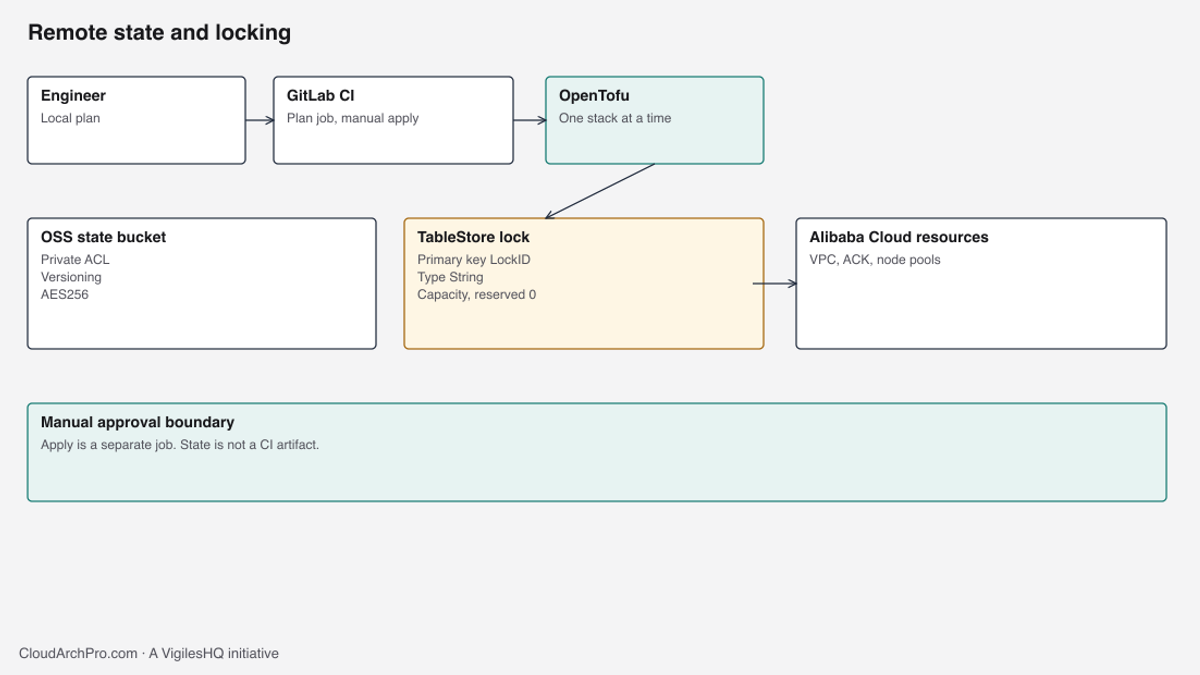
A second engineer cannot safely extend this platform while state lives on one laptop. Create a private, versioned OSS bucket and a TableStore lock with a string primary key named LockID, prove a second plan blocks, and only then migrate. Keep Argo CD on a ClusterIP service. The ACK API stays private unless a separate access review says otherwise.
Two people applying the same stack from two laptops will eventually both think they hold the latest state. One apply refreshes, the other writes an older serial, and a node pool disappears because the second plan never saw it. The fix is a private OSS object per stack and a TableStore row that only one OpenTofu process can hold. Do that before the migration. The first collision is too late.
GitOps is a different problem. Argo CD can deploy into the private ACK cluster from the cluster guide without a public API and without a public Argo CD Service. The node pool that runs it is the subscription system pool from the node pool guide. The complete OpenTofu example is available in the VigilesHQ Alibaba Cloud ACK repository.
Local state is an operations problem
A terraform.tfstate on a laptop is a secret store that also happens to be the inventory. It contains resource ids, the RRSA issuer, and often attributes you did not mean to keep. Git does not record that file, and nothing locks it. When the laptop disk fails, the next plan wants to create a second VPC beside the one you already pay for, unless someone imports every object by hand.
Shared state does not make the cloud safer by itself. It makes concurrent apply detectable. OSS without the lock table still lets two CI jobs write the same object. Last write wins, and the loser does not always notice. Turn on versioning so you can fetch the previous object. Turn on the lock so you rarely need to.
One object per stack
Workspaces are the wrong split here. A workspace is a prefix inside one backend configuration, selected by an environment variable. Point that variable at the wrong name and a production plan reads non-production state, or an apply writes production ids into the non-production workspace. The stacks in this platform have different approvals and different blast radius. Each one gets its own state object.
The object key is platform-foundation/<stack>/terraform.tfstate. The backend prefix is platform-foundation/<stack> and the key is terraform.tfstate. OpenTofu’s default prefix is env:, which is the workspace convention. Set prefix explicitly so a forgotten workspace flag cannot create env:/terraform.tfstate beside the real object.
| Stack | State object | Who may apply |
|---|---|---|
| resource-groups | platform-foundation/resource-groups/terraform.tfstate | Platform change with no cluster yet |
| state-backend | platform-foundation/state-backend/terraform.tfstate | After the bucket exists and state has been migrated |
| production-network | platform-foundation/production-network/terraform.tfstate | Network change window |
| nonproduction-network | platform-foundation/nonproduction-network/terraform.tfstate | Separate from production |
| production-egress | platform-foundation/production-egress/terraform.tfstate | NAT and SNAT only |
| nonproduction-egress | platform-foundation/nonproduction-egress/terraform.tfstate | Separate EIP |
| production-cluster | platform-foundation/production-cluster/terraform.tfstate | Cluster, logging, node pools |
| nonproduction-cluster | platform-foundation/nonproduction-cluster/terraform.tfstate | Separate cluster |
| production-argocd | platform-foundation/production-argocd/terraform.tfstate | Helm release only |
| nonproduction-argocd | platform-foundation/nonproduction-argocd/terraform.tfstate | Single replica |
Non-production uses VPC 172.22.0.0/16. Production uses 172.21.0.0/16. They do not share a state file, a NAT EIP, or an Argo CD release. A destroy in the non-production cluster stack cannot list the production cluster, because that id is not in the state it can see.
Later stacks read earlier outputs with terraform_remote_state. The egress stack reads the network stack. It does not re-declare the VPC. Credentials for that read are the same environment variables as the provider, passed outside the .hcl file.
data "terraform_remote_state" "network" {
  backend = "oss"
  config = {
    bucket              = var.state_bucket
    region              = var.state_region
    prefix              = "platform-foundation/production-network"
    key                 = "terraform.tfstate"
    tablestore_endpoint = var.tablestore_endpoint
    tablestore_table    = var.tablestore_table
    encrypt             = true
    acl                 = "private"
  }
}
The data source takes a lock on the network state while it reads. A long plan in egress holds that lock. Serialise applies per stack. Do not disable locking to “let the read through”.
The bucket
The state bucket is Standard storage, ZRS, in the platform-state resource group. ZRS keeps copies across zones in the region. It is not a backup in another account. Versioning is what you use when an apply writes a bad serial and you need the previous object. Cross-account replication is a separate decision and is not in this module.
resource "alicloud_oss_bucket" "state" {
  bucket          = var.bucket_name
  storage_class   = "Standard"
  redundancy_type = "ZRS"
  lifecycle {
    prevent_destroy = true
  }
}

resource "alicloud_oss_bucket_acl" "state" {
  bucket = alicloud_oss_bucket.state.bucket
  acl    = "private"
}

resource "alicloud_oss_bucket_public_access_block" "state" {
  bucket              = alicloud_oss_bucket.state.bucket
  block_public_access = true
}

resource "alicloud_oss_bucket_versioning" "state" {
  bucket = alicloud_oss_bucket.state.bucket
  status = "Enabled"
}

resource "alicloud_oss_bucket_server_side_encryption" "state" {
  bucket        = alicloud_oss_bucket.state.bucket
  sse_algorithm = "AES256"
}
prevent_destroy stops OpenTofu from deleting the bucket in a normal destroy. It does not stop a RAM user with oss:DeleteBucket in the console. If you ever do need to remove the bucket, migrate the state somewhere else first, then remove the lifecycle block in a reviewed change. Destroying the bucket while it is still the backend fails halfway and leaves every stack without a state pointer.
Private ACL plus the public access block means anonymous internet reads fail. It does not mean the endpoint is reachable only from the VPC. The example TableStore instance uses accessed_by = "Any" so a GitLab runner outside the VPC can take the lock with RAM credentials. “Private” here is “no anonymous access”, not “VPC-only”. Runners that live inside the VPC can use the internal OSS endpoint instead. Shared runners on the public internet cannot reach oss-internal. Do not switch the endpoint to internal and then wonder why CI times out.
AES256 on the bucket is server-side encryption with a key OSS manages. The OpenTofu backend argument encrypt = true means the same class of encryption on the state object. It does not accept the ACK Secret CMK. Leave the Kubernetes key and the state encryption as separate choices. The Secret key is granted to AliyunCSManagedSecurityRole. State is read by the CI role and by humans who apply. Those are different principals. Reusing the Secret CMK would let a change to the cluster key policy, or a disablement during a cluster incident, also block every plan. If you later move the bucket to a customer key, create a key whose only job is state, in security-shared, and grant the CI role. Do not point it at the disk key either. Resource group ownership of platform-state does not grant kms:Decrypt.
| Setting | Value in this example | What a weaker setting allows |
|---|---|---|
| ACL | private | A public-read bucket exposes state, including ids and metadata |
| Public access block | enabled | An ACL mistake is still reachable anonymously |
| Versioning | Enabled | A bad write replaces the only copy |
| SSE | AES256 | Objects stored without the bucket encryption default |
Backend encrypt | true | Client relies on a bucket policy someone can edit out from under it |
| Lock table | TableStore, key LockID String | Two applies write the same object |
Confirm the bucket with a read of the ACL and the versioning status after apply. A bucket that exists is not a bucket that is private. Anonymous GET of the state object must fail. Do that check from a network with no RAM credentials, or with a deliberately empty profile. A 403 is the pass. A 200 with a JSON body is a stop.
TableStore locking
OpenTofu’s OSS backend locks by writing a row to a TableStore table. The primary key column must be named LockID and its type must be String. A table keyed by id or by an integer does not lock. Plans succeed, run together, and corrupt the object. The module creates the key with those exact attributes.
resource "alicloud_ots_instance" "lock" {
  name          = var.table_instance_name
  accessed_by   = "Any"
  instance_type = "Capacity"
}

resource "alicloud_ots_table" "lock" {
  instance_name = alicloud_ots_instance.lock.name
  table_name    = var.lock_table_name
  time_to_live  = -1
  max_version   = 1

  primary_key {
    name = "LockID"
    type = "String"
  }
}
instance_type = "Capacity" with no reserved throughput is PayAsYouGo. Lock rows are rare: one write when a plan starts, one delete when it finishes. HighPerformance is a different instance class aimed at higher QPS, and it is not what this lock needs. Reserved capacity you do not consume is a standing charge. Leave it at zero and watch the TableStore bill after the first month of CI. If the lock API starts throttling, raise capacity then. Leave the first bootstrap at zero reserved capacity.
time_to_live = -1 keeps lock rows until OpenTofu deletes them. A TTL that expires the row early drops the lock while an apply is still running. The second apply then proceeds. Do not “clean up” the table with a short TTL.
The OpenTofu OSS backend page, as checked on 23 September 2026, documents tablestore_endpoint and tablestore_table. It does not document a backend argument named lock_timeout. The backend block leaves that argument out. The OpenTofu CLI still has -lock-timeout on plan and apply. That flag tells the client how long to wait for the lock. It is not stored in the .hcl file.
tofu plan -lock=true -lock-timeout=60s -input=falseIf the command returns a lock error after the timeout, stop. Someone else is planning or applying, or a crashed run left a row. Identify the holder from the error text. If a job is still running, wait. tofu force-unlock is allowed only after you have proved the holder is dead and no apply is in progress. Unlocking under a live apply is how the serial number goes backwards.
Prove the lock before you trust it. Start a plan in one terminal. Start a second plan against the same stack. The second must wait or fail with a lock error. If both print a full plan immediately, you are still on local state, or the table key is wrong, or the backend file points at a different table from the one you created. Fix that before migration. A migration into a backend that does not lock is a shared file with extra steps.
The backend cannot create itself
The first apply of bootstrap/state-backend uses local state. The bucket and the table are the resources being created. Pointing that first apply at backend "oss" with the bucket name you are about to create fails, because the bucket is not there, or it creates a cycle you cannot init. The partial backend block is already in versions.tf so you do not forget it later:
terraform {
  backend "oss" {}
}
An empty block reads every setting from -backend-config or from a file. The file backend/production.hcl.example holds only non-secret values:
bucket              = "example-platform-tfstate"
prefix              = "platform-foundation/production-cluster"
key                 = "terraform.tfstate"
region              = "ap-southeast-1"
endpoint            = "oss-ap-southeast-1.aliyuncs.com"
tablestore_endpoint = "https://example-locks.ap-southeast-1.ots.aliyuncs.com"
tablestore_table    = "opentofu_lock"
encrypt             = true
acl                 = "private"
example-platform-tfstate and example-locks are placeholders. Bucket names are global. Pick one your account can claim. The TableStore endpoint hostname includes the instance name. Copy it from the instance you just created. This page uses placeholders.
Authentication is separate from that file. The provider and the backend both read:
ALICLOUD_ACCESS_KEYALICLOUD_SECRET_KEYALICLOUD_SECURITY_TOKENwhen the caller is an STS roleALICLOUD_REGION
No values for those variables belong in the repository, in the .hcl file, or in the job log. Backend configuration chooses the bucket. Provider authentication chooses the caller. A plan can talk to the right bucket with the wrong account’s key and then propose creating a second copy of every resource. GetCallerIdentity stays in the preflight. Match the account to the ticket before init.
CI passes the same non-secret fields as -backend-config flags so the .hcl file is not the only place a prefix can drift. The flags in .gitlab-ci.yml use $TF_STATE_BUCKET, $ALICLOUD_REGION, $STACK_NAME, $TF_TABLESTORE_ENDPOINT and $TF_TABLESTORE_TABLE. Those names are the contract. The values live in CI variables, masked, and not echoed.
Migration order
Migrate one stack at a time. The state-backend stack is first, because every other stack will point at it. Resource groups can be next. Network, egress, cluster, then Argo CD. Do not migrate the cluster stack while an apply is open on it.
For each stack:
- Create the bucket and lock table with a local state apply of
state-backend, if this is the first stack. Later stacks skip this step. - Read the bucket ACL, the public access block, versioning, and SSE algorithm. Stop if any of them differ from the table above.
- Read the TableStore table’s primary key through the data API. The console label can disagree with the key the API returns. The key name is
LockIDand the type is String. Stop on any other shape. - Copy the local state file to a directory that is not inside the git working tree.
chmod 0600that copy. Anyone who can read the copy can read resource ids and metadata. - Record
shasum -a 256of the copy. Recordtofu state list. Record the top-levellineageandserialfrom the state JSON. You will compare addresses and ids after migration. The raw bytes will differ. - Keep the empty
backend "oss" {}block. Init with backend config pointing at this stack’s prefix. - Run
tofu init -migrate-state. Do not pass-force-copy.-force-copyoverwrites a remote object that already has data. If init says the destination is not empty, stop and find out what wrote it. - Run
tofu plan -lock=true -lock-timeout=60s. The only acceptable diff is no changes, or a diff you already expected from a code change in the same review. An unexpected create, update, replace, or delete is a stop. Do not apply it. - Confirm the object exists at
platform-foundation/<stack>/terraform.tfstate. - Confirm a second plan blocks on the lock.
- Keep the
0600backup until the next successful apply of that stack, and longer if your retention rule says so. Versioning on the bucket is not a reason to delete the only copy that you hashed.
Migration can re-encode JSON. Lineage should stay stable when OpenTofu copied the state rather than created a new one. Serial may increment. Resource addresses and the Alibaba ids inside them are the comparison that matters. An address that vanished, with no matching destroy in a plan you intended, means the migration did not round-trip. Restore the backup into a new local init and try again. Do not apply the partial remote state over the live VPC.
| Step | Stop if |
|---|---|
| Bucket checks | ACL is not private, versioning is off, or SSE is missing |
| Table key check | Primary key is not LockID String |
| Backup | The copy is inside the git tree, or mode is looser than 0600 |
tofu init -migrate-state | The prompt offers to overwrite a non-empty object. Do not use -force-copy |
| First remote plan | Any create, update, replace, or delete you did not expect |
| Second plan | It runs immediately, which means the lock is not held |
| Address comparison | A resource address or cloud id from the backup is missing |
CI plans, humans apply
The GitLab example runs tofu plan on merge requests and a manual apply on the default branch. Each matrix row is one stack. resource_group: ack-$STACK_NAME asks GitLab to run one pipeline job at a time for that stack. Two merge requests can still plan two different stacks. They must not apply the same stack together.
plan:
  stage: plan
  script:
    - tofu plan -input=false -lock=true
  rules:
    - if: $CI_PIPELINE_SOURCE == "merge_request_event"

apply:
  stage: apply
  when: manual
  script:
    - tofu plan -input=false -lock=true -out=plan.bin
    - tofu apply -input=false plan.bin
  rules:
    - if: $CI_COMMIT_BRANCH == $CI_DEFAULT_BRANCH
The apply job plans again. It does not download a plan artifact from the merge request. A plan artifact is a snapshot of state attributes, and it goes stale the moment someone else applies. The job log shows the fresh diff. A reviewer approves the manual job only after reading that diff. There is no artifacts key. State files, plan files, and terraform.tfstate.backup are not build products.
detailed-exitcode is not used. OpenTofu returns 2 when the plan contains changes, and GitLab would mark the job failed for an ordinary review. A non-zero exit from a real error, a lock timeout, or a credential failure still fails the job. Read those logs. Do not add allow_failure: true to hide them.
The CI role can plan every stack it is granted, and it should not be the same RAM user you use in the console with AdministratorAccess. Scope it to the state bucket, the lock table, and the resource groups this platform owns. An apply role can be a second role you assume only for the manual job. The example does not embed a policy document with account ids. Write that policy in RAM, in the account from the APAC architecture guide, and record the role name in the ticket.
| Job | When it runs | What it may do | What it must not do |
|---|---|---|---|
| plan | Merge request | init and plan with the lock | Apply, or upload state |
| apply | Manual, default branch | Fresh plan, then apply that file | Reuse an MR plan artifact |
| resource group | Per stack name | One job at a time for that stack | Serialise nothing, and hope OSS versions save you |
A plan that prints ALICLOUD_SECRET_KEY failed, even if the graph is empty. Mask the variables. Do not echo the environment in before_script.
Argo CD stays on ClusterIP
Argo CD is a Helm release in the argocd namespace. Production sets ha = true: two server replicas, two repo-server replicas, two ApplicationSet replicas, one controller, and Redis HA. Non-production sets ha = false so a single copy of each runs. The chart version is an exact x.y.z you have read. There is no default. Floating “latest” is how a Monday apply picks up a chart that changed the Service type.
server = {
  replicas = local.server_replicas
  service = {
    type = "ClusterIP"
  }
}
type = "ClusterIP" is hardcoded in the module. A tfvars file cannot flip it to LoadBalancer without editing the module, which is the review you want. A ClusterIP Service is reachable from pods in the cluster and from a client that can port-forward or proxy through the private API. It does not have a public address. Publishing it “so the laptop can connect” skips the access review. If a later design needs a browser without a tunnel, that design names TLS, SSO, WAF, and the source ranges allowed to connect. It is a different change. The networking guides are where that entry path should be specified. This release does not create it.
The pods select node-role=system and tolerate node-role=system:NoSchedule. They run on the subscription nodes. Keep them off the Spot pool. A repo-server on Spot dies during a reclamation and every sync stalls until it reschedules. One subscription node per zone is enough for the non-HA install. The HA install wants the three system nodes up so the two replicas are not forced onto one node. Check placement after install:
kubectl -n argocd get pods -o wideA pod on a node without the system label means the selector did not apply. Fix the values before you sync applications.

Reaching a private API and a private UI
The ACK API has no public SLB in this design. kubectl from a laptop works only if the laptop can route to that private address, usually through a VPN or a bastion you already operate. The kubeconfig used for the Helm provider is a variable, marked sensitive, with no default. It is a short-lived token. Do not write it into the backend file, and do not commit the rendered kubeconfig.
Operators who do not have a VPN can use ECS Session Manager to open a shell on an instance that already lives in the VPC, then run kubectl there. Session Manager does not require a public SSH port. The instance id in the ticket should be an example like i-example until you are in the account. Do not paste a live id into this repository.
From a client that can reach the API, the UI is a port-forward, not a LoadBalancer:
kubectl -n argocd port-forward svc/argocd-server 8080:443The Service listens on HTTPS because server.insecure is false. Open that forwarded port in the browser on the same client. A port-forward binds to your machine. It does not publish Argo CD to the VPC, and it does not survive the process exiting.
The initial admin password is created in argocd-initial-admin-secret. Read it once, on the client that will log in, and do not send the output to CI, to a chat, or to a ticket.
kubectl -n argocd get secret argocd-initial-admin-secret -o jsonpath="{.data.password}"The value is base64. Decode it locally. Log in. Rotate the password with the Argo CD account command your pinned chart documents. Log in again with the new password. Only then delete argocd-initial-admin-secret. Deleting it first, before a successful login with the new password, leaves you dependent on whatever copy you made. If that copy was a CI log, treat the password as compromised and rotate again.
Daily access should be SSO against the identity provider you already use for RAM. The local admin account remains a break-glass credential in the secret manager you already run. Keep it out of Git and out of the cluster initial secret. The identity and security guides cover that identity path. This Helm release does not configure an SSO connector, because the connector names your IdP.
Git traffic is not registry traffic
Repo-server clones git.example.com. The packets leave the system node, hit the SNAT rule on the node vSwitch, and appear on the internet as the NAT EIP from the egress stack. A private GitLab that allowlists source IPs must allow that EIP. If the allowlist has the office range and not the EIP, every sync fails with a timeout or a 403, while kubectl from the office still works. Those are different source addresses.
Confirm the source before you open a ticket with the Git host. The VPC flow log from the cluster guide should show the system node talking to the Git destination, and the EIP monitor should show the same flow. If the source is a node’s public address, the node pool bandwidth setting regressed. Fix that. Do not add a second allowlist entry for a public node IP you intend to remove.
Container image pulls are a second path. Nodes pull images from a registry hostname that may be a VPC endpoint in ap-southeast-1 and never use the NAT EIP. Allowlisting the EIP at GitLab does not authorise the registry. A registry policy that trusts the VPC does not authorise Git. When an application is ImagePullBackOff and Argo CD is also failing, check both paths. One NAT EIP at 200 Mbps is a shared cap for whatever does use SNAT. It is not 200 Mbps for each node, and registry traffic that stays on the VPC does not consume it. The FinOps guides are where the EIP line item should be watched during a large sync.
Repository credentials for private Git go in a Kubernetes Secret, or in an external-secrets object that projects one. They do not go in the Application manifest in Git. A token in Git is a token in every clone. The Secret is still protected by RBAC and by the Secret encryption key from the cluster guide. Encryption at rest does not stop a principal who can kubectl get secret in argocd.

A plan with no changes is not a healthy application
After migration, tofu plan on production-argocd should show no changes if nobody edited the chart values. That result means OpenTofu’s state matches the Helm release it tracks. It does not mean the application Deployment is Ready, the Git token is valid, or CoreDNS can resolve git.example.com.
Check the application with Argo CD’s own status, and with kubectl:
kubectl -n example get deploy,podsA release that is Synced and Healthy in a namespace you have not applied a default-deny policy to is still an open network. The cluster guide’s deny policy is part of “ready”. A no-diff plan never looks at it.
When the remote state is wrong
| What you see | What to do |
|---|---|
| Second plan does not block | Stop applies. Check LockID and that init used the TableStore endpoint. |
| Plan wants to create the VPC again | State is empty or pointed at the wrong prefix. Restore the hashed backup. Do not apply. |
| Plan wants to destroy the cluster | Stop. Diff the addresses against the backup. A prefix typo reads an empty object and plans a create, or reads another stack and plans a destroy. |
| Bucket deleted or ACL opened | Close the ACL. Restore the object version. Rotate any credential that was inside state. |
| Lock row stuck, no running job | Confirm the job is dead, then tofu force-unlock with the lock id from the error. |
argocd-initial-admin-secret logged | Rotate the admin password. Delete the secret. Treat the logged value as public. |
| Git sync times out, images still pull | Allowlist the NAT EIP at Git. Do not change the registry path for a Git problem. |
| Apply job reused an old plan file | Discard it. The job in this example plans again on purpose. |
Rollback of a bad apply is a forward fix or a restore of the previous state version, followed by a plan you read. Checking out an older Git commit and applying it is valid only when that commit’s code matches the state version you restored. Mixing yesterday’s code with today’s state, or the reverse, plans replacements you did not review.
Risks and limitations
accessed_by = "Any" on TableStore means the lock API is not VPC-only. Security is RAM plus TLS. If your standard requires a VPC endpoint, put the runners in the VPC and change accessed_by in a reviewed plan. Do not make that change while CI is on the public endpoint, or every plan will hang and someone will disable locking.
The OSS backend documented on 23 September 2026 does not take a customer KMS key id. AES256 is the encryption this module configures. A future backend argument could change that. Read the backend page again before you add a key field that today’s provider will reject.
Helm’s Kubernetes token in CI is cluster-admin for the time it lives. Shorten the TTL. A token in a masked variable with no expiry is a second kubeconfig on a shared runner. The runner’s disk is not the secret manager.
This page does not apply the stack. tofu validate -backend=false checks the schema. It does not create a bucket, and it does not prove your account’s TableStore endpoint string. Copy the endpoint from the instance after you create it.
Operational checklist
- Bucket is private, public access block is on, versioning is on, SSE is AES256. Anonymous GET returns 403.
- TableStore primary key is
LockIDString. A second plan blocks. - Each stack has its own prefix. No workspace flag in CI.
- Local backup is outside Git, mode
0600, SHA-256 recorded, addresses recorded. tofu init -migrate-stateran without-force-copy. The first remote plan had no surprise diff.- CI plan job has no state artifact. Apply is manual and plans again.
GetCallerIdentityin the job matches the account.- Argo CD Service is ClusterIP. Pods sit on system nodes.
- Initial password was rotated, then the initial secret was deleted. The password never entered the job log.
- GitLab allowlist contains the NAT EIP. The registry path was tested separately.
Alibaba Cloud architecture consulting covers the RAM boundary around the state role. Ankit Mehta checked the backend arguments and the Helm values against the documentation listed below on 23 September 2026. The series index is Building Secure Alibaba Cloud ACK Platforms.
Source code
The complete OpenTofu modules and examples are maintained in the VigilesHQ Alibaba Cloud ACK repository.
Questions before the first shared apply
Can two engineers share a state file in Git if they are careful?
No. Git has no lock that OpenTofu will honour, and the file is a secret. Use the bucket and the TableStore table, or do not let the second person apply.
Does versioning replace the lock?
No. Versioning lets you fetch an old object after two writes have already raced. The lock is what stops the race. You want both.
Is the Argo CD UI private if the API is private?
The ClusterIP Service has no public address. It is reachable by anything that can already call the API and port-forward, and by pods in the cluster. That is private in the network sense. It is not an authentication boundary. SSO and RBAC still apply.
Why did image pull succeed while Git sync failed?
They are different destinations. Git uses the NAT EIP. The registry may use a VPC endpoint and never appear on that EIP. Fix the allowlist for git.example.com. Leave the registry path alone unless image pull is also failing.
The remote plan wants to create everything. What now?
You are pointed at an empty prefix or the migration did not copy. Restore the hashed backup to a local backend, confirm tofu state list matches the address file, and repeat init -migrate-state. Do not apply the empty plan.