How to Add a New Availability Zone to an Alibaba Cloud ACK Cluster
Add another availability zone to an existing Alibaba Cloud ACK cluster by extending node and pod networks, NAT SNAT, Terway and node-pool configuration safely.

Guide details
- Platform
- Alibaba Cloud Container Service for Kubernetes
- Infrastructure as code
- OpenTofu 1.12
- Provider
- aliyun/alicloud 1.241 or later
- Example region
- Any ACK region. CIDRs and resource ids in the examples are placeholders.
- Last technically verified
- October 17, 2026
What you will learn
- How to tell whether the new zone has stock for your instance types
- How to size the pod vSwitch from the Pods you expect
- How to test the zone before a production pool changes
- How to import the new objects so the next OpenTofu plan is quiet
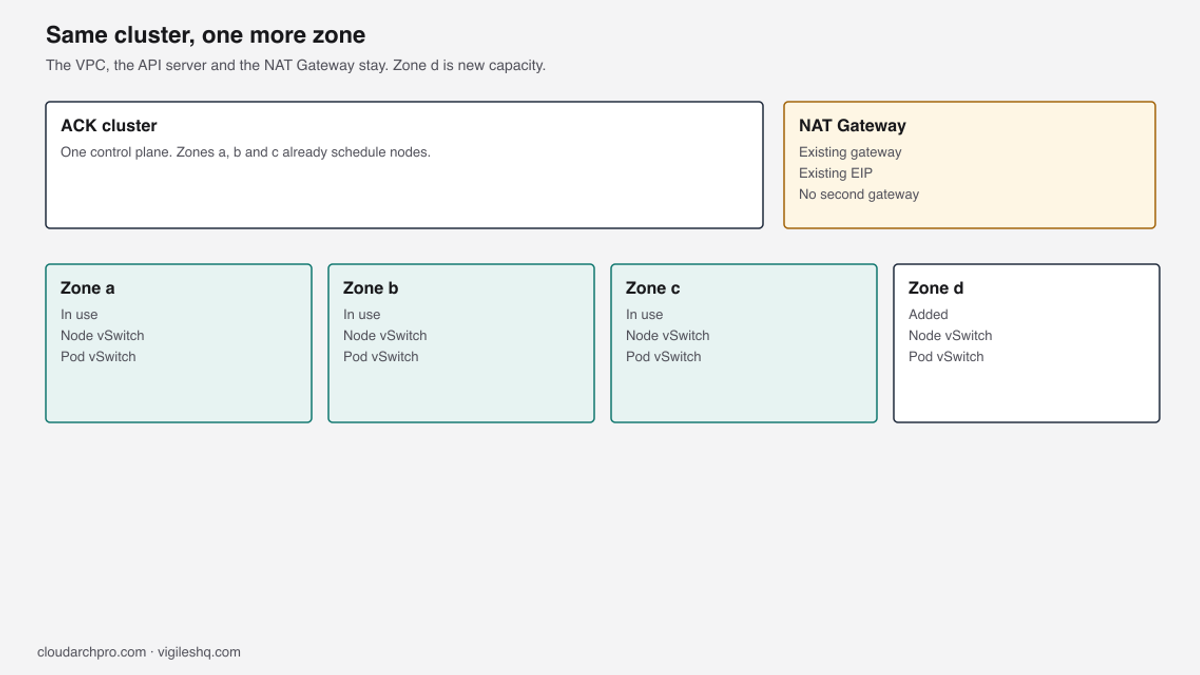
Add the zone inside the VPC you already have. Create a node vSwitch and a pod vSwitch, give both a route out through the NAT Gateway you already run, add the pod vSwitch to Terway, and include the node vSwitch on the PayAsYouGo pool. A scale-from-zero node can still launch in an older zone, so read its zone label before you treat the new zone as checked.
The cluster already ran in <region>a, <region>b and <region>c. Alibaba Cloud advised that <region>d had stronger compute availability, and recommended generation 9 instances for new capacity. A live stock check confirmed ecs.g9i.xlarge was available in <region>d, so the zone was added to improve PayAsYouGo scale-out capacity and reduce the risk of instance stock shortages.
The managed control plane, the VPC and the NAT Gateway were not rebuilt. A node vSwitch and a pod vSwitch were created in <region>d, both received SNAT through the existing NAT Gateway and EIP, Terway was extended with the <region>d pod vSwitch, and the PayAsYouGo node pool included the new node vSwitch. The scale-from-zero test succeeded after a conflicting upstream cluster-autoscaler was removed and ACK ack-goatscaler was restored, but the test node launched in <region>c, so worker placement in <region>d was not validated. The CIDRs later in this guide are examples.
| Step | Change |
|---|---|
| 1 | Confirm the zone has stock for every instance type the pools use |
| 2 | Choose two unused CIDRs inside the VPC |
| 3 | Create the node vSwitch |
| 4 | Create the pod vSwitch in the same zone |
| 5 | Give both vSwitches egress: route table and SNAT |
| 6 | Add the pod vSwitch to Terway |
| 7 | Test the zone with a temporary one-node PayAsYouGo pool |
| 8 | Bring the new objects under OpenTofu (import) |
| 9 | Add the node vSwitch to the PayAsYouGo pool, then, if wanted, the Subscription pool |
| 10 | Allow the new CIDRs in other services’ allowlists |
A zone that shows up in the region list can still have no stock for a type the pool uses, so finish step 1 before you reserve any addresses. The terms below are the ones the rest of the steps use.
| Term | Meaning on this cluster |
|---|---|
| vSwitch | A zonal subnet inside the VPC. ECS nodes take their primary addresses from the node vSwitch. |
| Pod vSwitch | The zonal subnet Terway uses for Pod addresses. It has to be in the same zone as the nodes it serves. |
| Terway | The ACK network plugin that assigns VPC addresses to Pods from pod vSwitches. |
| SNAT | The NAT entry that lets private addresses in one vSwitch reach the internet through an existing EIP. |
| PayAsYouGo pool | The pool that can grow and shrink. On this cluster its vSwitch list includes <region>d, and the scale-from-zero node still launched in <region>c. |
| Subscription pool | The fixed baseline. It places a node in the new zone only when you raise its desired size or replace a node. |

The private cluster build is in Secure Alibaba Cloud ACK with OpenTofu, and the series index is Building Secure Alibaba Cloud ACK Platforms. Capacity that stays on NoSpot is covered in ACK autoscaling without Spot.
What you add, and what you leave
You are adding a zone that can fail on its own, inside the cluster you already run, so a problem in <region>d doesn’t take the nodes in <region>a, <region>b and <region>c with it. Nodes in the new zone join the same API server, and Pods there use the same Services and the same CoreDNS. You create:
- One node vSwitch in
<new-zone-id> - One pod vSwitch in that same zone
- SNAT for those vSwitches, unless an entry already covers the VPC CIDR
- One new key in the Terway vSwitch map
- The
<region>dnode vSwitch on the PayAsYouGo pool. Placement is checked only when a node from that pool shows<new-zone-id>
The objects below stay as they are, because the new zone hangs off them rather than replacing them. Changing any of them is a different job from adding a worker zone.
- The VPC id and its CIDR
- The ACK cluster id
- The NAT Gateway and the EIP it already uses
- Existing vSwitches in
<region>a,<region>band<region>c - The Service CIDR
The cluster’s own vSwitch list doesn’t need the new zone. Node pool vSwitches decide where worker nodes are created, so leave the cluster list as it is.
Cloud disk PVs are zonal, so a Pod that already has a disk can’t run in the new zone, and new PVCs should use WaitForFirstConsumer so the disk is created in the Pod’s zone. RDS, Redis, OSS bucket policies, security groups and ACLs that allow the old node and pod CIDRs by range also need the new ranges, otherwise Pods in the new zone fail to reach those services.
This guide assumes Terway. ACK treats the CNI as fixed after the cluster is created, so a Flannel cluster, which takes Pod addresses from a virtual CIDR, doesn’t use the pod vSwitch steps here.
Prerequisites
- You can call VPC, NAT, ECS and ACK APIs in
<region>, and you can edit the cluster. - The cluster uses Terway. Open Add-ons, then terway-eniip, then Configuration, then PodVswitchId (or terway-eni, depending on the mode the cluster runs). Read the image with
kubectl -n kube-system get ds -l app=terway-eniip -o jsonpath='{.items[0].spec.template.spec.containers[0].image}{"\n"}'when you need the version. Editeni-configonly when that page isn’t available. - An Internet NAT Gateway already serves this VPC, and you know its id and the EIP it already uses.
- You have an OpenTofu state that already manages this network, or you are ready to import the objects you create by hand.
- The CIDRs in this guide are examples. Compare them with a full vSwitch inventory before you use them.
Confirm the zone has stock
A node pool has one instance type list for every vSwitch it uses, so every type in that list should have stock in <new-zone-id>, because a missing type means the pool places fewer nodes there than BALANCE implies. A region page can list a zone while ECS has no capacity there, and CreateVSwitch can return ResourceNotAvailable when the zone can’t hold a vSwitch.
Call DescribeAvailableResource once per type. The pools are NoSpot, so pass --SpotStrategy NoSpot, which that API documents, and repeat the call for every type in the production list.
aliyun ecs DescribeAvailableResource \
  --RegionId "$REGION_ID" \
  --ZoneId "$ZONE_ID" \
  --DestinationResource InstanceType \
  --InstanceChargeType PostPaid \
  --InstanceType ecs.g9i.xlarge \
  --NetworkCategory vpc \
  --SpotStrategy NoSpot |
jq '.AvailableZones.AvailableZone[].AvailableResources.AvailableResource[].SupportedResources.SupportedResource[] | {Value, Status, StatusCategory}'
Treat Status Available with StatusCategory WithStock or ClosedWithStock as usable. SoldOut, WithoutStock and ClosedWithoutStock are not, and an empty list means the zone can’t launch that type right now, so run the check again before a scale event you care about, because the result from the day you added the zone can be stale.
Alibaba Cloud recommended generation 9 for this new capacity, and the live stock check confirmed ecs.g9i.xlarge in <region>d, so that type is first in the example list. Put a generation 9 type first only where your own stock check returns it, because not every zone has one. Keep at least four compatible types, the same rule as ACK autoscaling without Spot, since ACK chooses among the listed types that have stock. Replace any type your stock check doesn’t return. If every type is absent, the pool stays empty in that zone and the failure looks like a network problem, which is why the stock check comes before the vSwitches.
instance_types = [
  "ecs.g9i.xlarge",
  "ecs.g8i.xlarge",
  "ecs.g7.xlarge",
  "ecs.g6.xlarge",
]
Pick two unused CIDRs
A vSwitch CIDR has to sit inside the VPC CIDR, and it can’t overlap another vSwitch in that VPC, because CreateVSwitch returns InvalidCidrBlock.Overlapped when the range is already taken. The node range and the pod range are two vSwitches, so they can’t overlap each other either. Terway uses a VPC address for each Pod, so the pod vSwitch is usually the larger of the two, because a rolling update needs spare addresses on top of the running Pods.
Alibaba Cloud’s Terway planning examples use /19 pod vSwitches. That’s an example, not a minimum. Size the range from the number of Pods you expect, how Terway allocates ENI addresses, the spare addresses a rolling update needs, and growth. A /20 (4,092 usable addresses) is fine when that’s enough.
Alibaba Cloud reserves the first address and the last three addresses of each vSwitch CIDR, so a /20 has 4,096 addresses and 4,092 usable, and a /19 has 8,192 addresses and 8,188 usable. Read AvailableIpAddressCount after creation so you see the usable count rather than the CIDR size.
Check both new ranges against the cluster’s Service CIDR. Take the value from the cluster resource in OpenTofu (service_cidr on alicloud_cs_managed_kubernetes; this repo doesn’t rename that argument) and confirm it on the cluster’s Basic Information page in the ACK console. kubectl can’t show it reliably, because ACK runs the control plane for you and its startup flags aren’t visible from inside the cluster.
These ranges are an example inside 10.20.0.0/16, so compare them with your inventory before you use them. They are not a range you can paste into a VPC that already uses part of that space.
| Zone | Role | Example CIDR | Notes |
|---|---|---|---|
<region>a | Nodes | 10.20.0.0/20 | Already present in this example |
<region>a | Pods | 10.20.96.0/20 | Already present in this example |
<region>b | Nodes | 10.20.16.0/20 | Already present in this example |
<region>b | Pods | 10.20.112.0/20 | Already present in this example |
<region>c | Nodes | 10.20.32.0/20 | Already present in this example |
<region>c | Pods | 10.20.128.0/20 | Already present in this example |
<region>d | Nodes | 10.20.48.0/20 | New. Next free node block |
<region>d | Pods | 10.20.144.0/20 | New. Next free pod block |
After those two blocks, 10.20.64.0/20, 10.20.80.0/20 and 10.20.160.0/19 onward stay free, and a VPC can take a secondary CIDR if this /16 fills up. The figure below is the same split, with node ranges and pod ranges in separate blocks.

Set the variables once, because later commands in this guide use the same shell, and a second block would drift out of date.
REGION_ID="<region>"
VPC_ID="<vpc-id>"
ZONE_ID="<new-zone-id>"
NODE_CIDR="10.20.48.0/20"
POD_CIDR="10.20.144.0/20"
NODE_VSWITCH_ID=""
POD_VSWITCH_ID=""
NAT_GATEWAY_ID="<nat-gateway-id>"
SNAT_TABLE_ID=""
NAT_EIP="<nat-eip>"
List every vSwitch before you pick a CIDR, because DescribeVSwitches rejects a PageSize above 50, so the loop reads TotalCount and fetches every page. Compare NODE_CIDR and POD_CIDR with every CidrBlock in that list, including vSwitches that belong to other clusters in the same VPC.
page=1
: > /tmp/vswitches.tsv
while :; do
  resp=$(aliyun vpc DescribeVSwitches \
    --RegionId "$REGION_ID" \
    --VpcId "$VPC_ID" \
    --PageNumber "$page" \
    --PageSize 50)
  printf '%s' "$resp" | jq -r '.VSwitches.VSwitch[]? | [.VSwitchId, .VSwitchName, .ZoneId, .CidrBlock, .ResourceGroupId, (.AvailableIpAddressCount|tostring)] | @tsv' >> /tmp/vswitches.tsv
  total=$(printf '%s' "$resp" | jq -r '.TotalCount')
  if [ $((page * 50)) -ge "$total" ]; then
    break
  fi
  page=$((page + 1))
done
cat /tmp/vswitches.tsv
Create the node and pod vSwitches
Create the node vSwitch first and wait until it is Available, then create the pod vSwitch, because CreateVSwitch refuses a second create in the same VPC while any vSwitch is still Creating. The error is IncorrectVSwitchStatus.
CreateVSwitch has no resource group argument, so the new vSwitch ends up in the resource group Alibaba Cloud assigns. Read ResourceGroupId from DescribeVSwitches and record it with the other vSwitch details, so your inventory matches what’s in the account.
Use the same tag keys as the existing cluster vSwitches. Tier is nodes or pods so an inventory can tell the subnets apart without parsing names, and ManagedBy=opentofu is accurate only after the import below.
NODE_VSWITCH_ID=$(aliyun vpc CreateVSwitch \
  --RegionId "$REGION_ID" \
  --VpcId "$VPC_ID" \
  --ZoneId "$ZONE_ID" \
  --CidrBlock "$NODE_CIDR" \
  --VSwitchName "nodes-${ZONE_ID}" \
  --Tag.1.Key Project --Tag.1.Value "<project>" \
  --Tag.2.Key Owner --Tag.2.Value "<owner>" \
  --Tag.3.Key ManagedBy --Tag.3.Value "opentofu" \
  --Tag.4.Key Repository --Tag.4.Value "<repository>" \
  --Tag.5.Key Environment --Tag.5.Value "<environment>" \
  --Tag.6.Key Workload --Tag.6.Value "<workload>" \
  --Tag.7.Key Purpose --Tag.7.Value "network" \
  --Tag.8.Key Tier --Tag.8.Value "nodes" |
  jq -r '.VSwitchId')

until [ "$(aliyun vpc DescribeVSwitchAttributes --RegionId "$REGION_ID" --VSwitchId "$NODE_VSWITCH_ID" | jq -r '.Status')" = "Available" ]; do
  sleep 5
done

POD_VSWITCH_ID=$(aliyun vpc CreateVSwitch \
  --RegionId "$REGION_ID" \
  --VpcId "$VPC_ID" \
  --ZoneId "$ZONE_ID" \
  --CidrBlock "$POD_CIDR" \
  --VSwitchName "pods-${ZONE_ID}" \
  --Tag.1.Key Project --Tag.1.Value "<project>" \
  --Tag.2.Key Owner --Tag.2.Value "<owner>" \
  --Tag.3.Key ManagedBy --Tag.3.Value "opentofu" \
  --Tag.4.Key Repository --Tag.4.Value "<repository>" \
  --Tag.5.Key Environment --Tag.5.Value "<environment>" \
  --Tag.6.Key Workload --Tag.6.Value "<workload>" \
  --Tag.7.Key Purpose --Tag.7.Value "network" \
  --Tag.8.Key Tier --Tag.8.Value "pods" |
  jq -r '.VSwitchId')

until [ "$(aliyun vpc DescribeVSwitchAttributes --RegionId "$REGION_ID" --VSwitchId "$POD_VSWITCH_ID" | jq -r '.Status')" = "Available" ]; do
  sleep 5
done
Both vSwitches should show Available, $ZONE_ID, and a non-zero AvailableIpAddressCount. If the count is zero, stop, because a vSwitch with no free addresses can’t take a node or a Pod.
Give both vSwitches a route out
Read the SNAT table and the DNAT table before you create anything, and save both listings so you can compare them at the end. You need the table id from the gateway before either create.
SNAT_TABLE_ID=$(aliyun vpc DescribeNatGateways \
  --RegionId "$REGION_ID" \
  --VpcId "$VPC_ID" \
  --NatGatewayId "$NAT_GATEWAY_ID" |
  jq -r '.NatGateways.NatGateway[0].SnatTableIds.SnatTableId[0]')

aliyun vpc DescribeSnatTableEntries \
  --RegionId "$REGION_ID" \
  --SnatTableId "$SNAT_TABLE_ID" \
  --PageSize 50 > /tmp/snat-before.json

aliyun vpc DescribeForwardTableEntries \
  --RegionId "$REGION_ID" \
  --ForwardTableId "$(aliyun vpc DescribeNatGateways --RegionId "$REGION_ID" --NatGatewayId "$NAT_GATEWAY_ID" | jq -r '.NatGateways.NatGateway[0].ForwardTableIds.ForwardTableId[0]')" \
  > /tmp/dnat-before.json
If one SNAT entry already covers the whole VPC CIDR, it covers the new vSwitches too, so skip this step. If egress is set per vSwitch, add one entry for each new vSwitch, node and pod. Keep to one style: Alibaba Cloud doesn’t document which entry wins when a VPC-wide entry and a vSwitch entry overlap, so mixing them makes egress hard to predict. Wait for the node entry to become Available before you create the pod entry.
NODE_SNAT_ID=$(aliyun vpc CreateSnatEntry \
  --RegionId "$REGION_ID" \
  --SnatTableId "$SNAT_TABLE_ID" \
  --SourceVSwitchId "$NODE_VSWITCH_ID" \
  --SnatIp "$NAT_EIP" \
  --SnatEntryName "nodes-${ZONE_ID}" |
  jq -r '.SnatEntryId')

until [ "$(aliyun vpc DescribeSnatTableEntries --RegionId "$REGION_ID" --SnatTableId "$SNAT_TABLE_ID" --SnatEntryId "$NODE_SNAT_ID" | jq -r '.SnatTableEntries.SnatTableEntry[0].Status')" = "Available" ]; do
  sleep 5
done

POD_SNAT_ID=$(aliyun vpc CreateSnatEntry \
  --RegionId "$REGION_ID" \
  --SnatTableId "$SNAT_TABLE_ID" \
  --SourceVSwitchId "$POD_VSWITCH_ID" \
  --SnatIp "$NAT_EIP" \
  --SnatEntryName "pods-${ZONE_ID}" |
  jq -r '.SnatEntryId')

until [ "$(aliyun vpc DescribeSnatTableEntries --RegionId "$REGION_ID" --SnatTableId "$SNAT_TABLE_ID" --SnatEntryId "$POD_SNAT_ID" | jq -r '.SnatTableEntries.SnatTableEntry[0].Status')" = "Available" ]; do
  sleep 5
done
After both entries exist, check four things. The forward table should still match the file you saved at the start of this section.
- Each new entry status is
Available. SourceVSwitchIdis$NODE_VSWITCH_IDon one entry and$POD_VSWITCH_IDon the other.SnatIpis$NAT_EIP.- The forward table matches
/tmp/dnat-before.json, so you didn’t add a DNAT entry.
A new vSwitch joins the VPC system route table unless you associate it with a custom one. If the existing cluster vSwitches use a custom table, associate both new vSwitches with that same table, because they won’t pick it up on their own.
# Read RouteTableId from an existing cluster vSwitch, then:
aliyun vpc AssociateRouteTable \
  --RegionId "$REGION_ID" \
  --RouteTableId "<cluster-route-table-id>" \
  --VSwitchId "$NODE_VSWITCH_ID"

aliyun vpc AssociateRouteTable \
  --RegionId "$REGION_ID" \
  --RouteTableId "<cluster-route-table-id>" \
  --VSwitchId "$POD_VSWITCH_ID"
Confirm that table has 0.0.0.0/0 with next hop $NAT_GATEWAY_ID. The NAT Gateway FAQ covers a custom table that has no such route, so add that route when it is missing and point it at the gateway you already run. The new zone still sends egress through the NAT Gateway in its original zone, which means you added compute redundancy, not egress redundancy. Use the Internet NAT Gateway and the EIP it already uses, because a second gateway adds a second egress IP and a second bill.

Add the pod vSwitch to Terway
Terway assigns Pod addresses from the pod vSwitch configured for the node’s zone, so open Add-ons → terway-eniip → Configuration → PodVswitchId (or terway-eni, depending on the mode the cluster runs) and select $POD_VSWITCH_ID. Editing eni-config directly works, but ACK and OpenTofu don’t know about the change, so a later Terway upgrade or reconfiguration may replace it. Use the add-on page where you can. If you edit the ConfigMap, run the check command again after every Terway change.
The new zone has no nodes yet, so the first Terway Pod on a node there reads the current config and this zone needs no Terway restart. Restart Terway only when you add a pod vSwitch to a zone that already has nodes. The ConfigMap procedure in the add-on document deletes the Terway Pods so they reload eni-config, and the label is app=terway-eniip or app=terway-eni, matching the mode you installed. Leave the Terway Pods alone when you used the add-on page, because it rolls them itself.
When you have to edit eni-config, run this in bash. set -euo pipefail stops the script if the zone key is already present, and kubectl replace fails if resourceVersion changed, so a concurrent edit fails the replace instead of being overwritten. kubectl apply would also warn that the ConfigMap has no last-applied annotation.
set -euo pipefail
cfg=$(kubectl get configmap eni-config --namespace kube-system -o json)
current=$(printf '%s' "$cfg" | jq -r '.data.eni_conf | fromjson')
printf '%s' "$current" | jq -e --arg zone "$ZONE_ID" 'has("vswitches") and (.vswitches[$zone] | not)' >/dev/null
updated=$(printf '%s' "$current" | jq --arg zone "$ZONE_ID" --arg vsw "$POD_VSWITCH_ID" '.vswitches[$zone] = [$vsw]')
printf '%s' "$updated" | jq -e --arg zone "$ZONE_ID" --arg vsw "$POD_VSWITCH_ID" '.vswitches[$zone] == [$vsw]' >/dev/null
next=$(printf '%s' "$cfg" | jq --arg conf "$updated" '.data.eni_conf = $conf')
printf '%s' "$next" | kubectl replace -f -
The first jq -e checks that vswitches exists and that $ZONE_ID is new, and the second checks that the new key is exactly one id. Confirm the live object with the command below, and you should see the previous zones plus <new-zone-id> pointing at $POD_VSWITCH_ID.
kubectl get configmap eni-config \
  --namespace kube-system \
  -o json |
jq -r '.data.eni_conf | fromjson | .vswitches'
If the zone key is missing, Pod ENI allocation can fail and the Pod can stay in ContainerCreating. Add the zone key, then recreate the Pod, because an ENI that never arrived does not repair itself.
Test with one PayAsYouGo node
Use a temporary PayAsYouGo pool before you change a production pool, so a failed zone costs one hourly node instead of a Subscription purchase. Use the first type in your production instance type list that passes the stock check, because the order of that list is the preference, not the order of the API response. On this cluster the PayAsYouGo pool already included the new vSwitch, and the scale-from-zero test stayed pending until the upstream cluster-autoscaler was removed and ACK ack-goatscaler was restored, as in ACK autoscaling without Spot. That node launched in <region>c, so a Ready node is not a zone d result until its zone label is <new-zone-id>.
- Desired size 1, or a minimum and maximum of 1 if the pool is autoscaled
vswitch_idscontains only$NODE_VSWITCH_ID- Public bandwidth 0
- The same image, security group, RAM role and disk encryption as the pools you trust
NoSpot
Wait until the node is Ready, then check the node itself. ready should be True, zone should equal <new-zone-id>, and the internal address should fall inside 10.20.48.0/20.
kubectl get node <node-name> -o json |
jq '{
  ready: ([.status.conditions[] | select(.type=="Ready") | .status][0]),
  zone: .metadata.labels["topology.kubernetes.io/zone"],
  internal: [.status.addresses[] | select(.type=="InternalIP") | .address],
  external: [.status.addresses[] | select(.type=="ExternalIP") | .address]
}'
external is empty because public bandwidth is 0. Confirm the system disk is encrypted with your key, <kms-key-id>, using the disk call below.
aliyun ecs DescribeDisks \
  --RegionId "$REGION_ID" \
  --InstanceId "<instance-id>" \
  --DiskType system |
jq '.Disks.Disk[] | {Encrypted, KMSKeyId}'
Confirm Terway and the other required DaemonSets are Ready on that node, because a node that is Ready with a broken CNI still fails the Pod test. Schedule a throwaway Pod into the zone, using an image the cluster is already allowed to pull, and that image has to contain nslookup and curl.
kubectl create namespace zone-test
kubectl -n zone-test run zone-probe \
  --image="<diagnostic-image>" \
  --restart=Never \
  --overrides="{\"spec\":{\"nodeSelector\":{\"topology.kubernetes.io/zone\":\"${ZONE_ID}\"}}}"
kubectl -n zone-test wait --for=condition=Ready pod/zone-probe --timeout=180s
kubectl -n zone-test get pod zone-probe -o jsonpath='{.status.podIP}{"\n"}'
The Pod IP has to fall in 10.20.144.0/20. If the Pod stays in ContainerCreating, Pod ENI allocation failed, often because the zone key is missing or the pod vSwitch has no free address.
From the Pod, resolve cluster DNS, reach a Service whose Pods run in <region>a to <region>c, and compare the egress source with $NAT_EIP. Use an IP-echo endpoint your egress policy allows.
kubectl -n zone-test exec zone-probe -- nslookup kubernetes.default
kubectl -n zone-test exec zone-probe -- curl -sk --max-time 10 https://kubernetes.default
kubectl -n zone-test exec zone-probe -- curl -s https://<ip-echo-endpoint>
A source address other than $NAT_EIP means the SNAT entry or the route table is wrong. Delete the probe and the namespace when the checks pass, then delete the temporary pool so the PayAsYouGo node is released, and confirm the instance is gone.
aliyun ecs DescribeInstances \
  --RegionId "$REGION_ID" \
  --VpcId "$VPC_ID" \
  --ZoneId "$ZONE_ID" \
  --InstanceName "<test-node-name>" |
jq '.TotalCount'
TotalCount should be 0. Leave the vSwitches, the SNAT entries and the Terway key in place.
Import the new objects
If the network and egress modules already use node_cidrs and pod_cidrs maps, add <new-zone-id> there and apply instead of the CLI creates in steps 3 to 5. Use the CLI path when those maps aren’t in the module yet, or when you need the vSwitches before the next planned apply, and import either way before a later apply can try to create a second copy.
Show the full map, because a snippet with only <region>d reads as if it replaces zones a, b and c. The new lines are the only change.
node_cidrs = {
  "<region>a" = "10.20.0.0/20"
  "<region>b" = "10.20.16.0/20"
  "<region>c" = "10.20.32.0/20"
  "<region>d" = "10.20.48.0/20" # new zone
}
pod_cidrs = {
  "<region>a" = "10.20.96.0/20"
  "<region>b" = "10.20.112.0/20"
  "<region>c" = "10.20.128.0/20"
  "<region>d" = "10.20.144.0/20" # new zone
}
The egress module should grow one SNAT entry per vSwitch, with snat_ip set to $NAT_EIP and the source set to the vSwitch id. Leave the node-pool vswitch_ids for the next section, so this plan only imports the vSwitches and the SNAT entries.
Suggested addresses:
module.network.alicloud_vswitch.nodes["<new-zone-id>"]
module.network.alicloud_vswitch.pods["<new-zone-id>"]
module.egress.alicloud_snat_entry.this["nodes-<new-zone-id>"]
module.egress.alicloud_snat_entry.this["pods-<new-zone-id>"]
OpenTofu 1.5 and later, including the 1.12 pin in the details box, can import in the configuration, and the plan shows the import before you apply. The provider import id for alicloud_snat_entry is <snat-table-id>:<snat-entry-id>.
import {
  to = module.network.alicloud_vswitch.nodes["<new-zone-id>"]
  id = "<node-vswitch-id>"
}

import {
  to = module.network.alicloud_vswitch.pods["<new-zone-id>"]
  id = "<pod-vswitch-id>"
}

import {
  to = module.egress.alicloud_snat_entry.this["nodes-<new-zone-id>"]
  id = "<snat-table-id>:<node-snat-entry-id>"
}

import {
  to = module.egress.alicloud_snat_entry.this["pods-<new-zone-id>"]
  id = "<snat-table-id>:<pod-snat-entry-id>"
}
Leave the cluster’s vswitch_ids and pod_vswitch_ids as they are; this change doesn’t need them. Terway stays in the add-on page, in eni-config, or in alicloud_cs_kubernetes_addon.
If you manage Terway with alicloud_cs_kubernetes_addon, put the new pod vSwitch in its config JSON in this same change. An apply that sends an older config without the new zone replaces the live PodVswitchId map and drops the zone key, so include every existing zone plus <new-zone-id>. Outputs should publish the new vSwitch ids so the node-pool module can read them.
With the import blocks in place, tofu plan should end with the line below. Anything else means stop and read the sentence under the second plan.
Plan: 4 to import, 0 to add, 0 to change, 0 to destroy.After tofu apply, a second tofu plan should say the infrastructure matches. That is the quiet plan you want before you touch the pools.
No changes. Your infrastructure matches the configuration.An add means an import didn’t bind, a change means the code differs from the live object, and a destroy means stop. Fix the code or the import, and apply a plan that imports or changes only what you expect. State and remote locking for this repository are covered in OpenTofu remote state and private GitOps. The modules live in the VigilesHQ Alibaba Cloud ACK repository. The node-pool change in the next section is a separate plan, and it should change the node pools and nothing else.
Add the node vSwitch to the pools
Change vswitch_ids in OpenTofu, because editing the pool in the console can reset fields that OpenTofu sets. Add $NODE_VSWITCH_ID to the list rather than replacing it, otherwise you drop <region>a, <region>b and <region>c. vswitch_ids on alicloud_cs_kubernetes_node_pool is not ForceNew, and the provider documents it as a list you can change after create, so the plan should be an in-place change.
vswitch_ids = [
  "<node-vswitch-a>",
  "<node-vswitch-b>",
  "<node-vswitch-c>",
  "<node-vswitch-id>", # <new-zone-id>
]
Add the zone to the PayAsYouGo pool first. Production Pods can then run in the new zone only when that pool scales out, and you can take the zone out again without paying for a Subscription node. Update the Subscription pool only when the fixed baseline should include the new zone.
Adding a vSwitch doesn’t move existing nodes. BALANCE only affects where new nodes go; rebalancing existing ones is a separate operation. A fixed Subscription pool puts nothing in the new zone until its desired size goes up or a node is replaced.
Keep BALANCE on a pool that already spans zones. The high-availability guidance describes distribution balancing as the way a multi-zone pool spreads new instances. Adding a fourth zone doesn’t mean the Subscription pool needs a fourth node, so two or three fixed nodes can remain the baseline.
Keep NoSpot, public bandwidth 0, and an encrypted ESSD system disk on the PayAsYouGo pool, as in ACK autoscaling without Spot. The Spot pool design, if you still run one, is in Alibaba Cloud ACK node pools: subscription, Spot and autoscaling, and you append the vSwitch there only when that pool is allowed to use the new zone.
For each pool you change, the plan should look like this when you edit one pool, or show one extra change per extra pool. A destroy in that plan means the list replace dropped a zone you still need.
Plan: 0 to add, 1 to change, 0 to destroy.
Release checklist
- Stock was confirmed for every instance type the production pools will try.
- Both vSwitches are
Availableand tagged, and you recorded theResourceGroupIdAlibaba Cloud assigned. - SNAT is
Availablefor both vSwitches, or an existing VPC-CIDR entry already covers them, and it uses$NAT_EIP. - The forward table matches the listing you saved.
- Both new vSwitches use the same route table as the existing cluster vSwitches, and that table sends
0.0.0.0/0to$NAT_GATEWAY_ID. - Terway shows
<new-zone-id>mapped to$POD_VSWITCH_ID. - Any test node you keep has zone
<new-zone-id>. The scale-from-zero node on this cluster launched in<region>c, so zone d placement is still unchecked. - A Pod on a node in
<new-zone-id>has a pod-CIDR address, DNS works, a Service in another zone answers, and egress uses$NAT_EIP. This cluster does not have that Pod yet, because the scale-from-zero node launched in<region>c. - The test pool is gone and
DescribeInstancesreturnsTotalCount0. tofu planended withPlan: 4 to import, 0 to add, 0 to change, 0 to destroy.and the plan after apply saidNo changes. Your infrastructure matches the configuration.- The PayAsYouGo pool lists the new node vSwitch without dropping the old ones.
- Allowlists outside the cluster include the new node and pod CIDRs.
Remove the zone
Remove the zone in OpenTofu, and leave the VPC, the cluster and the NAT Gateway in place. The nodes already in the zone stay until you drain and remove them, because taking the vSwitch off the pool only stops new ones.
- Remove
<node-vswitch-id>from every production pool in code, and leave the other vSwitch ids. The plan should change only those pools. - Taking the vSwitch out of the pool stops new nodes from being created there. This doesn’t delete nodes already in that zone. Drain and remove them yourself.
kubectl get nodes -l topology.kubernetes.io/zone=<new-zone-id>Cordon and drain every node that command lists, then remove it from the pool. A Subscription node in the zone keeps billing until you remove it as described in ACK autoscaling without Spot.
- Remove the Terway zone key only after no Pod in that zone still holds an address from the pod vSwitch. New ENIs stop using it after Terway reloads the config.
- Remove the zone from
node_cidrs,pod_cidrsand the SNAT map. The plan should destroy only those vSwitches and SNAT entries, so apply that plan rather than deleting the vSwitches in the console first. - Run the plan again. It should say
No changes. Your infrastructure matches the configuration.
Leave a vSwitch that still has an ENI attached until that list is empty, because VPC refuses the delete. Drain first, confirm the ENI list is empty, then let OpenTofu delete the subnet.
When a step fails
| Error or symptom | Cause | Correction |
|---|---|---|
InvalidCidrBlock.Overlapped | CIDR is already used | Inventory every vSwitch and choose another range |
| Page size rejected | PageSize exceeds 50 | Use 50 and paginate with TotalCount |
ResourceGroupId rejected on create | CreateVSwitch has no resource group argument | Create without it |
| Node can’t join | Missing SNAT, route, role, image or security group | Read the failed task in the node pool scaling activity |
Pod stays in ContainerCreating | Terway has no pod vSwitch for the zone, so ENI allocation fails | Add the zone key and recreate the Pod |
InvalidVSwitchId.IpNotEnough | Pod vSwitch has no free address | Enlarge the pod range or free addresses, then recreate the Pod |
| Node has no egress | Node vSwitch lacks SNAT and no VPC-CIDR entry exists | Create node SNAT |
| Pod has no egress | Pod vSwitch lacks SNAT and no VPC-CIDR entry exists | Create pod SNAT |
| New zone gets no nodes | No stock for every type in the pool list | Recheck live inventory |
| Workload Pods stuck Pending with a volume node-affinity error | Cloud disk PVs are zonal | Keep StatefulSets with disks out of the new zone, or migrate their data |
| OpenTofu plans a second vSwitch | The live vSwitch isn’t in state | Import the existing id |
When a node never becomes Ready, read the failed task in the node pool’s scaling activity before you change the vSwitch, because the zone and CIDR are usually fine. Applying a plan that creates alicloud_vswitch while the console already shows the subnet fails with InvalidCidrBlock.Overlapped, and an SNAT create against an existing entry fails with a duplicate-entry error, so import the existing id.
FAQ
Can another cluster in this VPC use the new vSwitches?
Give the other cluster its own ranges. A vSwitch can appear in only one SNAT entry, and the Terway map belongs to one cluster.
What if only some instance types have stock?
You can still add the zone, and the pool will place fewer nodes there than BALANCE suggests, because every zone shares one type list. Drop the types that failed the stock check if you want even placement, and keep at least four that pass.
Does WaitForFirstConsumer move an existing cloud disk?
No. It only delays a new PVC until the Pod is scheduled, so the new disk is created in that Pod’s zone. A disk that already exists stays in its original zone.
How do I tell terway-eniip from terway-eni?
Look at the DaemonSet label in kube-system. Use app=terway-eniip or app=terway-eni, whichever exists, when you reload Terway in a zone that already has nodes.
Why keep the test pool if the stock check already passed?
Stock only means ECS can launch the type. A scale-from-zero node still has to show <new-zone-id> on topology.kubernetes.io/zone. On this cluster that node launched in <region>c, so worker placement in the new zone was not checked.
The Alibaba Cloud guide index lists the rest of this cluster series, including the private build and the node pool articles linked above.