Alibaba Cloud ACK Autoscaling Without Spot: Subscription and PayAsYouGo Node Pools
Build an Alibaba Cloud ACK capacity model with fixed Subscription nodes and PayAsYouGo nodes that scale from zero through ACK GOATScaler, without Spot interruption risk.
Guide details
- Platform
- Alibaba Cloud Container Service for Kubernetes
- Infrastructure as code
- OpenTofu 1.12
- Provider
- aliyun/alicloud 1.241 or later
- Node scaler
- ACK GOATScaler (node instant scaling), Kubernetes 1.24 or later
- Kubernetes version tested
- MutatingAdmissionPolicy v1 is Kubernetes 1.32 or later; confirm the served version on the cluster
- Example region
- Any ACK region. Resource ids in the examples are placeholders.
- Documentation checked
- October 17, 2026
- Last technically verified
- October 17, 2026
- Evidence basis
- Production work and documentation
What you will learn
- Why Subscription capacity should remain fixed
- How a zero-node PayAsYouGo pool works
- How GOATScaler reacts to Pending Pods
- Why Pod resource requests matter
- How to validate scale-out and scale-in
- How to keep selected namespaces on stable capacity
- How to represent both pools in OpenTofu
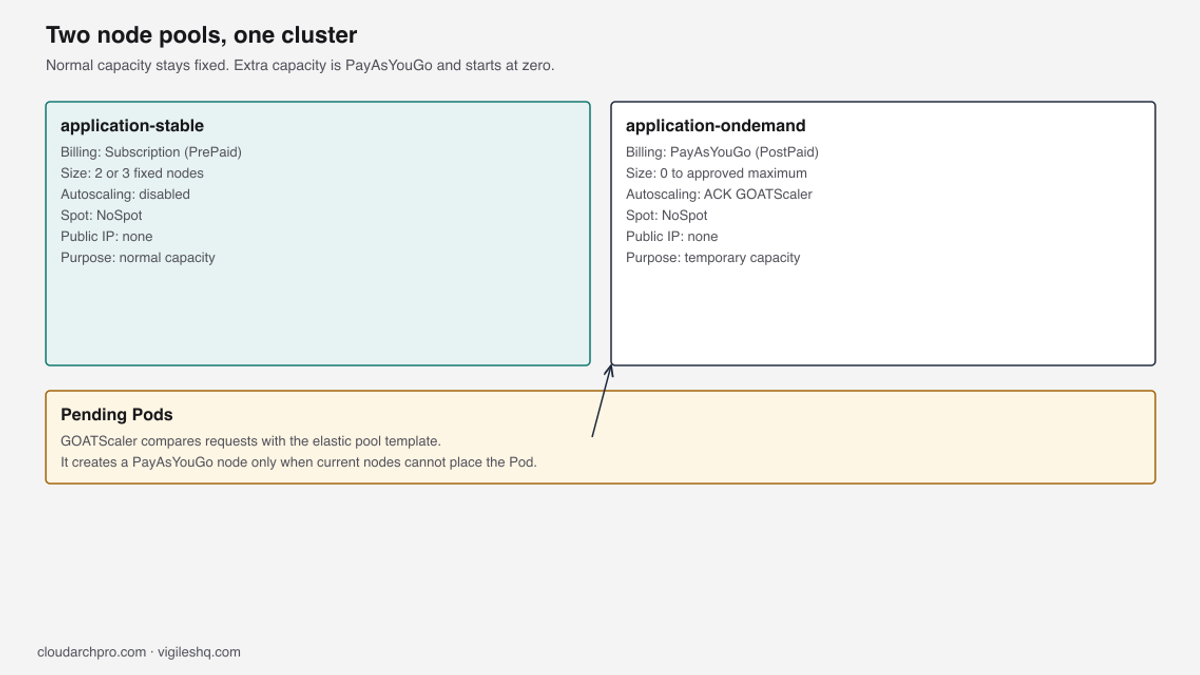
Run ACK with a Subscription pool of two or three nodes and a PayAsYouGo pool that starts at zero. ACK GOATScaler, the node instant scaling component, adds a PayAsYouGo node when a Pod is Pending, and releases it after the node stays under the scale-in threshold for the configured timers. Neither pool uses Spot instances.
Run ACK with two node pools. application-stable is a Subscription pool of two or three nodes with autoscaling off, and application-ondemand is a PayAsYouGo pool that starts at zero. When a Pod cannot be scheduled, ACK GOATScaler, the node instant scaling component, adds a PayAsYouGo node, then drains and releases it after the node stays under the scale-in threshold; neither pool uses Spot instances.
This shape fits any ACK cluster that can run node instant scaling. It does not depend on a region or a single instance family. The private cluster build is in Secure Alibaba Cloud ACK with OpenTofu.
The series index is Building Secure Alibaba Cloud ACK Platforms. The Spot design is a different choice, documented in Alibaba Cloud ACK node pools: subscription, Spot and autoscaling.
The two-pool model
| Term | Meaning in this design | API value |
|---|---|---|
| Subscription | You pay for the period you selected, such as one month, whether the node is busy or idle. In the API this billing type is PrePaid. | PrePaid |
| PayAsYouGo | Billed for the time the instance exists; releasing it stops the compute charge. In the API this billing type is PostPaid. | PostPaid |
| GOATScaler | ACK GOATScaler, the node instant scaling component. It watches Pods that stay Pending and changes the size of the PayAsYouGo pool. | goatscaler |
| Pool | Billing | Size | Autoscaling | Purpose |
|---|---|---|---|---|
application-stable | Subscription | 2 or 3 fixed nodes | Disabled | Steady load |
application-ondemand | PayAsYouGo | 0 to the pool maximum | Enabled | Extra capacity |
Removing a Subscription node from Kubernetes leaves the Subscription ECS instance and its billing period in place. A PayAsYouGo ECS instance is billed for the time it exists, and releasing it stops the compute charge. The hourly price in the cost section is billed per second and settled hourly.
The Subscription pool is sized for your steady load. GOATScaler only changes the size of the PayAsYouGo pool, and only when a Pod is Pending. Normal Pods can still run on a PayAsYouGo node once it exists (see Place normal and protected workloads).

Two nodes in two zones means a zone outage removes half of the Subscription capacity, and three nodes in three zones means a zone outage removes a third. Choose three when the remaining capacity after one zone outage must still carry the steady load, and the region has a third zone your network plan covers. ACK does not require three.
With two vSwitches in different zones and the BALANCE policy, ACK aims to place one node in each zone. The labels on the nodes record the pool for later selectors. Replace workload.vigileshq.com with a label prefix your organisation owns.
workload.vigileshq.com/capacity=stable
workload.vigileshq.com/billing=subscription
The PayAsYouGo pool uses capacity=ondemand and billing=payasyougo. The scheduler reads those labels only when a Pod or a policy asks for them.
Why Subscription nodes stay fixed
CreateClusterNodePool treats a pool with autoscaling disabled as a desired-size pool, so ACK keeps the Subscription pool at the count you set. If autoscaling were enabled on the Subscription pool, each scale-out would create another Subscription ECS instance, billed for the full period you selected.
Deleting the Node object, draining it, or removing it from the ACK console does not end that period. To remove a Subscription instance before its period ends, unsubscribe it in the ECS console under Alibaba Cloud’s refund rules; otherwise turn off auto-renew and let the period expire. kubectl delete node does not do either of those.
Turn off auto-renew when you have decided to shrink the Subscription pool, and do that before the renewal date. This design never lets the cluster reach zero nodes: the PayAsYouGo pool may be empty, the Subscription pool never is. CoreDNS, the metrics and monitoring add-ons, and any in-cluster controllers need nodes, and the cluster must keep serving while a PayAsYouGo node is being created, which takes minutes.
Terway and the node problem detector are DaemonSets, so they run on every node whose taints they tolerate, and this guide does not force every Deployment-type add-on onto the Subscription pool. A kube-system Pod that is not a DaemonSet, and that has no PodDisruptionBudget, keeps its node from scaling in (see Failures and checks). Prefer the soft affinity in Place normal and protected workloads on CoreDNS so it lands on capacity=stable when a Subscription node has room.
How scale from zero works
- The scheduler fails to place the Pod on the nodes that already exist.
- The Pod stays Pending, and its events include
FailedScheduling. - GOATScaler simulates that Pod against each node pool template that has autoscaling enabled.
- ACK creates a PayAsYouGo ECS instance from the PayAsYouGo pool template.
- The node joins the cluster, and the scheduler binds the Pod.
Scale-in uses the timers in Enable ACK GOATScaler: the post-scale-out window, then the cool-down after the node is under the utilization threshold, then the drain. GOATScaler does not react to high CPU, only to Pending Pods.

GOATScaler and the scheduler both size Pods by their resource requests, and both also apply affinity, topology spread, taints and whether the pool can provide a Pod IP. If a container sets neither requests nor limits, it counts as zero and a node looks emptier than it is; if it sets only limits, Kubernetes copies the limits into the requests. Set requests to what the process needs at steady load.
These four components are easy to confuse:
| Controller | What it changes | What it watches |
|---|---|---|
| Horizontal Pod Autoscaler | Replica count of a workload | Metrics, such as CPU, against the Pod requests |
| Kubernetes scheduler | Which node runs a Pod | Requests, affinity, taints, selectors and current allocatable capacity |
| ACK GOATScaler | Node count of autoscaling pools | Pending Pods that fit a pool template |
| ECS scaling group under the node pool | ECS instances | The desired change ACK already decided |
The Horizontal Pod Autoscaler can create the Pending Pods that GOATScaler then sees, and the scheduler is the component that fails the placement. GOATScaler does not bind Pods. A Pod can also stay Pending because it cannot get an IP address.
If the node has used all its ENI IPs, a new node fixes it and GOATScaler accounts for that. If the Terway pod vSwitch has no free addresses, a new node does not help and raising the pool maximum will not fix it; add a pod vSwitch or a larger CIDR. Read the Pod events to see which case you have.
Configure the stable pool
Use this baseline unless a reviewed change says otherwise:
Name: application-stable
Billing: PrePaid
Instance types: at least one type with stock in each zone you use
Period: 1 month
Auto-renew: on
Image type: AliyunLinux3
Autoscaling: disabled
Desired nodes: 2 or 3
Spot strategy: NoSpot
Public bandwidth: 0
System disk: encrypted ESSD
Scaling policy: BALANCE
Taints: none
BALANCE is the multi-zone policy on the scaling group: with a desired size of 2 and two vSwitches in different zones, plan on one node in each of those zones, and with a desired size of 3 and three vSwitches in different zones, plan on one node in each zone. If you pass three vSwitches and a desired size of 2, one zone will have no Subscription node. ACK does not promise an equal count after a stock miss in one zone.
PrePaid requires a period, and one month is the baseline used here, with auto-renew on so the pool stays in place when the period ends. Turn off auto-renew only when you intend to shrink the Subscription pool, and do that before the renewal date. The system disk is an encrypted ESSD; pass a user-created KMS key id, shown in the OpenTofu section as <kms-key-id>.
This guide assumes no separate system pool; if you run one as described in Alibaba Cloud ACK node pools: subscription, Spot and autoscaling, add-ons run there and the Subscription pool here carries only applications. Leave taints empty on application-stable when it is application capacity. If you add a NoSchedule taint here, normal Pods schedule on the PayAsYouGo pool, which raises cost, and Pods that require capacity=stable stay Pending.
Labels:
workload.vigileshq.com/capacity=stable
workload.vigileshq.com/billing=subscription
Public bandwidth stays 0, so ECS assigns no public IP. Egress goes through the cluster’s NAT gateway.
Use an image type ACK supports for your Kubernetes version, such as Alibaba Cloud Linux 3 (AliyunLinux3) or ContainerOS. If you use a custom image, it must run cgroup v2; an image configured for cgroup v1 fails to join. Read the image types for your version from DescribeKubernetesVersionMetadata, and pin the same image_type on both pools in the OpenTofu section.
Configure the PayAsYouGo pool
Name: application-ondemand
Billing: PostPaid
Autoscaling: enabled
Minimum: 0
Maximum: <approved-maximum>
Desired size: not sent (see below)
Spot strategy: NoSpot
Public bandwidth: 0
System disk: encrypted ESSD
Scaling policy: BALANCE
Scaling mode: standard (release)
Taints: none
Labels:
workload.vigileshq.com/capacity=ondemand
workload.vigileshq.com/billing=payasyougo
The pool maximum, written here as <approved-maximum>, is the largest number of PayAsYouGo nodes this pool may reach. Set it from three limits: the worst-case hourly spend you accept (maximum × PayAsYouGo hourly price), the free addresses in the node and pod vSwitches, and your ECS quota for these instance types. ACK creates an instance only when a Pod is waiting and the pool is under that maximum.
Instance types are the set ACK may launch. This list is an example, so confirm current stock in your region and in each zone before you apply. Use at least four types: more types means a scale-out is less likely to fail when one type is sold out in a zone.
ACK chooses among the listed types that have stock, and a generation 9 type is preferable where DescribeAvailableResource lists it for PostPaid. Generation 9 is not present in every region or every zone. The instance type list applies to every vSwitch: if a type shows no stock in a zone, keep it only if other zones have it, and if no zone has it, remove it.
instance_types = [
  "ecs.g9i.xlarge",
  "ecs.g8i.xlarge",
  "ecs.g7.xlarge",
  "ecs.g6.xlarge",
  "ecs.u1-c1m4.xlarge",
]
Query stock for the billing method you will actually use. A type available as PrePaid can be sold out as PostPaid on the same day.
aliyun ecs DescribeAvailableResource \
  --RegionId <region-id> \
  --DestinationResource InstanceType \
  --InstanceChargeType PostPaid \
  --SpotStrategy NoSpot \
  --ZoneId <zone-id> \
  --InstanceType ecs.g9i.xlarge
Replace <region-id>, <zone-id> and the instance type. A type available as PrePaid can be sold out as PostPaid on the same day. The pool can still launch if another type in the list has stock in one of the vSwitches.
If you enable autoscaling and also send desired_size or the deprecated count, ACK returns InvalidDesiredSizeOrCount.NotNull. Setting either field to 0 still sends a value, so omit both and put minimum 0 in the scaling configuration next to <approved-maximum>. Use auto mode only on the PayAsYouGo pool; the node pool management guide describes manual mode as a desired count and auto mode as a minimum and maximum.
Use at least two node vSwitches in different zones so BALANCE has two zones to spread across, and add a third when the region has a third zone your network plan covers. Both pools in the OpenTofu section take var.node_vswitch_ids, the same node vSwitches. Pod addresses, when you use Terway, come from the pod vSwitches, shown as <pod-vswitch-id>, and a scale-out that fills a pod vSwitch fails even when ECS still has instance stock.
Standard mode (scaling_policy = "release") creates and releases instances, which stops the PayAsYouGo compute charge on scale-in. Swift mode stops instances and keeps the disk, so the disk can still cost money after the compute charge stops. This design uses release, with spot_strategy set to NoSpot rather than the provider default; SpotAsPriceGo and SpotWithPriceLimit do not belong on this pool, and Spot compensation settings do not apply to it.
Enable ACK GOATScaler
ACK supports one node-scaling component per cluster. On Kubernetes 1.24 and later, CreateAutoscalingConfig defaults scaler_type to goatscaler; earlier clusters default to cluster-autoscaler. Do not install an unmanaged upstream cluster-autoscaler Deployment beside the add-on.
Check scaler_type first, and if it is cluster-autoscaler, uninstall that add-on before you enable node instant scaling. Installing both returns AddonConflicting. After the change, read the ConfigMap again and confirm scaler_type is goatscaler.
The block below is the CreateAutoscalingConfig request body. The OpenTofu section applies the same settings with alicloud_cs_autoscaling_config. The API examples use a number of minutes or seconds, without a unit suffix.
{
  "scaler_type": "goatscaler",
  "scale_up_from_zero": true,
  "scale_down_enabled": true,
  "scan_interval": "30",
  "expander": "least-waste",
  "unneeded_duration": "10",
  "cool_down_duration": "10",
  "utilization_threshold": "0.5"
}| Field | Value in the API body | Value in the provider argument |
|---|---|---|
scan_interval | "30" (seconds) | "30s" |
unneeded_duration | "10" (minutes) | "10m" |
cool_down_duration | "10" (minutes) | "10m" |
scale_up_from_zero lets the PayAsYouGo pool grow from zero nodes, and scale_down_enabled allows the release path. least-waste is the expander this design uses; the provider documents it as the expander GOATScaler supports. The threshold 0.5 means a node is eligible for scale-in when requested CPU and requested memory are both under half of allocatable capacity.
unneeded_duration is the window after a scale-out during which GOATScaler does not scale in, and cool_down_duration is the wait after a node is eligible before the scale-in runs. If you delete the test Pod more than 10 minutes after the node joined, expect the node to leave within about 15 minutes (the 10 minute cool-down plus the drain). If you delete it sooner, add whatever remains of the 10 minute post-scale-out window.
Node instant scaling in this design is used with standard release mode on the PayAsYouGo pool: enable the autoscaling config first, then set that pool to auto. A pool left on manual mode keeps its desired size and ignores Pending Pods. Read the live values before you assume the API saved what you sent.
kubectl get configmap autoscaler-meta \
  --namespace kube-system \
  -o jsonpath='{.data.autoscaler-meta}' |
jq .
Compare scaler_type, scale_up_from_zero and scale_down_enabled with the API body. If the add-on shows Installed and the ConfigMap shows goatscaler, no restart is needed. If you changed the worker RAM role and need the new permission now, finish any open RAM authorization prompt, then restart the Deployment:
kubectl rollout restart deployment/ack-goatscaler --namespace kube-systemskip_nodes_with_system_pods defaults to true, so a kube-system Pod that is not a DaemonSet and has no PodDisruptionBudget keeps its node. Set goatscaler.io/safe-to-evict: "false" on a Pod to stop GOATScaler from evicting it, which blocks scale-in of that node, or "true" when you accept eviction, including for local storage. DaemonSet Pods do not block scale-in under that system-Pod check.
Place normal and protected workloads
The Subscription pool and the PayAsYouGo pool have no taints. Normal Pods have no node selector and no node affinity, so the scheduler places them on any Ready node that satisfies requests, affinity and taints. The scheduler has no billing field, and a PayAsYouGo node that is already Ready is a normal place for a normal Pod.
Default scheduler scoring tends to favour the least-allocated node. After a scale-out, new Pods often go to the nearly empty PayAsYouGo node and keep it from scaling in, even when a Subscription node later has unrequested CPU and memory. A preferred affinity for capacity=stable asks for a Subscription node without making the Pod unschedulable when that pool is full:
affinity:
  nodeAffinity:
    preferredDuringSchedulingIgnoredDuringExecution:
      - weight: 100
        preference:
          matchExpressions:
            - key: workload.vigileshq.com/capacity
              operator: In
              values: ["stable"]
DaemonSet Pods run on every node whose taints they tolerate. With no taints, they run on PayAsYouGo nodes too, which is what you want for Terway and the node problem detector.
Stable-only namespaces
Some namespaces should stay on the Subscription pool even when PayAsYouGo nodes are Ready. Label the namespace, and a MutatingAdmissionPolicy adds a node selector to every new Pod in that namespace, so application teams do not edit every Deployment.
apiVersion: v1
kind: Namespace
metadata:
  name: batch-reports
  labels:
    workload.vigileshq.com/placement: stable-only
The selector the policy adds:
nodeSelector:
  workload.vigileshq.com/capacity: stable
Kubernetes serves MutatingAdmissionPolicy as admissionregistration.k8s.io/v1 from Kubernetes 1.32; earlier versions serve v1beta1 behind a feature gate. Run kubectl api-versions | grep admissionregistration and apply the apiVersion the cluster lists. Which ACK Kubernetes versions currently serve v1 is noted in the comment under this paragraph.
The policy matches Pod creates in namespaces that carry the label. The mutation is an ApplyConfiguration, so it works when the Pod has no spec.nodeSelector yet. A JSON Patch add on /spec/nodeSelector/<key> fails in that case, and failurePolicy: Fail would reject the Pod.
apiVersion: admissionregistration.k8s.io/v1
kind: MutatingAdmissionPolicy
metadata:
  name: stable-only-placement
spec:
  failurePolicy: Fail
  reinvocationPolicy: Never
  matchConstraints:
    resourceRules:
      - apiGroups: [""]
        apiVersions: ["v1"]
        operations: ["CREATE"]
        resources: ["pods"]
    namespaceSelector:
      matchLabels:
        workload.vigileshq.com/placement: stable-only
  mutations:
    - patchType: ApplyConfiguration
      applyConfiguration:
        expression: >
          Object{
            spec: Object.spec{
              nodeSelector: {"workload.vigileshq.com/capacity": "stable"}
            }
          }
The binding only needs policyName. The namespace selector is already on the policy, so the binding needs no match rules.
apiVersion: admissionregistration.k8s.io/v1
kind: MutatingAdmissionPolicyBinding
metadata:
  name: stable-only-placement
spec:
  policyName: stable-only-placement
The policy changes new Pods, and existing Pods keep their spec until they are recreated. failurePolicy: Fail rejects the create if the expression errors, which surfaces a bad policy instead of a Pod that lands on a PayAsYouGo node with no selector. If the API server does not serve the kind, set the node selector on the few Deployments that need it and record that exception next to the namespace list.
Confirm the mutation on a Pod that had no selector:
kubectl create namespace stable-only-check
kubectl label namespace stable-only-check workload.vigileshq.com/placement=stable-only
kubectl run stable-check --namespace stable-only-check --image=registry.k8s.io/pause:3.10 --restart=Never
kubectl get pod stable-check --namespace stable-only-check -o jsonpath='{.spec.nodeSelector}'
The jsonpath should print {"workload.vigileshq.com/capacity":"stable"}; delete the namespace when you are done. Strict placement can leave Pods Pending when the Subscription pool is full, because those Pods ask for capacity=stable and GOATScaler will not add a PayAsYouGo node for a label that pool does not have. Raise the desired size in a reviewed change, or remove the namespace label if the workload may use the PayAsYouGo pool.
Test scale-out and scale-in
Run the test in a temporary namespace. The node selector forces a PayAsYouGo node so a free Subscription node does not hide the scaler; it exists only to prove scale-from-zero, and you should remove it from real workloads. The 500m / 1 GiB request is small enough to fit one xlarge node.
kubectl create namespace scale-testapiVersion: apps/v1
kind: Deployment
metadata:
name: scale-probe
namespace: scale-test
spec:
replicas: 1
selector:
matchLabels:
app: scale-probe
template:
metadata:
labels:
app: scale-probe
spec:
nodeSelector:
workload.vigileshq.com/capacity: ondemand
containers:
- name: pause
image: registry.k8s.io/pause:3.10
resources:
requests:
cpu: "500m"
memory: 1GiUse an image the node can already pull through your egress path. pause is enough, because the container only has to stay Running. If the pull fails, the Pod still holds its requests and the node will not scale in until you delete the Pod.
Watch the Pod, the scaler log and the node list. kubectl describe pod is a one-off when you need the events.
kubectl get pods --namespace scale-test --watchkubectl describe pod --namespace scale-test -l app=scale-probekubectl logs --namespace kube-system deployment/ack-goatscaler --tail=80 -fkubectl get nodes -L workload.vigileshq.com/capacity,workload.vigileshq.com/billing --watchYou want a Pending Pod, then a new node with capacity=ondemand, then a Running Pod on that node. ACK sets providerID to <region-id>.<instance-id>. Copy the instance id before you delete the test:
kubectl get nodes -l workload.vigileshq.com/capacity=ondemand \
  -o jsonpath='{range .items[*]}{.spec.providerID}{"\n"}{end}' |
awk -F. '{print $NF}'
Clean up:
kubectl delete namespace scale-testThe Pod is gone. The node is a scale-in candidate if nothing else is holding it. With the timers above, expect the node to leave within about 15 minutes when you deleted the namespace more than 10 minutes after the node joined.
DaemonSet Pods do not block scale-in. A Pod disruption budget, a local volume, or a kube-system Pod without a PodDisruptionBudget will pin the node. kubectl describe node names the Pods that remain.
After the node disappears from kubectl get nodes, confirm ECS released the instance. Replace <region-id> and <instance-id>.
aliyun ecs DescribeInstances \
  --RegionId <region-id> \
  --InstanceIds '["<instance-id>"]'
TotalCount of 0 means the instance is gone. A status of Running means scale-in has not released it yet. Leave the Subscription nodes in place while you read the result.
If the instance still exists 30 minutes after you deleted the namespace, read the GOATScaler log for the Pod that blocked eviction, then check the node pool activity in ACK for a failed release task.
Build it with OpenTofu
The maintained modules live in the VigilesHQ Alibaba Cloud ACK repository. Extend the published ack-node-pool module with the inputs in the calls below: PrePaid and a fixed desired size for the Subscription pool, PostPaid and NoSpot for the PayAsYouGo pool, minimum 0, and no desired size when autoscaling is on. Do not paste a second copy of the module into the stack.
State for these pools belongs in the remote backend described in OpenTofu remote state and private GitOps. Apply from that locked state. With a local state file, the next person who applies has no record of the pools and OpenTofu tries to create them again.
Enable GOATScaler before the PayAsYouGo pool, so the pool is created after the autoscaling config:
resource "alicloud_cs_autoscaling_config" "goatscaler" {
  cluster_id            = var.cluster_id
  scaler_type           = "goatscaler"
  scale_up_from_zero    = true
  scale_down_enabled    = true
  scan_interval         = "30s"
  expander              = "least-waste"
  unneeded_duration     = "10m"
  cool_down_duration    = "10m"
  utilization_threshold = "0.5"
}
Stable pool. Both pools use var.node_vswitch_ids.
module "application_stable" {
  source                     = "../../modules/ack-node-pool"
  name                       = "application-stable"
  cluster_id                 = var.cluster_id
  pool_role                  = "stable"
  vswitch_ids                = var.node_vswitch_ids
  instance_types             = var.stable_instance_types
  instance_charge_type       = "PrePaid"
  enable_autoscaling         = false
  desired_size               = var.stable_desired_size
  period                     = 1
  period_unit                = "Month"
  auto_renew                 = true
  auto_renew_period          = 1
  image_type                 = "AliyunLinux3"
  spot_strategy              = "NoSpot"
  multi_az_policy            = "BALANCE"
  scaling_policy             = "release"
  system_disk_encrypted      = true
  disk_kms_key_id            = var.disk_kms_key_id
  internet_max_bandwidth_out = 0
  labels = {
    "workload.vigileshq.com/capacity" = "stable"
    "workload.vigileshq.com/billing"  = "subscription"
  }
}
PayAsYouGo pool. max_size is the pool maximum you chose, and approved_maximum is a separate finance cap, so the precondition is not comparing a value with itself. desired_size is absent on the call.
module "application_ondemand" {
  source                     = "../../modules/ack-node-pool"
  name                       = "application-ondemand"
  cluster_id                 = var.cluster_id
  pool_role                  = "ondemand"
  vswitch_ids                = var.node_vswitch_ids
  instance_types             = var.ondemand_instance_types
  instance_charge_type       = "PostPaid"
  enable_autoscaling         = true
  min_size                   = 0
  max_size                   = var.payg_max_size
  approved_maximum           = var.approved_maximum
  image_type                 = "AliyunLinux3"
  spot_strategy              = "NoSpot"
  multi_az_policy            = "BALANCE"
  scaling_policy             = "release"
  system_disk_encrypted      = true
  disk_kms_key_id            = var.disk_kms_key_id
  internet_max_bandwidth_out = 0
  labels = {
    "workload.vigileshq.com/capacity" = "ondemand"
    "workload.vigileshq.com/billing"  = "payasyougo"
  }

  depends_on = [alicloud_cs_autoscaling_config.goatscaler]
}
Inside the module, on alicloud_cs_kubernetes_node_pool, set the desired size with this expression. In OpenTofu, null means the argument is unset. Check the plan: it must not show desired_size or count for the PayAsYouGo pool.
desired_size = var.enable_autoscaling ? null : var.desired_sizeOpenTofu 1.12 can reference other variables from a validation block, provided the condition also references the variable being validated. These rules stay as lifecycle preconditions inside alicloud_cs_kubernetes_node_pool, because that is the resource that sends the combination.
lifecycle {
  precondition {
    condition     = var.pool_role != "stable" || var.enable_autoscaling == false
    error_message = "A Subscription pool cannot enable autoscaling."
  }
  precondition {
    condition     = var.pool_role != "ondemand" || var.instance_charge_type == "PostPaid"
    error_message = "The PayAsYouGo pool must be PostPaid."
  }
  precondition {
    condition     = var.pool_role != "ondemand" || var.spot_strategy == "NoSpot"
    error_message = "The PayAsYouGo pool cannot use Spot."
  }
  precondition {
    condition     = var.pool_role != "ondemand" || (var.max_size > 0 && var.max_size <= var.approved_maximum)
    error_message = "The pool maximum must stay within the finance cap."
  }
  precondition {
    condition     = var.pool_role != "ondemand" || length(var.instance_types) >= 4
    error_message = "The PayAsYouGo pool needs at least four instance types."
  }
  precondition {
    condition     = var.pool_role != "ondemand" || length(var.vswitch_ids) >= 2
    error_message = "The PayAsYouGo pool needs at least two node vSwitches."
  }
  precondition {
    condition     = var.internet_max_bandwidth_out == 0
    error_message = "Public bandwidth must remain zero."
  }
  precondition {
    condition     = var.system_disk_encrypted == true
    error_message = "Disk encryption must be enabled."
  }
}var.cluster_id, the vSwitch ids, the KMS key and the finance cap are the placeholders <cluster-id>, <node-vswitch-id>, <kms-key-id> and <approved-maximum>. None of those tokens is a live resource id. The network example uses 10.20.0.0/16 for the VPC; split node and pod ranges inside that block, and keep the service CIDR off the VPC, because you cannot change the service CIDR after the cluster is created (Secure Alibaba Cloud ACK with OpenTofu).
The plan for the PayAsYouGo pool should show a scaling configuration and no desired size, and the plan for the Subscription pool should show a desired size of 2 or 3 and autoscaling disabled. If either plan differs from this, do not apply.
Failures and checks
| Symptom | Cause | Correction |
|---|---|---|
| Pending Pod, no node | Scaler not installed or conflicting; pool in manual mode; Pod does not fit any pool template (selector, affinity, or resources too large for the instance types); pool maximum reached | Read Pod events, then the GOATScaler log |
AddonConflicting | Two autoscalers installed | Remove the unintended add-on |
InvalidDesiredSizeOrCount.NotNull | desired_size or count sent with autoscaling | Omit both fields |
| Custom image fails to join (cgroup v1) | Image is not cgroup v2 | Use AliyunLinux3, ContainerOS, or a cgroup v2 image |
| Node stays NotReady | Security group, route, worker RAM role, KMS key, or image pull | Fix the cause the task message names |
| Node will not scale in | PDB, local storage, or a kube-system Pod without a PDB | Remove the blocker |
| Subscription node removed but still billed | The Subscription ECS instance is still in its period | Unsubscribe or turn off auto-renew, as in Why Subscription nodes stay fixed |
A Pending Pod with no new ECS activity has one of the four causes in the first row: the scaler is missing or conflicting, the pool is in manual mode, the Pod does not fit any pool template, or the pool maximum is already reached. Read the Pod events first. FailedScheduling names the resource that was short.
A message about insufficient instance stock means none of the listed instance types had stock in the pool’s zones at that moment; add types or zones. A message about quota means your ECS quota for that instance family in this region is lower than the scale-out needs; request a quota increase or lower the pool maximum. AddonConflicting means the add-on API refused a second scaler: delete the extra add-on, because scaling its Deployment to zero leaves the other component installed.
When a node stays NotReady, open the node-pool task in ACK. Typical causes are a security group that blocks the private API, a worker RAM role that cannot use the KMS key, a node that cannot pull images through the NAT gateway, a vSwitch route that cannot reach the API, or an image the kubelet rejects. Fix the cause the task message names and let ACK retry the join; do not replace application-stable, because that deletes Subscription nodes you are still paying for.
Scale-in blockers are the Pods kubectl get pods --all-namespaces --field-selector spec.nodeName=<node-name> still lists. A Pod disruption budget with minAvailable equal to the current replicas refuses eviction, and a kube-system Pod without a PodDisruptionBudget keeps its node even after every application Pod has moved off it. Local storage blocks scale-in until you set goatscaler.io/safe-to-evict: "true" on that Pod, which accepts the data loss; do not lower the utilization threshold to work around a blocker.
Cost and capacity decisions
This guide gives no savings percentage, because it depends on your instance prices and how many hours the PayAsYouGo pool runs. Write the bill as three lines. The hourly price is billed per second and settled hourly.
Subscription cost per month (divide the period price by the number of months)
= (instance + disk) period price / months in the period × Subscription node count
PayAsYouGo cost
= PayAsYouGo hourly price × node hours, including join, image pull and scale-in wait
Worst-case PayAsYouGo cost per hour
= pool maximum × PayAsYouGo hourly price
A maximum of 100 does not create 100 nodes; it bounds the worst case for as long as Pods stay Pending and their requests keep new nodes full. Compare that maximum with the free addresses in the node and pod vSwitches before you raise it. Release mode, described in Configure the PayAsYouGo pool, is what stops the compute charge on scale-in.
Compare one PayAsYouGo node with one more Subscription node. If PayAsYouGo node hours in a month exceed (Subscription monthly price ÷ PayAsYouGo hourly price), adding a Subscription node is cheaper. Check this monthly from the bill.
Raising desired size is a finance change, because it adds Subscription ECS instances. Raising the pool maximum is a risk change, because it raises the most you can spend in a burst. Record both numbers in the same change, with the instance types you checked that day.
FAQ
01 Can an ACK node pool scale from zero?
Yes. Set the PayAsYouGo pool minimum to 0 and set scale_up_from_zero: true in the autoscaling config. GOATScaler adds a node when a Pod stays Pending. Keep the Subscription pool above zero so cluster add-ons still have nodes while a PayAsYouGo node is being created.
02 Should Subscription nodes use autoscaling?
Leave autoscaling off. If autoscaling were enabled on the Subscription pool, each scale-out would create another Subscription ECS instance for the billing period you configured. Change the desired size only when the baseline itself has changed.
03 Does Kubernetes prefer Subscription nodes?
The scheduler has no billing field. It places a Pod on any Ready node that satisfies resource requests, affinity, taints and node selectors. A PayAsYouGo node that is already Ready is a normal place for a Pod that has no node selector.
04 Can ACK GOATScaler and cluster-autoscaler run together?
ACK supports one node-scaling component per cluster. Installing GOATScaler and cluster-autoscaler together returns AddonConflicting. Remove the component you did not select, then confirm scaler_type is goatscaler.
05 Why must the PayAsYouGo pool omit desired size?
An autoscaling pool is controlled by its minimum and maximum. Sending desired_size, or the deprecated count field, together with autoscaling returns InvalidDesiredSizeOrCount.NotNull. Omit both fields. Do not set them to 0.
06 How many fallback instance types should a node pool have?
Use at least four types on the PayAsYouGo pool, after you check current stock in each zone. More types means a scale-out is less likely to fail when one type is sold out in a zone. ACK chooses among the listed types that have stock. Prefer a generation 9 type where the zone lists it for PostPaid.
07 Can one namespace be restricted to stable nodes?
Yes. Label the namespace and install a MutatingAdmissionPolicy that adds a node selector for workload.vigileshq.com/capacity equal to stable. New Pods in that namespace schedule only on the Subscription pool. Existing Pods keep their spec until they are recreated. If that pool is full, those Pods stay Pending.
08 Does a maximum of 100 create 100 ECS instances?
The pool maximum is a ceiling. ACK creates a PayAsYouGo node only when a Pod cannot be placed and the pool is still under that ceiling. A maximum of 100 allows up to 100 nodes. It does not buy them in advance.